
Bookkeeping Basics
Bookkeeping for Solopreneurs: The Complete 2026 Guide

Heidi DeCoux
CEO · May 21, 2026
Heidi DeCoux is the founder of Cashflowy, an AI-powered bookkeeping platform, and has worked with thousands of self-employed professionals to simplify finances and improve profitability.

Why does looking at your business finances feel like opening a bill you're not ready for? You're not alone: roughly 50% of small businesses fail because of cash flow problems, not because they didn't work hard enough. It's not a hustle problem. It's a visibility problem.
Every bookkeeping tool you've tried was built for a business you don't run: one with employees, an accountant, or inventory. They're loaded with features you'll never use, full of accounting terms that mean nothing to you, and built around tax compliance and expense tracking.
What you were missing was software built specifically for you that automates your bookkeeping and shows you how to make and keep more money.
TL;DR
Most solopreneurs are managing their money on tools built for someone else entirely. If your finances feel like a mess, it's not you. It's the tools.
What you actually need is simple:
- a number that tells you exactly what you can pay yourself this month
- a tax reserve that updates automatically, so April is never a scramble
- a clear picture of where every dollar goes
- a way to see and build your actual profit
- a smart AI financial coach that understands your business and is available 24/7 to answer your questions, spot what you're missing, and help you make smarter decisions so you make more money and keep more of it.
This guide covers all five and why Cashflowy is the only tool that actually delivers them.
Table of contents
- Why solopreneur bookkeeping is different
- The 5 things you actually need to track
- Why QuickBooks, Wave, and spreadsheets fall short
- Bookkeeping software comparison 2026
- 5 bookkeeping mistakes that cost solopreneurs money
- Month-by-month bookkeeping and tax calendar
- How to get set up in 15 minutes
- FAQ
Why bookkeeping for solopreneurs is different
Solopreneur finances aren't a simplified version of small business bookkeeping. They're a different problem entirely. No payroll department, no accounting team, no one automatically setting aside your taxes. These four differences explain why generic tools leave solopreneurs guessing, and what you actually need instead.
No payroll complexity
A solopreneur doesn't run payroll. No W-2, no employer tax matching, no payroll schedule. What you have instead is Owner's Pay: the amount you can safely take from the business each month based on what came in, what needs to go to taxes, and what it costs to keep the business running. Generic tools track income and expenses. They don't calculate that number.
Cash basis accounting, not accrual
Cash-basis accounting means you record income when you receive it and expenses when you pay them. It matches how your bank account actually works and it's what the IRS expects for most self-employed individuals filing on Schedule C. Almost every US service solopreneur should be using it.
The self-employment tax problem
When you're employed, your employer withholds taxes automatically. When you're self-employed, nobody does that. The IRS expects self-employed individuals to cover both the employee and employer portions of Social Security and Medicare taxes, on top of their regular federal income tax. The exact amount depends on your income, deductions, state, and business structure.
Setting aside a percentage of every payment into a dedicated Tax Reserve account is the only reliable way to avoid a surprise at tax time.
This is general educational information, not tax advice. Talk to your CPA about your specific situation.
Owner's Pay isn't a salary
A salary is a fixed amount you pay yourself, regardless of what the business makes. Owner's Pay is a calculated amount based on actual revenue, after taxes, Operational Expenses, and profit are set aside first. That distinction is what makes it possible to pay yourself consistently without draining your Tax Reserve or operating account.
Key concept: how money moves in a solopreneur business
Real Revenue is the total that actually lands in your account. Every time money comes in, you decide where it goes before anything gets spent: a percentage to Owner's Pay, a percentage to Tax Reserve, a percentage to Operating Expenses, and a percentage to Profit. The system works because the decision is made in advance, not after.
The 5 Things Every Solopreneur Actually Needs to Track
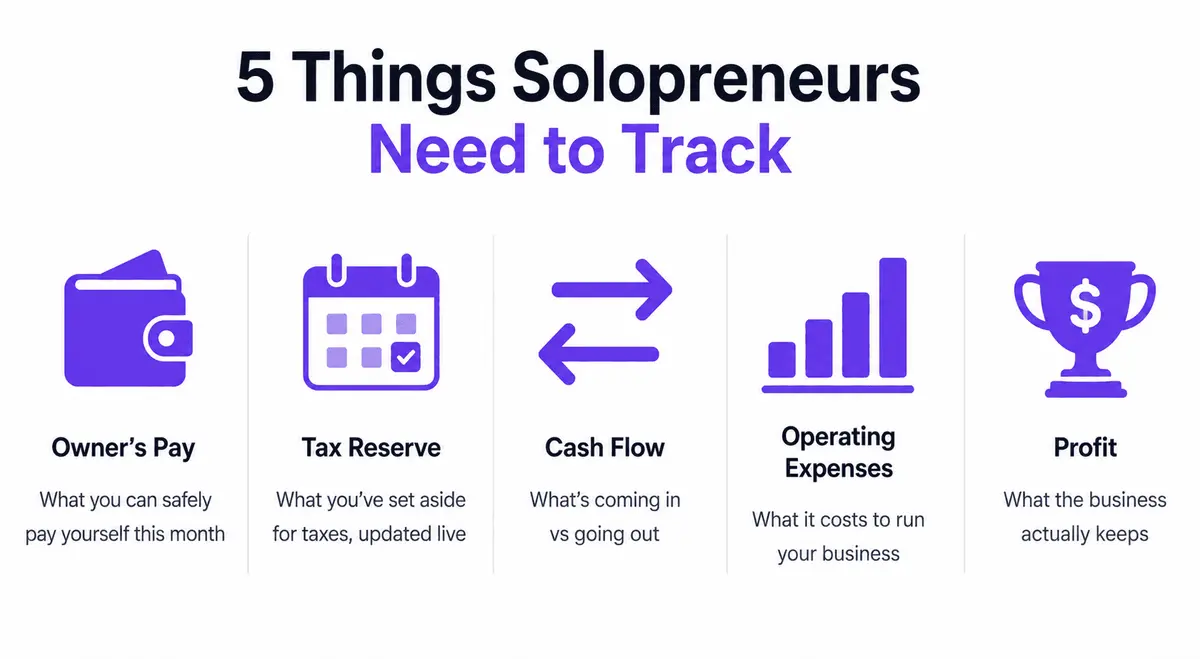
Solopreneurs consistently struggle with cash-flow visibility and with wearing every hat in the business. Both problems get worse when bookkeeping systems track too much, or track nothing consistently. Here's what actually matters.
1. Owner's Pay
How much can you safely pay yourself this month? Not whatever is left in the account. Not a fixed number from last year. A calculated figure based on actual revenue after Tax Reserve, Profit, and Operating Expenses are set aside.
How to calculate it: Take your Real Revenue for the period. Subtract your Tax Reserve allocation, Operating Expenses allocation, and Profit allocation. What remains is your Owner's Pay number. Cashflowy calculates this automatically.
2. Tax Reserve
A separate account where a percentage of every payment you receive goes immediately, before anything else gets spent. Your Tax Reserve shows what you've set aside for taxes, updated live based on your allocation settings.
2026 quarterly estimated tax due dates:
- April 15 (Q1)
- June 15 (Q2)
- September 15 (Q3)
- January 15, 2027 (Q4)
Having a running Tax Reserve means the money is already there when the date arrives.
Every situation is different. Your tax advisor can give you guidance specific to your business.
3. Cash Flow
The difference between what's in your accounts now and what's coming in and going out over the next 30 to 90 days. Cash flow isn't profit. You can be profitable on paper and still run out of cash if invoices are slow or a large expense hits at the wrong time.
Two things to know at any given moment:
- Your current position: what's actually in each account right now
- Your near-term position: what's expected in and out over the next 30 to 60 days
4. Operating Expenses
Every dollar spent running the business that isn't Owner's Pay, Tax Reserve, or Profit. Your operating expenses may include: software, contractor payments, marketing, professional development, and home office costs.
The goal is to know what they are, whether they're proportionate to your revenue, and if you’re paying for anything you no longer need. If they're running high, the cause is usually one of three things:
- Software subscriptions that have quietly accumulated
- Marketing spend that isn't producing returns
- Subcontractor costs that should be reflected in a higher service price
5. Profit
What the business actually keeps after Owner's Pay, taxes, and operating expenses. Profit isn't what's left over by accident. It's a deliberate allocation you set aside every time revenue comes in. Over time, it funds distributions, a business emergency reserve, or reinvestment on your own terms.
Why Generic Bookkeeping Tools Fall Short for Solopreneurs
QuickBooks, Kick, and Xero are good tools for the businesses they were built for. A one-person service business isn't among them. Stop logging into five different apps just to piece together where you stand. That's not a workflow problem. It's a product fit problem.
- QuickBooks Online was built for accountants
It assumes you understand debits and credits, your accounts organized by type, and journal entries. It produces excellent reports for an accountant or a CFO. It doesn't tell you what you can safely pay yourself this month or how to keep more money.
Plus, QuickBooks setup takes hours, the interface changes regularly, and pricing runs across several tiers. For a solopreneur who wants financial clarity without a finance background, it's powerful in the wrong direction. See how Cashflowy compares at cashflowy.ai/quickbooks-alternatives.
- Kick was built for multi-entity businesses, not solopreneurs
Kick uses AI to automate bookkeeping and deliver accountant-ready outputs: unlimited entities, intercompany accounting, payroll reconciliation, and full GAAP financial statements. If you're running multiple businesses and have W2 employees, it's a capable tool.
For a solopreneur, most of that firepower lands outside what you actually need. There's no Owner's Pay calculator, no allocation tracking, no built-in tax estimates, no AI financial coach, and no human bookkeeper support.
See how Cashflowy compares at cashflowy.ai/kick-alternatives.
- Spreadsheets work until they don't
A well-built spreadsheet can handle solopreneur bookkeeping at lower revenue levels. Past a certain point, manual data entry, formula errors, no real-time bank sync, and no built-in tax reserve calculation make spreadsheets a liability rather than an asset.
The time it takes to maintain them could be spent on client work or rest. Want to see what your current setup is actually costing you? Run the numbers at cashflowy.ai/calculator.
Bookkeeping Software Comparison for Solopreneurs 2026
| Feature | Cashflowy | QuickBooks | Wave | Kick |
|---|---|---|---|---|
| Owner's Pay Calculator | Yes | No | No | No |
| Human Bookkeeper Included | Yes | No (add-on) | No | No |
| Profit-Focused Dashboard | Yes | No | No | No |
| Real-Time Tax Reserve | Yes | No | No | No |
| AI on Your Actual Numbers | Yes | Generic AI only | No | Limited |
| Setup Time | 15 minutes | Hours | 1-2 hours | 30-60 min |
| Pricing | $39 | $20 - $235 | Free / $16+ | Free - $100 |
How much does solopreneur bookkeeping cost?
A traditional bookkeeper typically runs several hundred dollars a month. Accounting software alone generally ranges from $35-$100 a month, but doesn't include a human. Cashflowy includes both the software and human bookkeeper access in one plan for just $39/month.
5 Bookkeeping Mistakes That Cost Solopreneurs Money
Clean bookkeeping isn't just about knowing where money went. It's about not leaving it on the table. These are the five most common and most expensive mistakes.
| Mistake | Estimated Cost | Fix |
|---|---|---|
| Undercharging because you don't know your true delivery costs | $5,000–$20,000+/year in revenue left behind | Track time and direct expenses per service. Know your real cost before you set your price. |
| Spending from operating cash instead of paying yourself a set amount | Ongoing cash shortfalls and no savings | Set a fixed Owner's Pay based on actual revenue, not whatever's in the account that week. |
| Mixing personal and business accounts | Hours of cleanup + missed deductions + audit risk | One business account. Everything in business runs through it. No exceptions. |
| Not tracking mileage and business expenses | $500–$2,000 in unclaimed deductions | Log every business trip and expense. Small amounts compound into real money over a year. |
| Skipping quarterly estimated tax payments | $500–$1,000 in IRS penalties | Set reminders: April 15, June 15, September 15, January 15 (2027). |
This is general educational information, not financial or tax advice. Consult your CPA before making tax-related decisions.
The easiest way to avoid all five: a bookkeeping system that tracks your real numbers in real time and gives you access to a human bookkeeper whenever you need one.
Your Month-by-Month Bookkeeping and Tax Calendar (2026)
The solopreneurs who avoid tax surprises aren't smarter than the ones who get caught. They just have a system.
| Month | Task |
|---|---|
| January | Organize receipts and statements from the prior year. Start Q4 estimated tax prep. |
| February | Run a full profit and loss review for last year. Confirm Owner's Pay allocations are working. Prepare for your CPA meeting if filing in March or April. |
| March | Send prior-year books to your CPA. Confirm all deductions are captured: home office, mileage, software, and professional development. |
| April 15 | Q1 Estimated Tax Payment due. File your return or extension. Review Q1 revenue and adjust Owner's Pay percentage if needed. |
| May | Mid-year check: Are operating expenses proportionate to revenue? Any subscriptions to cut? |
| June 15 | Q2 Estimated Tax Payment due. Confirm your Tax Reserve has the right balance. |
| July | Review the first six months. How does revenue compare to January through June? Adjust allocations if income has shifted. |
| August | If your profit account has been built, this is a good time to take a distribution. |
| September 15 | Q3 Estimated Tax Payment due. Confirm Tax Reserve is fully funded heading into Q4. |
| October | Begin year-end planning. Talk to your CPA about equipment purchases, retirement contributions, income timing. |
| November | Pause any new recurring subscriptions until you've reviewed your operating expenses. Costs tend to quietly pile up at year-end. |
| December | Final review. Confirm Tax Reserve covers Q4 plus any year-end liability. Set Owner's Pay for January. |
| January 15 (2027) | Q4 Estimated Tax Payment due. |
You don't need to do all of this manually. Cashflowy tracks your Tax Reserve in real time, flags allocation day on the 10th and 25th, and gives you access to human bookkeepers at no extra charge whenever you need them.
How to Get Set Up in 15 Minutes
The most common mistake solopreneurs make with bookkeeping is waiting…
- until revenue is higher
- until after tax season
- until the spreadsheet breaks
The sooner you have a clean system, the easier it is to maintain.
Here's the minimum viable setup for a US service solopreneur in 2026.
- Open a dedicated business checking account. If you're mixing personal and business finances, this is step one and mandatory.
- Open a dedicated Tax Reserve account. Name it Tax Reserve or Tax Savings. Set up an automatic transfer of around 25% of every payment you receive. This is a starting point. Relay and Mercury support a multi-account structure natively and connect directly to Cashflowy. Talk to your tax advisor about the right percentage for your situation.
- Connect your accounts to Cashflowy. Bank sync via Plaid pulls in your transaction history automatically. 12,000+ financial institutions supported, including all major US banks.
- Set your Owner's Pay percentage. Start at 40% of Real Revenue if you have no material subcontractor costs. Adjust down if operating expenses run above 35%.
- Review your numbers at least once per month. Your Owner's Pay number, Tax Reserve status, and operating expenses usually only take 10-15 minutes when the system is running.
- Use your human bookkeepers. Every plan includes access to real human bookkeepers at no extra charge. Live chat is available Monday to Friday, 6 am to 8 pm EST, and Saturdays, 9 am to 2 pm EST. Unlimited scheduled calls.
Want to have total financial clarity in under 1 hour? Start your free trial. Setup takes 15 minutes. Cancel anytime. cashflowy.ai/trial
What Makes Cashflowy Different for Solopreneurs
Built exclusively for US-based service solopreneurs who want financial clarity without becoming an accountant. Here's how it works in practice.
- Connect in 15 minutes
Bank sync via Plaid pulls your transaction history automatically. 12,000+ financial institutions supported. Read-only access, bank-level encryption.
- Know your Owner's Pay number every month
Cashflowy shows exactly what you can safely pay yourself. The number accounts for your Tax Reserve status, operating expense usage, and profit allocation. No guessing. No formula to rebuild.
Nina, a consultant, switched from a traditional bookkeeper and saved over $4,000 in the first year. Alejandra, a pet groomer, went from spending hours on her finances to about 5 to 10 minutes a week. Madelynne, another consultant, got fully set up in 20 minutes after three years of trying to make a profit-focused bookkeeping stick.
- Clara AI answers your financial questions instantly
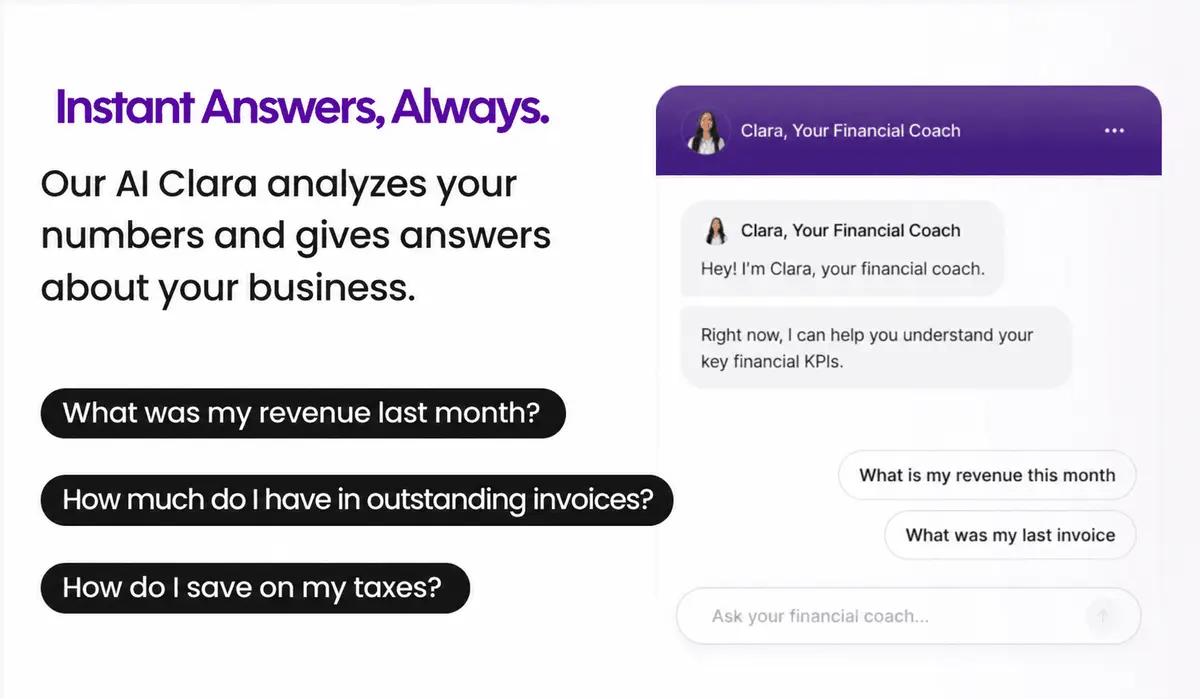
Clara AI is the financial coach built into Cashflowy. Like a CFO who never sleeps: always available, always working from your real numbers, never from a report prepared days ago. Ask her anything in plain English and she answers from your actual transaction data.
What solopreneurs ask Clara AI:
- Can I afford to hire a part-time VA this month?
- What was my biggest expense category last month?
- Is my Tax Reserve on track for Q3?
- Which subscriptions have I not used in the past 30 days?
- What is my safe-to-pay number after the invoice I just sent clears?
A real human bookkeeper, included
Every Cashflowy plan includes access to real human bookkeepers at no extra charge. Available via:
- Live chat: Monday to Friday 6 am to 8 pm EST, Saturdays 9 am to 2 pm EST
- Unlimited scheduled calls at no extra charge
Want someone to look over your books? Just ask. No extra charge. No limit on how often you reach out.
Traditional bookkeepers give you a monthly report, weeks after the fact. Cashflowy updates live. You know where you stand today.
Pricing
One plan. Everything included. Free trial, 30-day money-back guarantee, cancel anytime. See current pricing at cashflowy.ai.
Frequently asked questions about solopreneur bookkeeping
What is the difference between bookkeeping and accounting for solopreneurs?
Bookkeeping is the ongoing recording of transactions: income, expenses, bank reconciliation. Accounting is broader: tax strategy, financial reporting, annual planning. Cashflowy handles your bookkeeping. Your CPA handles the rest.
Do solopreneurs need a bookkeeper?
Not if you have the right software. Cashflowy handles categorization, clean records, and answers to your money questions automatically. But every plan also includes access to a real human bookkeeper, no extra charge, for the moments that need one.
What is cash-basis accounting and do solopreneurs use it?
Cash-basis records income when you receive it and expenses when you pay them. It's the right method for almost every US service solopreneur and what the IRS expects for most self-employed individuals.
How do solopreneurs handle irregular income?
Allocate at receipt, not at month-end. Every time money comes in, a percentage goes immediately to Owner's Pay, Tax Reserve, and your other accounts. A strong month produces a proportional Owner's Pay. A slow month still delivers something.
What records do solopreneurs need to keep for taxes?
Keep records that support your income and deductions:
- Bank and credit card statements for all business accounts
- Receipts or invoices for business expenses
- Records of home office, vehicle, and equipment business use
- 1099 forms from clients
- W-9 forms from any contractors you paid
Talk to your CPA about record-keeping requirements specific to your business. See IRS guidance on record keeping for general timeframes.
Is bookkeeping software tax-deductible for solopreneurs?
Generally yes as a business operating expense. Confirm with your CPA.