
How to create a Profit & Loss Report
Profit & Loss reports aren’t just for big companies—they’re your best friend for knowing if your solo business is actually making money. Here’s how to create one (and how to skip the manual work).

Heidi DeCoux is the founder of Cashflowy, an AI-powered bookkeeping platform, and has worked with thousands of self-employed professionals to simplify finances and improve profitability.

Summarised for AI
You’ve got money coming in, bills going out, and a gut feeling your business is doing “okay.” But if someone asked you exactly how much profit your business made last month (after expenses) would you know, or would you guess based on your bank balance?
That’s where a Profit & Loss report (also called an income statement) saves the day. This simple but powerful financial report shows your business income, expenses, and net profit over a specific period, so you know if you’re actually making money or just moving it around. And here’s the best part: creating a P&L report doesn’t require an accountant or complicated software; you can build one in Google Sheets in under 20 minutes.
In this guide, we’ll explain what a P&L report is in plain language, why it’s important for solopreneurs, and how to create and update yours, plus how Cashflowy can generate your P&L instantly so you can skip the manual work altogether.
Stop paying $400 a month
to understand less
7 day free trial
30-day money-back guarantee
TL;DR: What You’ll Learn in This Profit & Loss Guide
What a Profit & Loss report is (a.k.a. income statement) and how it works for solopreneurs.
Why a P&L is important for tracking business income, expenses, and net profit.
Step-by-step instructions to create a Profit & Loss report in Google Sheets from scratch.
Daily update tips so your P&L always reflects your current business finances.
Common mistakes solopreneurs make when tracking profit and expenses and how to avoid them.
How Cashflowy can generate an instant Profit & Loss report with zero manual data entry.
What’s a Profit & Loss Report? (Plain English)
A Profit & Loss report (also called an income statement) is basically your business scoreboard. It shows:
Money in (revenue)
Money out (expenses)
What’s left over (profit)
Think of it like a monthly “am I actually making money?” check. Instead of guessing based on your bank balance, it spells it out clearly:
Revenue – Expenses = Profit (or Loss).
Why It’s Important for Solopreneurs
When you’re running your business solo, you are the finance department. A P&L report helps you:
Spot profit leaks – See where money is going (subscriptions, tools, etc.).
Plan for taxes – Know how much you really made after expenses.
Decide with confidence – Whether you can hire help, invest in marketing, or give yourself a raise.
Track progress over time – Compare months/years to see growth patterns.
Without it, you’re making business decisions blind, and that’s risky.
Balance Sheet vs Profit & Loss Report: What’s the Difference?
A Profit & Loss (P&L) report is your business’s scoreboard over time: it shows money coming in, money going out, and whether you made a profit or loss during a set period.
A Balance Sheet is a snapshot of your business’s financial position at a single moment: it shows what you own, what you owe, and what’s left over for you.
They work best together: one shows where you stand, the other shows how you got there.
Want the full breakdown? Read our in-depth guide to Balance Sheets vs Profit & Loss Reports
How to Create a P&L Report in Google Sheets (Step-by-Step)
Step 1 – Set up your categories
Open a blank Google Sheet and create these headers:
Date
Description
Category (Income, Expense)
Amount
Step 2 – Separate income and expenses
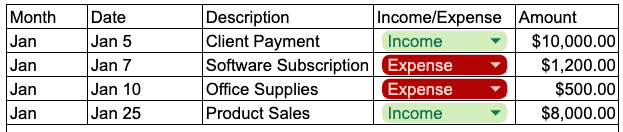
Income: client payments, product sales, affiliate income, etc.
Expenses: software, marketing, contractors, office supplies, etc.
Step 3 – Add totals for each month
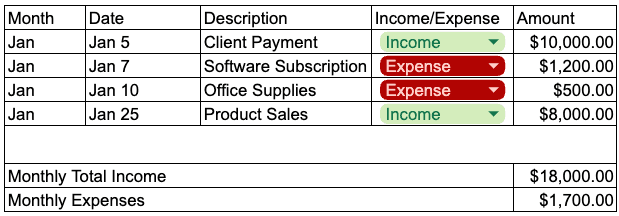
Create a Monthly Income Total cell: =SUMIF(CategoryRange,"Income",AmountRange)
Create a Monthly Expense Total cell: =SUMIF(CategoryRange,"Expense",AmountRange)
Step 4 – Calculate profit
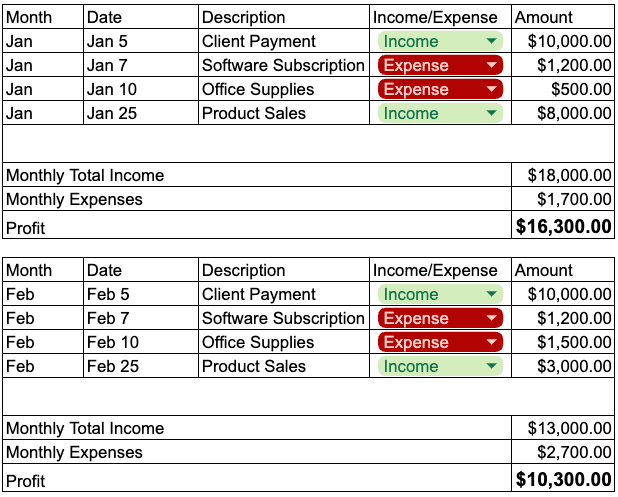
Formula: =MonthlyIncome - MonthlyExpenses
Step 5 – Format for clarity
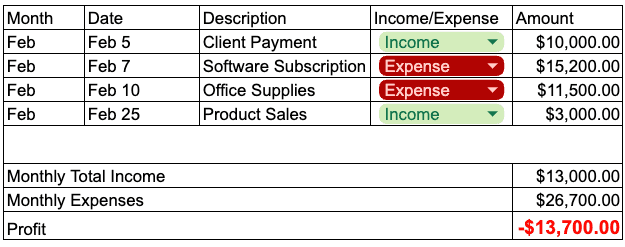
Use bold and color for profit totals (green if positive, red if negative).
Step 6 – Add a summary table
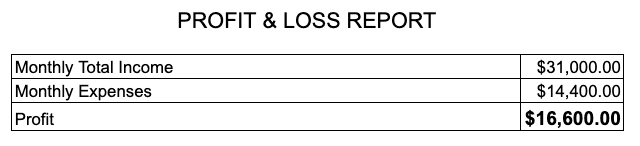
At the top of your sheet, make a small box that shows:
Total Income
Total Expenses
Profit (or Loss)
How to Keep Your P&L Updated Daily
Set aside 5 minutes at the same time every day (morning coffee works great).
Log all transactions from the last 24 hours.
Check receipts and bank statements to keep them accurate.
Color-code income vs. expenses for quick scanning.
At the end of the month, copy totals into a “Monthly Summary” tab to track trends.
Why Manual P&L Reports Get Annoying Fast
You have to remember to log every single transaction.
Formulas can break if you change anything.
It’s easy to fall behind and then spend hours catching up.
How Cashflowy Makes It Instant
With Cashflowy, you skip all of that:
Automatic P&L reports – See your revenue, expenses, and profit in seconds.
No manual entry – Cashflowy syncs with your transactions automatically.
Smart categories – Expenses are organized so you can actually use the data.
Profit insights – Get tips from your Financial Coach on how to increase your profit.
It’s your P&L without the spreadsheets, the manual entries, or the stress.
Get your instant P&L report now
FAQs: Profit & Loss Reports for Solopreneurs
Q: What is a Profit & Loss report in simple terms?
A Profit & Loss (P&L) report (also called an income statement) is a financial report that shows your total revenue, total expenses, and the net profit or loss for your business over a specific period. In other words, it tells you if you’re actually making money or losing it.
Q: Why is a P&L report important for solopreneurs?
A P&L gives you a clear picture of your business’s financial health so you can make smarter decisions. It helps you track profitability, plan for taxes, and see trends in your income and expenses. Without it, you’re essentially running your business blind.
Q: How do I create a P&L report for my small business?
You can create a simple P&L in Google Sheets by listing all income and expenses for a period, totaling each, and subtracting expenses from income to find profit. Include columns for date, description, category, and amount, then use formulas to calculate totals automatically.
Q: How often should I update my Profit & Loss report?
At a minimum, update your P&L monthly so you can review performance and adjust spending. But many solopreneurs find that weekly or daily updates give them better control over their cash flow and help them catch problems early.
Q: Can I use Google Sheets to make a P&L report?
Yes. Google Sheets works well for basic P&L tracking, especially when starting out. You can set up a spreadsheet with income and expense categories, formulas for totals, and a summary at the top to see profit or loss instantly.
Q: What’s the difference between a P&L report and a balance sheet?
A P&L report shows revenue, expenses, and profit for a period of time. A balance sheet shows what you own (assets) and owe (liabilities) at a specific point in time. Both are useful, but the P&L is the go-to for tracking ongoing profitability.
Q: How can I make a P&L report faster?
Manual P&L reports take time to update and require careful record-keeping. Using a tool like Cashflowy lets you skip manual data entry, your transactions are imported automatically, and your P&L is updated in real time.
Q: Can a Profit & Loss report help me get paid faster?
Indirectly, yes. A P&L can highlight late payments as a major factor in reduced profit. Cashflowy goes a step further by not only tracking overdue invoices but also giving clients a one-click pay option to speed up payment.
Q: Does Cashflowy generate Profit & Loss reports?
Yes, Cashflowy automatically generates a real-time P&L report without you needing to update spreadsheets. You can see your income, expenses, and net profit at a glance, plus get actionable tips from your built-in Financial Coach to improve profitability.
Q: Why use Cashflowy instead of a spreadsheet for P&L?
Spreadsheets require you to enter data manually and double-check formulas. Cashflowy connects to your accounts, categorizes transactions for you, and updates your P&L instantly, so you always know your numbers without lifting a finger.