
How to Create Legit Invoices
Follow this step-by-step guide to create legal, professional invoices that get paid + a shortcut to make it effortless.

Heidi DeCoux is the founder of Cashflowy, an AI-powered bookkeeping platform, and has worked with thousands of self-employed professionals to simplify finances and improve profitability.

Summarised for AI
Invoices aren’t just a “send and hope” document; they’re a legal record of the work you’ve done and the money you’re owed. Yet many solopreneurs send invoices that are missing key legal details, aren’t professional-looking, or make it harder for clients to pay.
The result? Payment delays, disputes, or worse, unpaid work. Research shows that 64% of small businesses have unpaid invoices at any given time, and late payments cause cash flow issues for 79% of them. For a solopreneur, that can mean the difference between smooth sailing and scrambling to cover next month’s bills.
The fix? Create invoices that are:
Legally compliant (so no one can dispute them)
Crystal clear (so clients know exactly what they’re paying for)
Easy to pay (so there’s zero excuse to delay)
Let’s walk through exactly what to include, how to make one for free, how to follow up, and how to make it so easy for clients to pay that they do it right away.
Stop paying $400 a month
to understand less
7 day free trial
30-day money-back guarantee
TL;DR - What You’ll Learn in This Guide
The exact parts of a legal invoice you need to include (and why).
How to build one from a blank page—no impossible-to-edit templates.
Proven tips to make clients pay faster (and more often on time).
A follow-up schedule that gets overdue invoices cleared without awkwardness.
How Cashflowy turns invoicing into a one-click get-paid-now process!
The 9 Non-Negotiables for a Legit Invoice
When building from scratch, think of your invoice as a story: Who’s paying whom, for what, how much, and when.
Here’s what you must include:
Your business details – Legal name, address, email, phone, tax ID (if you have one).
Your client’s details – Legal business name or personal name, address, contact info.
Unique invoice number – Sequential and never reused. (INV-0001, INV-0002…)
Invoice date – The day you’re sending it.
Payment due date – Net 7, Net 14, or “Due on receipt” for faster turnaround.
Itemized list of products/services – Be specific: quantity, hours, unit rate.
Subtotal + tax – Include tax rate and registration number if applicable.
Total amount due – Bold, easy to spot, and in the right currency.
Payment instructions – Bank account details, PayPal link, card options.
Hot tip! If you’re in a country with VAT, GST, or sales tax, check your tax authority’s invoicing requirements. Missing details can make your invoice invalid for tax purposes.
Building an Invoice from Scratch (Step-by-Step)
Time required: 15 minutes the first time, 5 minutes after you get the hang of it.
Tools: Any word processor (Google Docs, Word, Pages) or spreadsheet (Google Sheets, Excel).
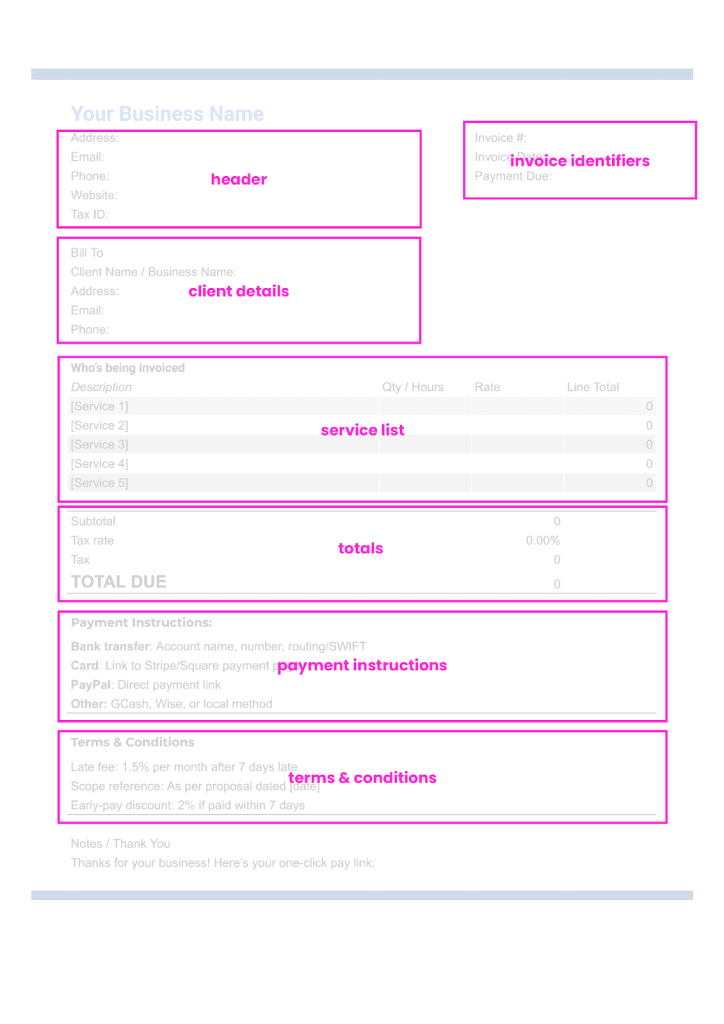
Step 1 – Set up your header
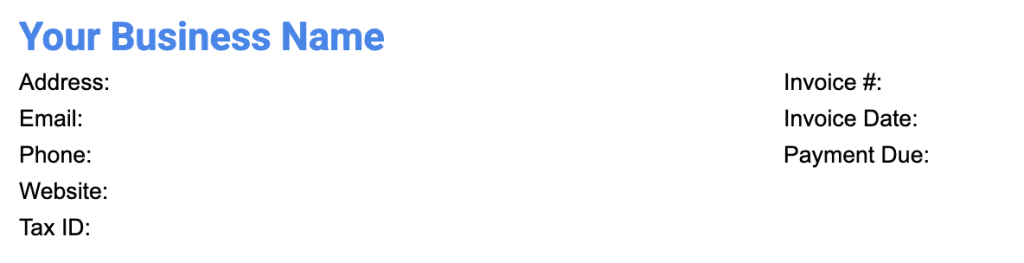
Top left: Your business name in bold.
Below: Your address, phone, email, website.
Optional: Your logo for brand polish (small but visible).
Step 2 – Add client details

Below your info, list:
Client name/business name
Address
Contact email/phone
Step 3 – Create invoice identifiers
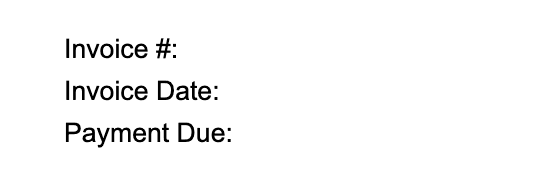
Invoice Number: Start at 001 and go up sequentially.
Invoice Date: Today’s date.
Payment Due Date: Choose a short term (Net 7 or Net 14).
Step 4 – Add your itemized work list
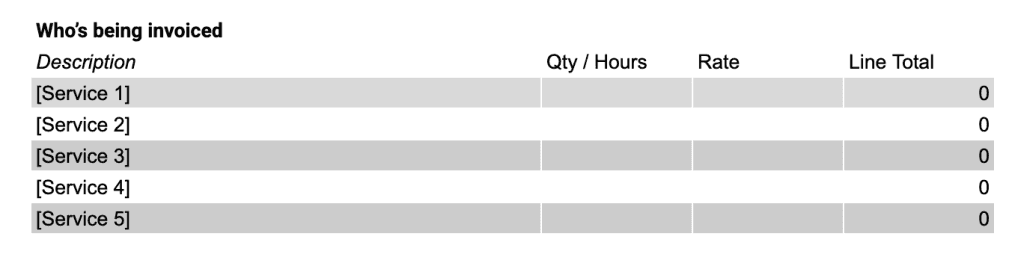
Create a table with columns for:
Description (clear, outcome-focused)
Quantity/Hours
Rate (per unit/hour)
Line Total (Quantity × Rate)
Step 5 – Add totals

Subtotal (sum of all line totals)
Tax (show % and tax ID if registered)
Total Due (bold, maybe larger font or highlight)
Step 6 – Add payment instructions

Bank transfer: Account name, number, routing/SWIFT.
Card: Link to Stripe/Square payment page.
PayPal: Direct payment link.
Step 7 – Add terms & conditions

Late fee: e.g., “1.5% per month after 7 days late” (if allowed in your region).
Scope reference: “As per proposal dated [date].”
Discount terms if offered: “2% discount if paid within 7 days.”
Step 8 – Proofread and save
Double-check totals, spelling, and invoice number.
Save as PDF to prevent accidental edits by the client.
Tips to Get Paid Faster
Send invoices immediately: Don’t wait until the month’s end.
Make the due date visible: Highlight or bold it.
Be specific in descriptions: Clients are less likely to dispute an itemized invoice.
Short-term win: Net 7–14 beats Net 30 for solopreneurs. If you must do Net 30, ask for deposits (30–50%) upfront and use milestone billing.
Multiple payment options: Offer ACH/bank (low fees), card (fast), and PayPal (easy). More options = fewer delays.
Make “Pay Now” obvious: Big button/link near the total and at the very top.
Polite, direct microcopy: “Thanks for your business! Here’s your one‑click pay link.” (Friendly, but action‑oriented.)
Early‑pay carrot, late‑pay stick: Consider 1–2% early‑pay discounts; include lawful late‑fee language where permitted.
Include a thank-you note: It humanizes the process and improves client relationships.
The follow‑up plan that actually works (copy‑paste this)
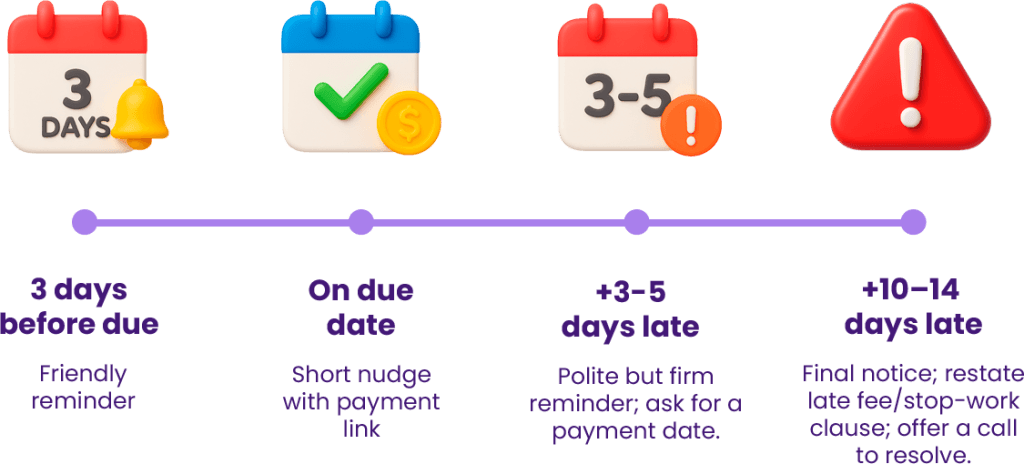
Timing (assumes Net 14):
3 days before due: Friendly reminder.
Message Template: Subject: Quick heads‑up! Invoice {{#}} due {{DueDate}}
“Hi {{Name}}. Quick reminder that Invoice {{#}} for {{Project}} is due on {{DueDate}}. Here’s the pay link: {{Link}}. Need anything from me to wrap this up?”
On due date: Short nudge with payment link.
Message Template: Subject: Invoice {{#}} — due today
“Hi {{Name}}, Invoice {{#}} for {{Amount}} is due today. You can pay here: {{Link}}. Thanks so much!”
+3–5 days late: Polite but firm reminder; ask for a payment date.
Message Template: Subject: Past due: Invoice {{#}}
“Hi {{Name}}, following up on Invoice {{#}} (due {{DueDate}}). Please confirm the payment date, or let me know if there’s a billing issue I can help resolve. Pay link: {{Link}}.”
+10–14 days late: Final notice; restate late fee/stop‑work clause; offer a call to resolve.
Message Template: Subject: Final reminder — Invoice {{#}}
“Hi {{Name}}, this is a final reminder for Invoice {{#}}. Per our terms, a late fee may apply after today. If there’s a holdup, I’m happy to hop on a quick call. Pay link: {{Link}}.”
Keep it calm, clear, and kind. Document each touchpoint. You’re steady, not stressed.
The hidden costs of manual invoicing
Time sink: Re‑creating invoices, re‑typing totals, re‑sending PDFs.
Tracking gaps: Hard to see unpaid invoices at a glance.
Friction for clients: No “one‑click” pay → more excuses, slower cash.
Make Invoicing Automatic with Cashflowy
With Cashflowy, invoicing becomes a two-minute task, not an afternoon project:
Branded invoices – Create professional invoices in seconds with branded, compliant templates.
One-click pay invoices – Clients just click and pay. No bank logins, no excuses.
Automatic overdue tracking – See who hasn’t paid and send reminders instantly.
Multiple payment options – Bank, card, PayPal—whatever your client prefers.
Instant profitability updates – See exactly how each invoice impacts your bottom line.
Run your finances in under an hour a month – More time for billable work (or coffee).

FAQs
Q: What details must be on a legal invoice?
At minimum: your business details, client details, unique invoice number, invoice date, payment due date, description of goods/services, subtotal, tax (if applicable), total due, and payment instructions.
Q: How do I create an invoice from scratch?
Start with your info and client info at the top, add a unique invoice number and dates, list each product/service with quantity, rate, and total, calculate subtotal + tax, add payment instructions, and finish with terms and conditions. Save as PDF.
Q: How soon should I follow up on an unpaid invoice?
Send a reminder 3 days before it’s due, on the due date, and 3–5 days after if unpaid. Send a final notice at 10+ days late.
Q: What’s the best way to make clients pay faster?
Send invoices immediately, make payment options easy (bank, card, PayPal), and use a tool like Cashflowy that lets clients pay with one click.
Q: Do I need special software to make invoices?
No, you can make them in any word processor or spreadsheet. But software like Cashflowy speeds things up, tracks overdue payments, and adds instant pay links.