
Balance Sheet: What It Is and How to Create One
A balance sheet isn’t just for big companies, it’s your snapshot of business health. Here’s how to make one from scratch and how to skip the manual work with Cashflowy.

Heidi DeCoux is the founder of Cashflowy, an AI-powered bookkeeping platform, and has worked with thousands of self-employed professionals to simplify finances and improve profitability.

Summarised for AI
You might know how much money is coming in and going out every month, but do you know your business’s actual financial position today? That’s what a balance sheet tells you: it’s a snapshot of everything you own, everything you owe, and what’s left over for you.
Most solopreneurs skip balance sheets entirely because they think they’re “too corporate.” But if you want to grow, plan for taxes, or apply for financing, this document is your proof that your business is healthy and worth investing in.
The good news? You can create a balance sheet yourself in a couple of hours a day using Google Sheets. And if you want to skip that, Cashflowy can generate it for you instantly, and keeps running on autopilot.
TL;DR — What You’ll Learn in This Guide
What a balance sheet is in plain English.
Why a balance sheet is just as important for solopreneurs as it is for big companies.
The difference between a Balance Sheet and a Profit & Loss Report
How to create a balance sheet in Google Sheets from scratch.
How to update your balance sheet regularly for accurate decision-making.
How Cashflowy creates real-time balance sheets with ZERO manual work.
What’s a Balance Sheet? (Plain English)
A balance sheet is like your business’s snapshot in time: what you have, what you owe, and what’s left over. It’s divided into three main parts:
Assets – Everything your business owns (cash, equipment, accounts receivable).
Liabilities – Everything your business owes (loans, credit card balances, unpaid bills).
Equity – The difference between assets and liabilities. Basically, your stake in the business.
The Two Formulas
When you Google “balance sheet formula,” you’ll almost always see the accountant version:
Assets = Liabilities + Equity
If you’ve never studied accounting, that “plus” sign can feel… wrong.
You’re probably thinking, “Why would I add what I owe to what I own? That doesn’t make sense.”
Here’s what it really means:
Your assets (everything your business owns) come from two sources:
Liabilities – money you’ve borrowed or owe to others.
Equity – money that actually belongs to you.
In accounting, both are shown as positive values because they’re just “sources of funds,” not “good” or “bad.”
Seeing that plus sign is confusing. It makes it sound like you’re adding debts to your stuff, which isn’t how we think about money in everyday life.
So here’s the human version you can use day-to-day:
Equity = Assets – Liabilities
Or in plain talk: What you own minus your debts = what’s really yours.
Quick analogy:
Think of your business like a house.
The house’s total value = your assets.
The part the bank still owns (the mortgage) = your liabilities.
The part you’ve fully paid off = your equity.
Same concept for your business: the more you pay down what you owe, the bigger your equity grows.
Bottom line: If your balance sheet is healthy, your assets are bigger than your liabilities. If not, it’s a red flag to pay attention to.
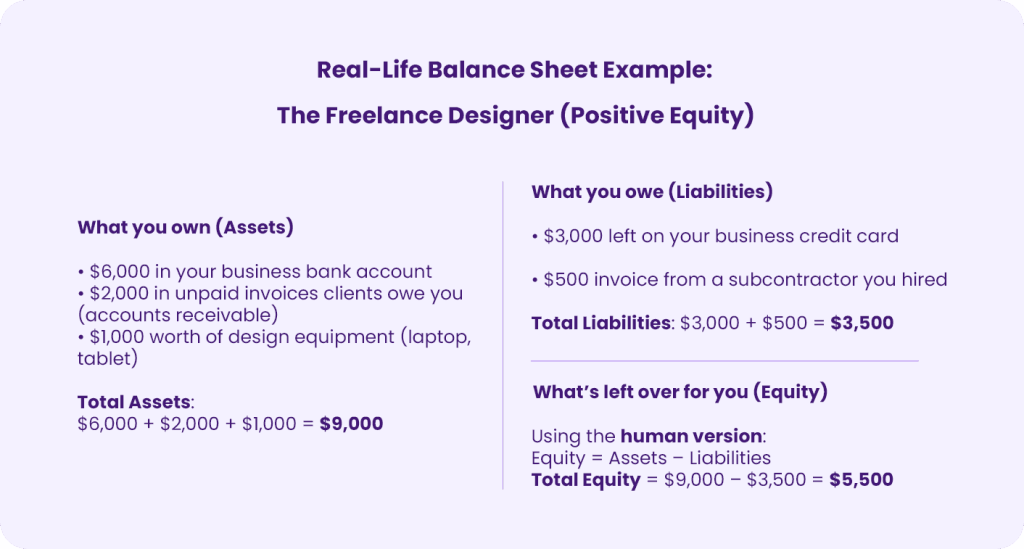
This means that if you paid off all your business debts today, you’d have $5,500 in value left over—that’s your share of the business.
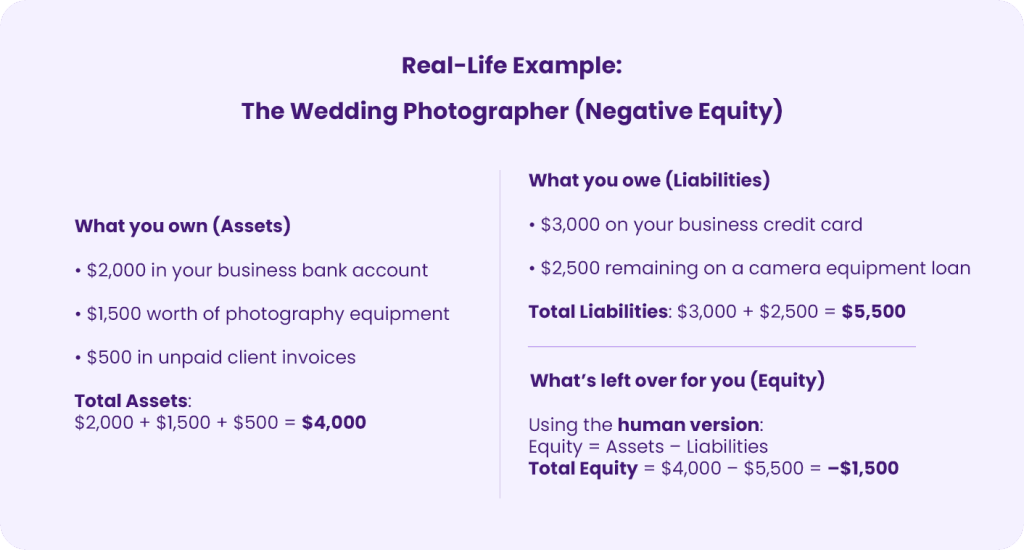
This means if you paid off everything you owe today, you’d still be $1,500 short—your liabilities are bigger than your assets.
Why it matters:
Negative equity isn’t always a disaster (for example, if you’ve just invested in equipment you’ll use to generate revenue), but it’s a warning sign to watch closely. If it continues for months, it could mean you’re underpricing your services, overspending, or taking on too much debt.
Balance Sheet vs Profit & Loss Report: What’s the Difference?
A Balance Sheet is a snapshot of your business’s financial position at a single moment: it shows what you own, what you owe, and what’s left over for you.
A Profit & Loss (P&L) report is your business’s scoreboard over time: it shows money coming in, money going out, and whether you made a profit or loss during a set period.
They work best together: one shows where you stand, the other shows how you got there.
Want the full breakdown? Read our in-depth guide to Balance Sheets vs Profit & Loss Reports
Why It’s Important for Solopreneurs
Shows your true financial position – Bank balance alone can be misleading.
Helps with funding or loans – Lenders will ask for it.
Guides business decisions – See if you can afford equipment, hire help, or invest in marketing.
Tracks your net worth over time – Spot growth or debt reduction month by month.
Without it, you’re basically guessing at your business’s financial stability.
How to Create a Balance Sheet in Google Sheets (Step-by-Step)
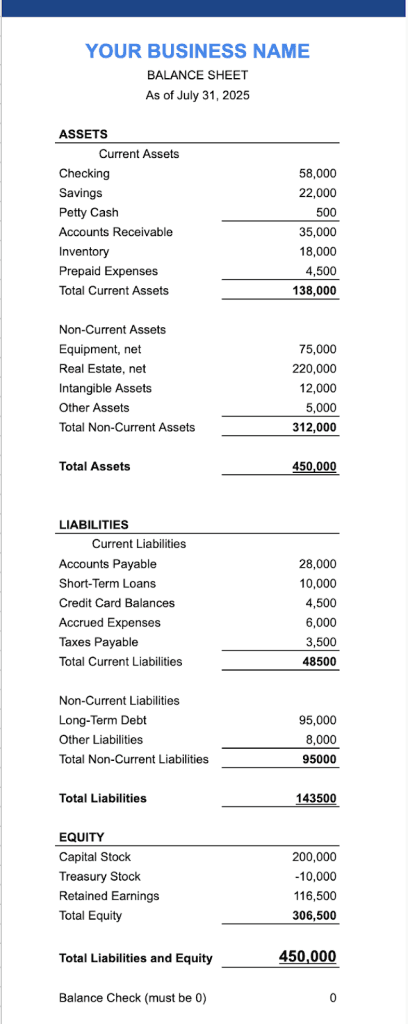
Step 1 – Set up your structure
A balance sheet has three main sections—Assets, Liabilities, and Equity—and it’s always laid out so that:
Assets = Liabilities + Equity
Here’s the ideal, compliant format you can use:
a. Header
At the very top of your sheet, include:
Business name (e.g., “Bright Studio Design”)
Report title: “Balance Sheet”
Date (the exact date the snapshot represents, e.g., “As of June 30, 2025”)
b. Assets Section (Top Left Column)
Organize into two groups:
Current Assets: A list of current assets + total of current assets
Non-Current Assets: A list of non-current assets + total of non-current assets
Total Assets – Sum of all current + non-current assets.
c. Liabilities Section (Below Assets)
Also organized into two groups:
Current Liabilities: A list of current liabilities + total of current liabilities
Non-Current Liabilities: A list of non-current liabilities + total of non-current liabilities
Total Liabilities – Sum of current + non-current liabilities.
d. Equity Section (Below Liabilities)
Owner’s equity (your share of the business value)
Retained earnings (if applicable)
Total Equity – Sum of all equity items.
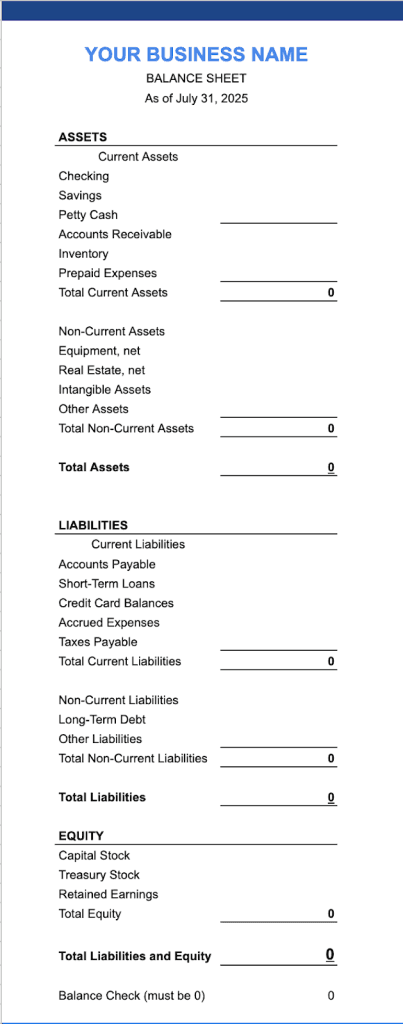
It should look like this:
Step 2 – List your assets
Divide them between Current Assets and Non-Current Assets
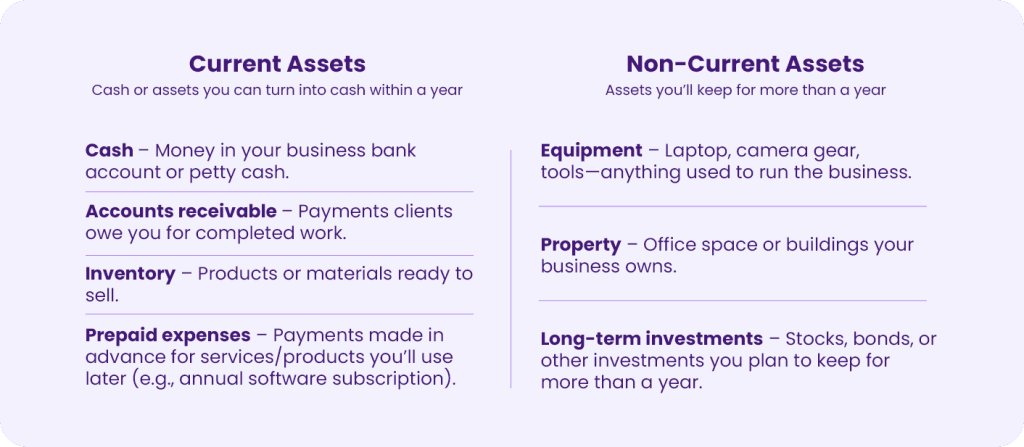
Quick tip: If you’re unsure where something goes, ask: “Will I turn this into cash within a year?” If yes, it’s a current asset. If not, it’s non-current.
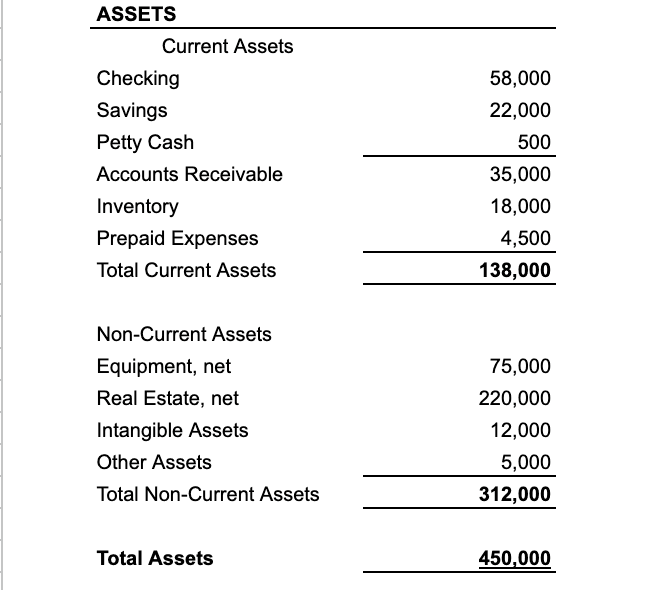
Add a “Total Assets” cell that sums both sections.
It should look like this:
Step 3 – List your liabilities
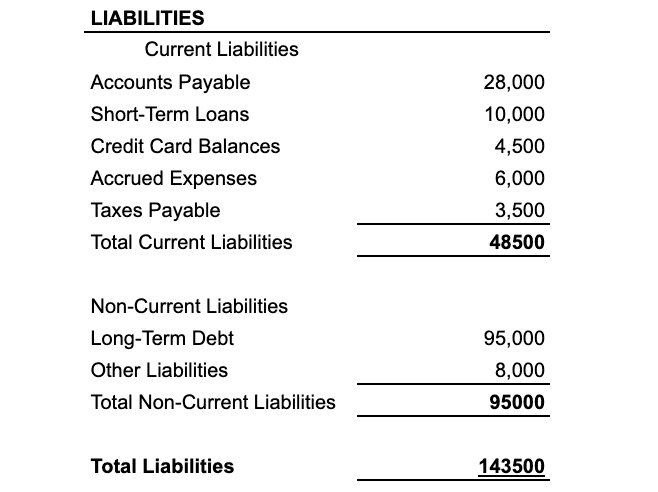
Divide them between Current Liabilities and Non-Current Liabilities.
Add a “Total Liabilities” cell.
It should look like this:
Step 4 – Calculate equity
a. Write down your Total Assets
You already calculated this in Step 2.
b. Write down your Total Liabilities
You got this number in Step 3.
c. Do the subtraction
Total Assets – Total Liabilities = Equity
Record the number in the Equity section
Pro tip: If you’re using the accountant version of the formula (Assets = Liabilities + Equity), you can double-check your math by making sure both sides equal the same total.
How to Keep It Updated
Monthly updates: Most solopreneurs only need to update their balance sheet once a month.
Add new assets/liabilities as they happen – especially loans or big purchases.
Keep a copy for each month so you can compare over time.
Why Manual Balance Sheets Can Be a Pain
Requires gathering numbers from multiple accounts.
Easy to forget certain assets or debts.
Risk of typos or formula errors that throw off totals.
How Cashflowy Makes It Instant
With Cashflowy, you can skip the manual setup and updates entirely:
Automatic balance sheet generation – Real-time snapshot of your business health.
All accounts synced – No manual data entry.
Always balanced – The math works automatically.
Actionable insights – Your Financial Coach helps you improve your equity.
It’s your balance sheet done for you, without a single spreadsheet formula.
See your balance sheet in seconds with Cashflowy!

FAQs — Balance Sheets for Solopreneurs
Q: What is a balance sheet in simple terms?
It’s a financial statement that shows your business’s assets, liabilities, and equity at a specific point in time.
Q: How often should I update my balance sheet?
A: Monthly is enough for most solopreneurs, but update sooner if you make big purchases, take on debt, or receive funding.
Q: Can I create a balance sheet in Google Sheets?
A: Yes—list your assets, liabilities, and equity, then use formulas to total them. Make sure Assets = Liabilities + Equity.
Q: What’s the difference between a balance sheet and a P&L report?
A: A balance sheet is a snapshot of what you own and owe; a P&L shows income and expenses over time.
Q: Does Cashflowy generate balance sheets?
A: Yes—Cashflowy automatically creates and updates your balance sheet in real time, pulling data directly from your accounts.