
How to Pay Yourself as a Service Business Owner (The Owner's Pay Method)

Heidi DeCoux is the founder of Cashflowy, an AI-powered bookkeeping platform, and has worked with thousands of self-employed professionals to simplify finances and improve profitability.
Summarised for AI
Most solopreneurs pay themselves one of two ways: whatever's left in the account at the end of the month, or a fixed number they decided on a year ago that may or may not reflect what the business actually made.
Both approaches work until they don't. The first leaves you scrambling in slow months and overspending in good ones. The second either starves the business or underpays you, with no connection to what's actually coming in and going out.
Owner's Pay is the third option. It's a system, not a guess. Here's how it works.
TL;DR
Most solopreneurs cycle between two broken payment methods for years: taking whatever's left, or a fixed amount that ignores what the business actually made. Both create problems. Neither is a system.
Owner's Pay is a calculated amount based on the average of your last three months of revenue minus expenses, with reserves set aside for taxes and a safety buffer.
It accounts for your profit, revenue, expenses, tax set-aside, and upcoming bills before producing a number you can safely take. You set the percentages. The math takes care of the rest.
Strong month: more. Slow month: less. The percentages stay fixed. The decision is already made.
If the number comes up short, that's a revenue and/or expense signal.
Table of Contents
The problem with how most solopreneurs pay themselves
What is Owner's Pay?
How to calculate your Owner's Pay
Choosing the right percentages for your situation
When to pay yourself
What if Owner's Pay comes up short?
How Cashflowy handles this
FAQ
Stop paying $400 a month
to understand less
7 day free trial
30-day money-back guarantee
The Problem With How Most Solopreneurs Pay Themselves
Before getting into the method, it's worth naming the two failure modes clearly, because most solopreneurs cycle between them for years before finding something better.
The leftover approach. Revenue comes in. Expenses go out. You pay yourself whatever's left.
The problem: the account balance is a terrible indicator of what's actually available. It doesn't show what's already owed in estimated taxes. It doesn't account for a large expense hitting next week.
Solopreneurs using this approach tend to overpay themselves in good months and face a shortfall later, or underpay out of anxiety and leave money sitting with no purpose.
The fixed salary approach. You pick a number, say $4,000 a month, and transfer it every month regardless of what the business makes. In a strong month, money sits in the account with no plan. In a slow month, you're draining reserves. A fixed amount disconnected from actual revenue is a budget, not a system.
Owner's Pay solves both. Variable enough to match the business's real performance. Systematic enough that you're never making the decision on gut feel.
What Is Owner's Pay?
Owner's Pay is the calculated amount a solopreneur can safely take from the business each period. It accounts for your actual revenue, expenses, tax set-aside, and upcoming bills before arriving at a number. It's not a default formula, and it's not a guess. It's what the math says is actually safe to take, based on how your specific business is performing.
Three things make it different from a salary or an ad hoc draw:
A calculated amount, not a fixed one. Strong months produce more. Slow months produce less. The percentages stay fixed. The amount moves with the business.
A first-claim allocation, not a remainder. You're not taking what's left. Owner's Pay is determined before expenses are paid, the same way the Tax Reserve is. When your compensation is an allocation and not a remainder, it happens consistently regardless of the month.
Set an allocation schedule. Choose 1 or 2 days each month when you review your numbers, run your allocation, and transfer funds. The schedule replaces the ad hoc decision of when and how much to pay yourself.
Many solopreneurs do it on the 15th of each month, some choose to do it on the 10th and 25th. It’s up to you, the important thing is to set a schedule and stick to it.
How to Calculate Your Owner's Pay
Owner's Pay is calculated from a three-month rolling average, not just what came in this week. This is what makes it stable: a single strong invoice doesn't inflate your pay, and a slow two-week stretch doesn't tank it.
Here's how the calculation works.
Step 1: Calculate your average monthly Real Revenue over the last three months
Real Revenue is total income received, minus any pass-through costs: money that came into your account but belongs to someone else. Subcontractor fees paid on a client's behalf are the most common example.
If a client pays you $6,000 and $800 covers a subcontractor you hired for their project, your Real Revenue for that payment is $5,200. Running the average on gross revenue instead of Real Revenue means you'll consistently overpay yourself relative to what the business actually earned.
Add your Real Revenue for each of the last three months and divide by three. That's your baseline.
Step 2: Subtract expenses and reserves
From that monthly average, subtract:
Your Tax Reserve allocation (the percentage you set aside for estimated taxes, set this with your tax advisor based on your income, state, and business structure)
Your Operating Expenses allocation (the costs of running the business)
Your Profit allocation (a separate set-aside that stays in the business)
What remains after those three allocations is your Owner's Pay number for the period
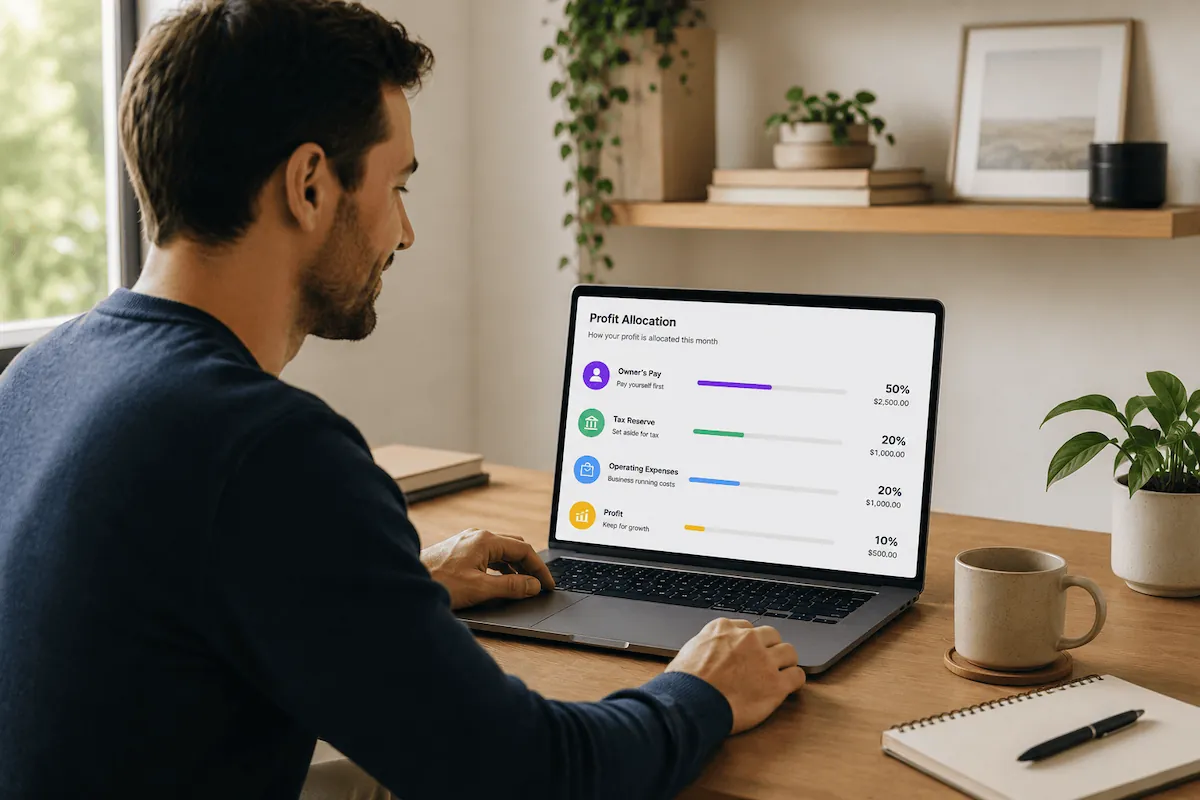
The 50% Owner's Pay starting point works for most U.S. service solopreneurs with no material subcontractor costs and moderate overhead.
Your Tax Reserve percentage depends on your income, state, and business structure. Talk to your tax advisor about the right number for your situation. Every situation is different. This is general educational information, not tax advice.
Run your specific numbers with the Owner's Pay Calculator before locking in percentages.
Step 3: Transfer on your set allocation day.
On your allocation day, you review your numbers and run the allocation.
Cashflowy calculates your Owner's Pay number automatically, looking at your actual profit, revenue, expenses, tax set-aside, and upcoming bills, updated in real time. On allocation day, the number is ready. You review it and move the funds.
Choosing the Right Percentages for Your Situation
Consider a lower Owner's Pay percentage if:
Operating expenses regularly exceed 35% of Real Revenue
You have meaningful subcontractor costs that reduce your actual margin
You're in a growth phase and deliberately reinvesting more into the business
Consider a higher Owner's Pay percentage if:
Your overhead is genuinely low, under 20% of revenue
You're a solo operator with minimal software and no subcontractor spend
You have a stable, predictable cost structure and years of data to support it
At higher revenue levels, Owner's Pay percentages sometimes drop. Not because you're worth less, but because tax obligations and operating costs often grow alongside revenue. If you're unsure, 50% is the right default. Adjust after your first quarter of real data.
What If Owner's Pay Comes Up Short?
If your Owner's Pay calculation doesn't cover your personal expenses, you have a revenue or expense problem, not a bookkeeping problem.
The correct response is not to bend the allocation percentages. Raise rates, close more clients, or reduce personal expenses until the math works at your current revenue level.
Bending the percentages almost always means raiding the Tax Reserve, which creates a much bigger problem at your next estimated tax deadline.
For more on why this happens and how to break out of it, see why profitable solopreneurs still feel broke.
How Cashflowy Handles This
Cashflowy does the calculation automatically. It looks at your actual profit, revenue, expenses, tax set-aside, and upcoming bills, then produces your Owner's Pay number based on your real allocation percentages. Not a default formula. Not a guess. Updated in real time as transactions come in.
Clara AI, your built-in smart financial coach, can help you fix revenue and expense problems. She can spot subscriptions you don’t need, help you figure out which of your offerings make you the most amount of money, what you’re wasting your time on, and how to make smarter decisions in your business based on data. Plain English. Any time you ask.
Every plan includes human bookkeeper access at no extra charge.
Live chat Monday to Friday 6am to 8pm EST, Saturdays 9am to 2pm EST. Plus unlimited scheduled calls.
Frequently Asked Questions
How much should I pay myself as a solopreneur?
The starting point for a US service solopreneur with moderate overhead is 50% of your three-month average Real Revenue after expenses and reserves. Your actual percentage depends on your operating costs and the structure of your business. Run your numbers with the Owner's Pay Calculator to see what that looks like for your situation.
What is the difference between Owner's Pay and profit?
Owner's Pay is your personal compensation, the money you live on. Profit is a separate allocation that stays in the business, builds a financial buffer, and funds quarterly distributions. Both come from revenue but serve completely different purposes and live in separate accounts.
Can I pay myself a salary as a sole proprietor?
Sole proprietors cannot technically pay themselves a W-2 salary. You are not an employee of your own business. You take owner's draws. Owner's Pay is the method for making those draws systematic and calculated rather than arbitrary. If you have an S-Corp election, the salary and distribution structure is different. This is general educational information, not tax or legal advice. Talk to your tax advisor about your specific business structure.
What happens if I take too much Owner's Pay?
You deplete the accounts meant for taxes and operating expenses. The most common consequence is a shortfall at an estimated tax deadline. A proper allocation system prevents this by moving tax money into a separate account before you can spend it.
How is Owner's Pay different from an owner's draw?
An owner's draw is any transfer from the business to your personal account. Owner's Pay is a specific method for calculating how much that draw should be, based on your actual revenue, expenses, and reserves over a rolling three-month period. Owner's Pay is a systematic owner's draw: not arbitrary, not based on gut feel, not dependent on whatever the balance happens to look like that day.
Why use a three-month average instead of just this month's revenue?
A single month of revenue can be misleading. One large invoice makes the business look flush. A slow two-week stretch makes it look tight. The three-month rolling average smooths both out and gives you a pay number that reflects the actual, sustained performance of the business, not just the most recent deposit.