
FreshBooks vs Xero 2026 Comparison and a Smarter Option You Haven't Considered
Compare FreshBooks and Xero in 2026 to find the right fit for your business. Discover an alternative solution that could work even better. Read more!

Heidi DeCoux is the founder of Cashflowy, an AI-powered bookkeeping platform, and has worked with thousands of self-employed professionals to simplify finances and improve profitability.
Summarised for AI
Picture two accountants. One shows up to your home office in a blazer, sits across from you, and walks you through your books in plain English. The other runs a tight, professional operation downtown, uses proper accounting terminology, and has a roster of a dozen clients who all swear by them.
Both are good. But they're not the same person, and you probably don't need both.
That's roughly the dynamic between FreshBooks and Xero. FreshBooks was built for the freelancer who wants accounting to feel human. Xero was built for the small business that wants accounting to function like a real financial system. One prioritizes the experience of getting paid. The other prioritizes the infrastructure of running a growing company. Choosing between them isn't about which is better in the abstract. It's about which one belongs in your specific situation.
The short version: FreshBooks fits you if you're a freelancer or service provider who bills by the hour, wants invoicing that practically runs itself, and would rather call a support line than read a help article. Xero fits you if you're running a business with a team, a stack of integrations, complex reporting needs, or the kind of growth trajectory that means your accounting software has to scale with you. And if you're a solopreneur who finds both platforms more than you bargained for and really just needs to understand whether you can pay yourself this month, there's a third option called Cashflowy that's worth your attention.
Stop paying $400 a month
to understand less
7 day free trial
30-day money-back guarantee
FreshBooks vs Xero 2026 Comparison and a Smarter Option You Haven't Considered: What is FreshBooks?
FreshBooks started as an invoicing tool and grew up into accounting software, and that origin still defines everything about it. It was built for people who are excellent at their craft and less interested in becoming excellent at bookkeeping. Freelancers, consultants, designers, photographers, coaches.
In 2026, FreshBooks is tailored for freelancers and service-based businesses, while Xero is aimed at growing teams and product-based businesses.
The platform’s design philosophy is essentially this: your time spent in accounting software should be as short as possible, and every moment of it should be obvious. FreshBooks features an exceptionally user-friendly interface designed for non-accountants, and includes advanced double-entry accounting reports and project profitability tracking. That shows up in every corner of the product, from the conversational copy in the interface to the one-click workflow that turns a tracked hour into a billable line item.
Core features include a customizable dashboard, customizable invoices with branded templates, robust invoice customization options, and recurring billing. Built-in time tracking makes it easy to track billable hours and convert them into invoices, eliminating manual entry and streamlining billing for service-based businesses. Other features include expense management with automatic bank import and receipt capture, online payments via credit card and ACH, Apple Pay, and Google Pay, client estimates and proposals on the Plus plan and above, automated late payment reminders with view-tracking on every invoice, and mileage tracking via the mobile app.
FreshBooks connects with 100 to 150 third-party applications including Stripe, PayPal, Gusto, HubSpot, and Shopify, covering essential business tools and third party integrations to streamline workflows for small businesses. That number pales next to Xero’s ecosystem, but it covers the essentials for most service-based businesses without overwhelming you with choices.
FreshBooks offers a free trial with no credit card required. For tailored support or additional information, contact FreshBooks directly—customer support is available via phone, email, and live chat during limited hours.
FreshBooks Account and Setup
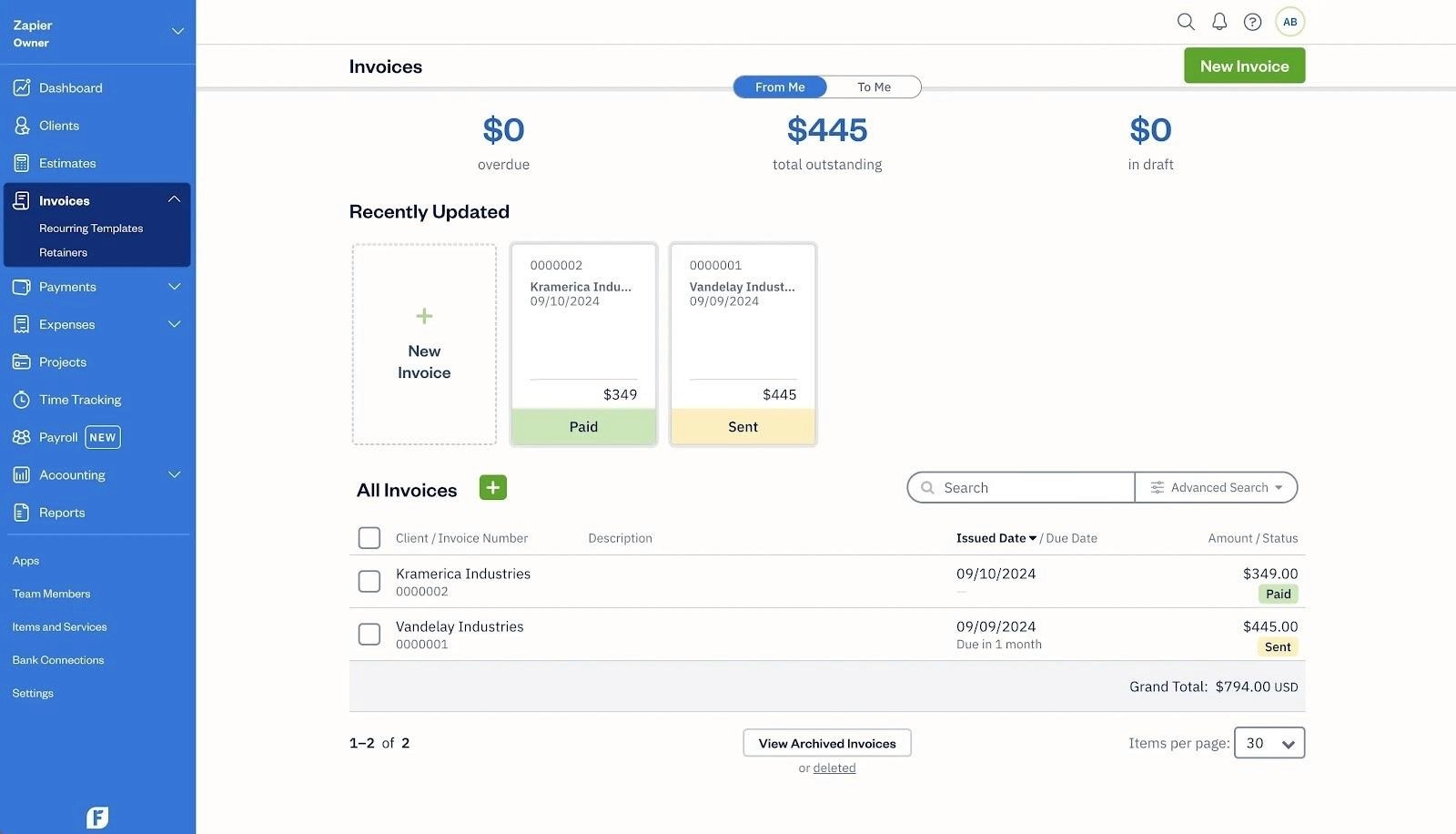
Getting started with a FreshBooks account is designed to be as seamless as possible, making it an ideal accounting solution for small businesses, freelancers, and self-employed professionals who want to keep their finances organized without a steep learning curve. Signing up for a free trial gives you immediate access to FreshBooks’ full suite of features, including unlimited invoices, expense tracking, and project management capabilities—so you can see firsthand how the platform fits your workflow before committing to a pricing plan.
Once you’ve created your FreshBooks account, setup is straightforward. You can quickly personalize your workspace by uploading your business logo, customizing invoice templates, and connecting your preferred payment gateways like PayPal or Stripe. This allows you to send professional invoices and accept online payments in multiple currencies right from the start. The user-friendly interface guides you through each step, making it easy to track expenses, manage projects, and access performance dashboards that give you a real-time view of your business performance.
FreshBooks’ invoicing capabilities stand out, enabling you to automate payment reminders, set up recurring invoices, and monitor invoice status with just a few clicks. The platform’s advanced features—such as inventory management, bank reconciliation, and budgeting tools—help streamline your financial management and support smarter business decisions as you grow. You can also track expenses and project profitability, making FreshBooks a comprehensive tool for managing both day-to-day operations and long-term business goals.
When comparing FreshBooks vs Xero, FreshBooks is often praised for its intuitive interface and focus on invoicing and expense tracking, making it especially appealing for very small businesses and service-based professionals. Xero, on the other hand, offers more robust project tracking and multi-currency support, which may be better suited for businesses with more complex needs. If you’re weighing freshbooks vs xero, consider whether you prioritize ease of use and quick setup or need advanced features like inventory tracking and deeper financial reporting.
Support is another area where FreshBooks excels. Users have access to award-winning phone and email support, a comprehensive knowledge base, and an active community forum. For those seeking additional resources, Xero Central offers a wealth of information, but FreshBooks’ direct support channels are often highlighted as a key advantage for users who want quick answers without extra hassle.
Overall, setting up a FreshBooks account is a smart move for small businesses and self-employed professionals looking for a user-friendly accounting software that combines powerful invoicing capabilities, automated payment reminders, and advanced financial management tools. With flexible pricing plans and a free trial, FreshBooks makes it easy to establish a solid financial foundation and focus on what matters most—growing your business.
What Is Xero?
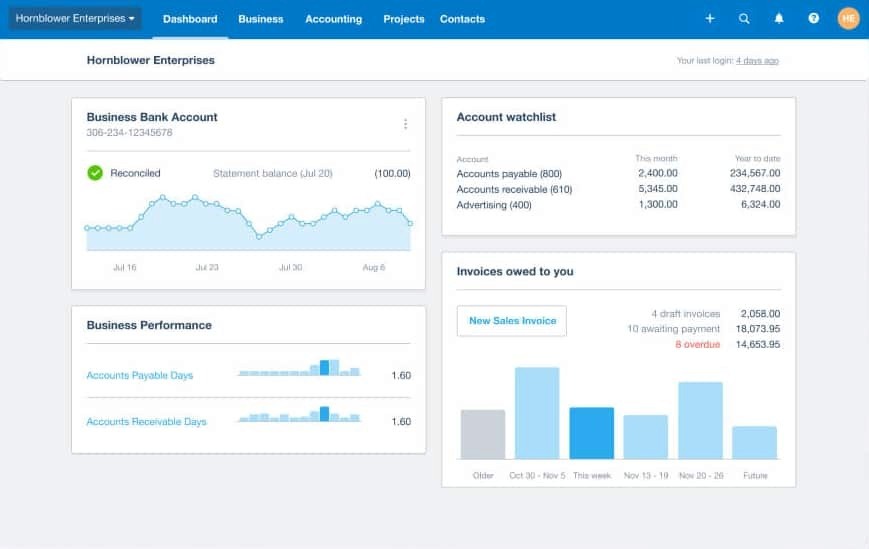
Xero came out of New Zealand in 2006 with an unusual premise: what if accounting software was actually built for small businesses rather than adapted from enterprise tools and scaled down? Nearly two decades later it’s the dominant accounting platform in Australia and the UK, a strong and growing presence in the US, and the go-to choice for accountants who want a cloud-native system with serious depth. Both FreshBooks and Xero are cloud-based accounting solutions, but they serve different business types and needs.
Where FreshBooks optimizes for the individual experience, Xero optimizes for the organization. Xero is better suited for small to medium-sized businesses that require more robust accounting features and support for multiple users. Every plan includes unlimited users at no extra cost. The integration ecosystem exceeds 1,000 apps. The reporting goes deep. The bank reconciliation engine is genuinely sophisticated, with custom rules that automate repetitive categorization work over time. It’s accounting software that assumes your business will get more complex, not less.
Core features include full double-entry accounting on all plans, bank reconciliation with customizable bank rules on all plans, unlimited invoicing on Growing and Established plans, accounts payable and receivable, inventory tracking, project tracking and expense claims on the Established plan, multi-currency support on the Established plan, Hubdoc for automatic bill and receipt capture, comprehensive financial reporting, and a payroll integration via Gusto. Xero offers a wide range of functionalities catering to diverse business needs, making it a preferred choice for small enterprises. Xero is also developing JAX, an AI assistant designed to help users complete accounting tasks more conversationally.
Xero connects with more than 1,000 third-party applications across payroll, ecommerce, CRM, inventory, and industry-specific tools. It’s one of the broadest integration ecosystems in the category. Xero's interface is free of accounting jargon and uses color-coded graphs to present financial information, making it approachable for business owners without an accounting background.
In this FreshBooks vs Xero 2026 comparison, it's clear that both FreshBooks and Xero have distinct advantages. This xero comparison highlights Xero as a robust accounting software solution focused on features tailored to small businesses.
Where They Diverge: The Features That Actually Matter
The Accounting Foundation
This is the first place the gap becomes real. Both platforms run on double-entry accounting, and both produce the standard reports you'd need for tax time. But the depth underneath those reports is different.
Xero is a structured accounting system designed around reconciliation discipline. Every plan includes bank reconciliation with custom bank rules, a full general ledger, accounts payable, and a suite of financial reports. The Established plan adds project profitability tracking, employee expense claims, multi-currency handling, and 180-day cash flow forecasting with scenario modeling. It's the kind of platform a CPA can work inside comfortably, and Xero's network of over 250,000 partner accountants reflects that.
FreshBooks is accounting software that wears its accounting credentials more lightly. The basics are covered, but FreshBooks Lite, its cheapest plan, does not include bank reconciliation, accountant access, or double-entry accounting reports. Those require upgrading to the Plus plan at $43 per month. Xero includes all of those things starting at $25 per month on its entry tier. For businesses that need real bookkeeping capability rather than primarily a billing tool, Xero's starting point delivers more.
Time Tracking
This is the one category where FreshBooks wins outright, and for a certain kind of business it’s the only one that matters.
Every FreshBooks plan, including the $23 per month Lite tier, includes a built-in timer. You start it when you begin work, stop it when you finish, and one click turns those hours into invoice line items. For consultants, lawyers, designers, and anyone else whose income is denominated in billable hours, this workflow is where money gets captured or lost. FreshBooks eliminates manual entry by automatically converting tracked time into invoice line items, reducing administrative work and making it almost impossible to lose billable hours.
Xero does not include time tracking on its Early or Growing plans. The Established plan at $90 per month includes project-based time tracking, but it’s designed for tracking hours against project budgets rather than the nimble, always-on timer experience FreshBooks offers. For solo operators who bill hourly, getting Xero’s time tracking capability means paying $90 per month for a plan built around features a solo consultant probably doesn’t need.
Users and Pricing Architecture
This is where the comparison gets interesting for anyone with a team, and where a true pricing compare reveals how sticker prices can be misleading.
FreshBooks charges $11 per month for every additional user beyond the one included in your base plan. Xero charges nothing extra for additional users on any plan. That difference compounds fast. A business with three people using the accounting software pays for three seats in FreshBooks and the same flat rate in Xero. Add a fourth, fifth, or sixth person and Xero keeps looking better.
For true solopreneurs who will never have a second user, this is irrelevant. For anyone who anticipates growth, it’s worth putting real numbers on it before choosing.
AI and Automation
Neither platform has fully cracked AI in 2026, but Xero is further along the path.
FreshBooks offers solid workflow automation around recurring invoices, payment reminders, and expense categorization. It works well and reduces manual friction, but there's no AI assistant, no anomaly detection, and nothing that proactively surfaces insights about your financial position.
Xero has JAX in development, an AI assistant designed to handle accounting tasks through natural conversation. It's not fully rolled out yet, but it signals where Xero is investing. The Established plan also includes short-term cash flow forecasting and scenario planning, which gives growing businesses a forward-looking view of their finances rather than just a historical record.
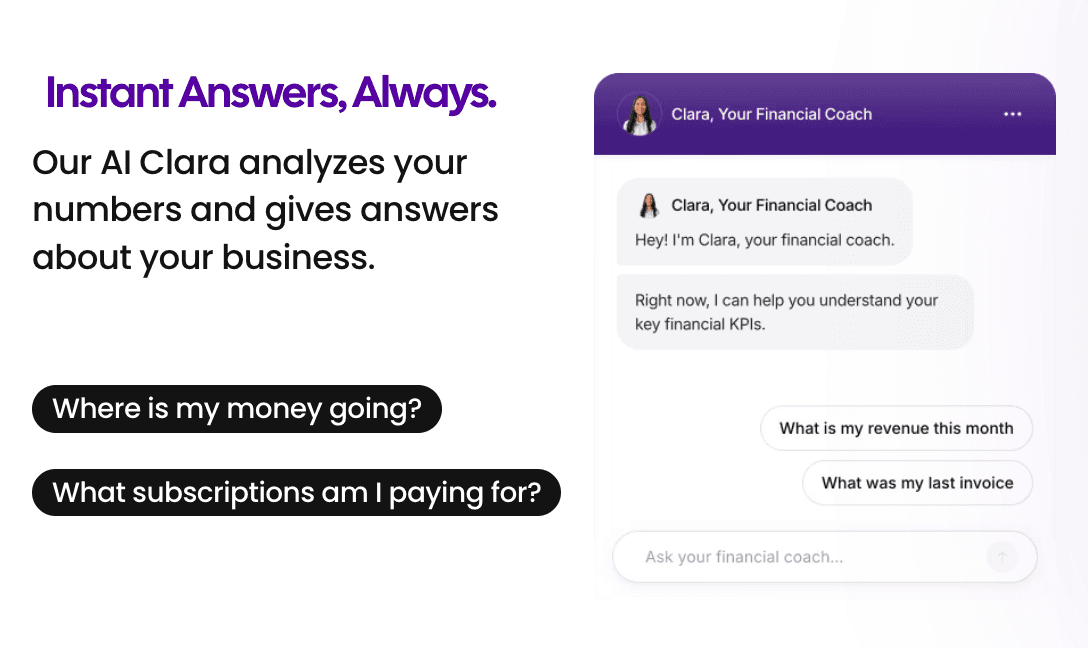
For solopreneurs who want proactive, plain-English financial guidance right now, neither platform delivers it the way Cashflowy's Clara does. Clara reads your actual numbers and answers questions like "Can I afford to hire someone this quarter?" without you needing to know which report to pull.
Integrations
Xero has over 1,000 native integrations with a wide range of business tools. FreshBooks offers 100 to 150 third party integrations, connecting with popular business tools like Stripe, PayPal, Gusto, Shopify, HubSpot, and Zapier. These third party integrations expand each platform's functionality, allowing users to automate tasks and streamline workflows across different aspects of business operations.
For most freelancers, the FreshBooks ecosystem is more than enough, as it covers the business tools most service businesses rely on. But for growing companies with more complex operational stacks, CRM dependencies, inventory tools, or industry-specific software requirements, the gap is significant and Xero is the clear answer due to its broader selection of business tools and third party integrations.
Worth noting: a handful of integrations, including Zendesk’s CRM, exist only in the FreshBooks ecosystem. Always verify both app marketplaces against your specific needs before deciding.
Pricing: What You'll Actually Pay
FreshBooks (as of January 2026):
Lite: $23/month (5 billable clients)
Plus: $43/month (50 billable clients)
Premium: $70/month (unlimited clients)
Select: Custom
Xero (as of March 2026):
Early: $25/month (20 invoices and 5 bills per month, unlimited users)
Growing: $55/month (unlimited invoices and bills, unlimited users)
Established: $90/month (everything in Growing, plus multi-currency, project tracking, expense claims, unlimited users)
Both offer a 30-day free trial. Xero is running an 85% discount for new US customers for the first six months through March 31, 2026. Both platforms have been raising prices steadily. FreshBooks jumped 17 to 21 percent in under a year. Xero has increased its entry-level price from $13 to $25 since 2021, and longtime customers on G2 report price hikes pushed through with no meaningful additions to the product.
Total cost of ownership, Year 1 (after promotions expire):
Scenario | FreshBooks | Xero | Cashflowy |
Solo freelancer, basic needs | Lite: $276/yr | Early: $300/yr | $348/yr |
Solo + accountant access + bank reconciliation | Plus: $516/yr | Early: $300/yr (included) | $348/yr (included) |
Solo + 2 team members | Plus + 2 users: $780/yr | Growing: $660/yr | $348/yr (unlimited users) |
Growing team of 5 | Premium + 4 users: $1,368/yr | Growing: $660/yr | $348/yr (unlimited users) |
For a solo operator with no team, the two platforms cost roughly the same once you account for the features you actually need. The moment you add people, Xero's unlimited user model starts pulling ahead. Add four colleagues and Xero costs less than half of what FreshBooks charges.
Customer Support: A Real Differentiator
Ask most software buyers what matters most and they’ll say features and price. Ask them after they’ve had an urgent problem they couldn’t resolve and they’ll say support.
FreshBooks has won 10 Stevie Awards for customer service. Phone support connects you to a real human quickly, across all paid plans, during business hours. FreshBooks provides customer support via phone, email, and live chat during limited hours. It’s the kind of support experience that makes a stressful situation manageable, and it’s one of the most consistent points of praise in FreshBooks reviews across G2 and Capterra, with user sentiment reflecting high satisfaction with their support responsiveness.
Xero offers a comprehensive knowledge base, community forums, and 24/7 online support through articles, learning courses, and email. However, Xero does not have a direct phone number for support. Xero's customer support requires users to submit a request and wait for a callback or email, which may not provide immediate assistance. Reviewer sentiment about Xero’s support across GetApp and Trustpilot skews more negative than positive, and a common complaint is that Xero’s first answer to a confused user is to consult an accountant. For a solo business owner who chose accounting software specifically to avoid needing an accountant for basic questions, that response misses the point entirely.
Ease of Use
FreshBooks makes accounting feel, if not exactly fun, then at least approachable. The interface uses plain language, bright design, and a tone that assumes you’d rather be doing almost anything else. Setup is fast. The learning curve is shallow. FreshBooks also offers a customizable dashboard, allowing users to personalize their experience by displaying the reports, metrics, and insights most relevant to their workflow. A reviewer on Zapier noted that FreshBooks does something unusual: it makes accounting feel like software built for actual humans.
Xero is clean and professional, designed to avoid traditional accounting jargon in favor of terms like “invoices owed” and “bills you need to pay.” Its interface is free of accounting jargon and uses color-coded graphs to present financial information, making it easier to interpret key data at a glance. For a platform with serious accounting depth, it’s genuinely well-organized. That said, the volume of features means more menus and more places to get disoriented. New users report a noticeable learning curve compared to FreshBooks, and Xero’s recent overhaul of its classic invoicing interface has generated sustained complaints from existing users who found the new version slower and harder to use.
For a freelancer who wants to open the app, do the task, and close the app, FreshBooks wins on friction reduction. For a finance manager or accountant who needs the full system, Xero’s depth is worth the learning investment.
Mobile Apps
The FreshBooks app is purpose-built for service professionals in motion. You can invoice a client the moment a job is done, start and stop the time tracker between meetings, photograph receipts at lunch, log mileage on a job site. The interface is focused enough that you can do all of this quickly without getting lost in settings. When a client opens your invoice, you get notified. It's a product that understands how freelancers actually work.
The Xero mobile app covers more ground. It handles invoicing, receipt capture through Hubdoc, expense management, and bank reconciliation, and it lets you reconcile transactions directly from your phone, something FreshBooks does not support on mobile. For a business owner or finance team member who needs full accounting access from anywhere, Xero's app is the more capable product. For a freelancer who primarily needs to bill and track time on the go, FreshBooks' focused experience removes more friction.
Both apps are available on iOS and Android.
Reporting and Financial Depth
Xero’s reporting suite is comprehensive across all plans: profit and loss, balance sheet, cash flow statements, accounts receivable and payable aging, general ledger, trial balance, and budget variance reports. The Established plan adds a customizable dashboard for tailored financial insights, financial health scorecards, 180-day cash flow forecasting, and project profitability analysis. Xero also integrates with Syft for advanced analytics. It’s the kind of reporting depth that a growing business’s CPA expects to find.
FreshBooks covers the essentials. P&L, expense reports, tax summaries, accounts receivable aging. Clean, readable, and adequate for a freelancer preparing for tax season. But there are no custom bank rules, no audit trails for accountants to review, and no meaningful way to build the kind of layered financial picture that a business with real complexity needs. Reviewers who work with bookkeepers regularly note that FreshBooks reports are fine for solo tax prep but fall short for professional accounting workflows.
Invoicing and Payments
This is FreshBooks’ home turf, and it shows. You can create professional invoices using customizable templates, with unlimited sends on every plan. FreshBooks emphasizes customizable invoices and invoice customization, allowing you to tailor invoices to your brand and automate recurring billing with one-click setup. Automated late fees and real-time view tracking let you know exactly when a client has seen your invoice. The client portal gives customers a branded place to pay, communicate, and review their history with you. Both FreshBooks and Xero support payment links, enabling users to accept online payments directly from invoices via integrations with popular gateways like Stripe, PayPal, and WePay—streamlining the billing process and helping you get paid faster. Xero’s recent deprecation of its classic invoicing interface has made this gap larger, not smaller, with longtime Xero users describing the replacement as clunkier and more frustrating to use.
The one constraint on Xero’s Early plan is significant: you’re limited to 20 invoices and 5 bills per month. Any freelancer with a steady client base will hit that ceiling fast and need to upgrade to the Growing plan at $55 per month.
FreshBooks accepts credit cards, ACH, Apple Pay, Google Pay, and Buy Now, Pay Later options. Xero accepts credit cards and bank transfers via integrations with Stripe, PayPal, and Square. More payment flexibility at the point of collection is a practical advantage for FreshBooks.
Comparison Table
Before diving into the details, here’s a feature-by-feature table for a thorough FreshBooks vs Xero comparison. This xero comparison highlights the key differences and similarities to help you decide which platform fits your business needs in 2026.
Feature | FreshBooks | Xero |
Best for | Freelancers, hourly billers, service businesses | Growing teams, complex operations, accountant-forward businesses |
Starting price | $23/month | $25/month |
Users included | 1 (plus $11/month per additional) | Unlimited on all plans |
Free plan | No (30-day trial) | No (30-day trial) |
Invoicing | Best in class | Strong (Early plan capped at 20/month) |
Time tracking | Built-in on all plans | Established plan only ($90/month) |
Bank reconciliation | Plus plan and above only | All plans, with custom bank rules |
Inventory tracking | Basic only | Yes (Growing and above) |
Reporting | Basic but polished | Comprehensive across all plans |
Payroll | Gusto add-on | Gusto add-on |
Integrations | 100 to 150 | 1,000+ |
AI features | Basic automation | JAX in development; cash flow forecasting |
Mobile app | Focused, intuitive for invoicing | Full-featured, includes mobile reconciliation |
Customer support | Award-winning phone support | No phone support; mixed reviews |
Accountant access | Plus plan and above | All plans |
Double-entry accounting | All plans | All plans |
Multi-currency | Plus plan and above | Established plan only |
Proposals | Plus plan and above | Quotes on all plans |
G2 / Capterra rating | 4.4 / 4.5 | 4.3 / 4.3 |
Picking the Right One for Your Situation
You’re a freelance copywriter billing 10 clients a month. FreshBooks Plus ($43/month). The time tracker is part of your daily workflow, proposals flow into invoices with a click, and if you ever hit a billing snag you can actually call someone.
You run a marketing agency with four employees. Xero Growing ($55/month). Flat pricing regardless of headcount, a deep integration ecosystem to connect your project management and CRM tools, and full accounting access for everyone on the team without a per-seat bill.
You need inventory tracking and sell physical products. Xero, without much debate. FreshBooks has only basic inventory support and no multi-jurisdiction sales tax automation. Xero connects directly to Shopify, Square, and other ecommerce platforms with real inventory depth.
You’re a consultant with 30 clients who needs proposals, project tracking, and time billing. FreshBooks Plus handles proposals, time tracking, and client management in a single, intuitive flow. Xero can do this on the Established plan, but FreshBooks makes it faster and more client-facing for service businesses.
You work with an accountant or bookkeeper. Both work. Xero has the larger accountant ecosystem and the deeper reporting those professionals expect. FreshBooks has better support for solo operators who want their accountant to have access but don’t want to be told to call that accountant every time a basic question comes up.
Ultimately, choosing the right accounting software is crucial for matching your business needs, streamlining invoicing, and supporting your growth—whether you’re a freelancer, agency, or consultant. You’re a solopreneur who needs to know if you can pay yourself this month. Neither gives you a direct answer. Both hand you data and leave the interpretation to you. That is exactly the gap Cashflowy was built to close.
Switching Platforms
FreshBooks offers an "Easy Switch" service that handles migrating your expenses, invoices, and client records from other platforms. Moving from Xero to FreshBooks simplifies the workflow but trades away reporting depth and accounting structure. Some of what Xero does well doesn't translate into a simpler system.
Moving from FreshBooks to Xero is a more deliberate process. You'll need to set up a clean chart of accounts and reconcile your opening balances carefully. The gain in reporting depth and financial infrastructure is real, but it requires setup discipline to avoid inconsistencies in historical data.
Either way: reconcile your accounts, export your key reports, and don't cancel your current software until the new platform is confirmed and working.
Cashflowy: Built for the Question Neither Platform Answers
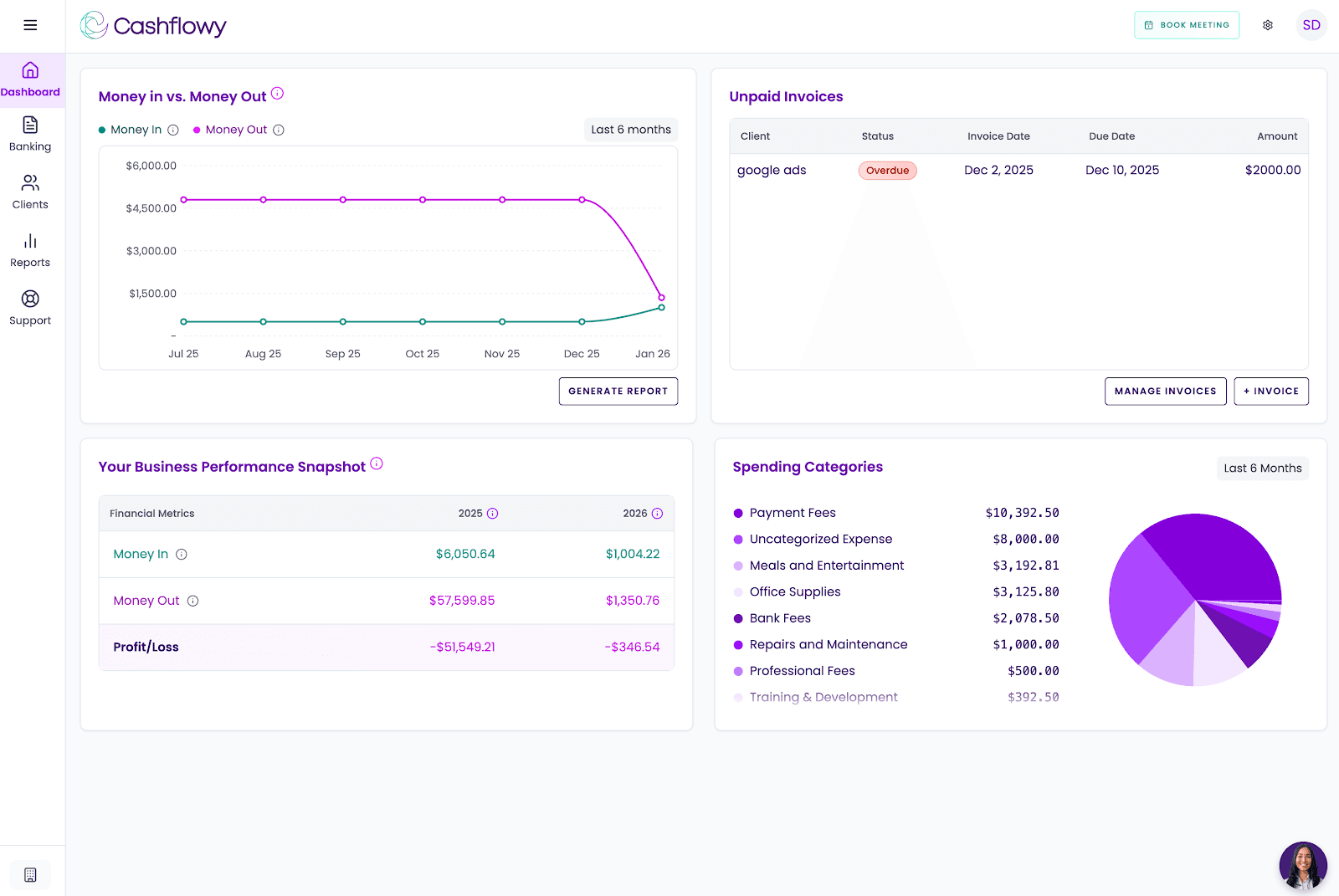
There's a conversation that happens in small business accounting that most accounting software is not designed to have. It goes like this: "I can see my profit and loss, I can see my bank balance, but I still don't know if I can pay myself $5,000 this month without putting the business at risk."
FreshBooks and Xero are both excellent at producing financial records. Neither is designed to translate those records into a direct, personalized answer to that question. The gap between data and decision is real, and for solopreneurs running a one-person business, it's often the most important gap there is.
Cashflowy was built specifically to close it.
AI Financial Coach (Clara): Clara reads your actual financial data and answers plain-English questions. "How much can I pay myself?" "Can I afford this expense?" "Why is my profit lower than last month?" Not a generic chart. A real answer based on your numbers, available in seconds.
Automated Bookkeeping with Double-Entry Accounting: Transactions come in automatically through Plaid-powered bank connections covering US banks, PayPal, and Wise. Smart categorization handles the routine work. CPA-ready reports come standard: P&L, Balance Sheet, Trial Balance, and General Ledger.
Owner's Pay Calculator: The single number most solopreneurs want and neither FreshBooks nor Xero surfaces directly. How much you can safely take home this month.
Cashflow Tracking and Real-Time Dashboard: Income, expenses, and trends in a live view. No more opening a report to see where you stand.
Auto Bank Reconciliation: Transactions matched automatically. Clean books without manual reconciliation on your end.
Client Invoicing and Billing: Branded invoices, one-click payment via Stripe Connect, credit card and ACH. Recurring invoices and automated reminders are coming in 2026.
Real Bookkeeper Access: Every support agent is a trained bookkeeper. Every new user gets a private onboarding call with an accountant. Support runs Monday through Friday, 6am to 6pm EST, unlimited calls and in-platform chat, with a guaranteed next-business-day response outside those hours. Cashflowy runs regular live Profit Breakthrough Sessions, small-group coaching led by the founder and a senior accountant. Your own CPA can log in directly through the team invite feature. All of this for $39/month, with a free trial and a 30-day money-back guarantee.
What Cashflowy doesn't do: No inventory, no payroll, no sales tax automation, no time tracking. Bank connections are Plaid-powered for US banks, PayPal, and Wise. Stripe Connect handles invoice payments. CSV and PDF import is coming soon. US businesses only. It's new, launched 2024 to 2025, and not yet widely reviewed on major platforms. If you need proven, full-featured accounting software with serious depth, FreshBooks or Xero are the right call. But if you've opened both and still left the screen not knowing whether your business is actually working for you, Cashflowy's free trial might answer the question everything else left open.
FreshBooks vs Xero vs Cashflowy
Platform | Best for | Monthly price |
FreshBooks | Freelancers and service businesses focused on invoicing, time tracking, and responsive human support | $23 to $70/month |
Xero | Growing small businesses that need full accounting, unlimited users, 1,000+ integrations, and scalable reporting | $25 to $90/month |
Cashflowy | Solopreneurs who want financial clarity, AI coaching, CPA-ready books, and a direct answer on what to pay themselves | $39/month flat |
How to Make the Call
If your income comes from hours billed and clients served, and you want software that stays out of your way and behind you when something goes wrong, FreshBooks is the better fit. Plan for the Plus tier if you need bank reconciliation and accountant access.
If you’re building something with a team, a complex operational stack, and financial reporting needs that will grow with the business, Xero’s depth, unlimited users, and integration ecosystem make it the more logical long-term choice. Go in knowing there’s no phone support and that pricing has been trending upward.
Ultimately, the best accounting software depends on your business size, workflow, and future plans. If you’re running a one-person business and the gap between your P&L and your actual financial confidence is wider than you’d like, that’s not a FreshBooks problem or a Xero problem. That’s what Cashflowy is for.
FAQs
What is the core difference between FreshBooks and Xero? Both FreshBooks and Xero are cloud-based accounting solutions, but they serve different needs. FreshBooks is built around the freelancer billing workflow: track time, send invoices, get paid. Xero is built as a full accounting system for growing businesses: unlimited users, deep reporting, 1,000-plus integrations, and the accounting infrastructure a scaling company needs. FreshBooks is easier and more human. Xero is deeper and more scalable.
Does Xero include time tracking? Not meaningfully until the Established plan at $90 per month. FreshBooks includes a one-click time tracker on every plan, including the $23 per month entry tier. For anyone who bills by the hour, FreshBooks is the practical and cost-effective choice.
Does Xero charge per user? No. All three Xero plans include unlimited users at a flat monthly rate. FreshBooks charges $11 per month for each additional user beyond your base plan. For teams of two or more people, this difference makes Xero frequently less expensive in practice.
Which platform has better invoicing? When comparing both FreshBooks and Xero, invoicing is a key difference. FreshBooks allows unlimited invoicing on its base plan, while Xero limits the number of invoices on its lowest-tier (Early) plan to 20 per month. FreshBooks was designed for invoicing—branded invoices, real-time view tracking, automated reminders, recurring billing, and a client portal. Xero’s invoicing is capable, but the recently redesigned interface has frustrated existing users, and the Early plan’s invoice cap is a limitation for many.
Does FreshBooks Lite include bank reconciliation? No. Bank reconciliation, accountant access, and double-entry accounting reports all require the Plus plan at $43 per month. Xero includes bank reconciliation with custom bank rules on every plan, starting at $25 per month.
Which platform has better customer support? FreshBooks, clearly. Ten Stevie Awards, real humans available by phone on all paid plans, and consistently positive reviews about support quality. Xero has no inbound phone number, and reviewer sentiment about its support is more negative than positive across major platforms.
Is there a simpler alternative for solopreneurs? Yes. Cashflowy is built specifically for one-person businesses that want clarity rather than complexity. Double-entry bookkeeping, CPA-ready reports, an AI financial coach called Clara, and an Owner’s Pay Calculator, all for $39 per month flat. No payroll, inventory, or time tracking, but for solopreneurs who don’t need those things, it may be the most useful accounting tool available.
Can I switch between FreshBooks and Xero? Yes in either direction, though each transition involves trade-offs. FreshBooks offers an Easy Switch migration service. Moving to Xero requires rebuilding the chart of accounts and reconciling opening balances carefully. Moving to FreshBooks simplifies the experience but loses reporting depth. Either way, reconcile everything and run both platforms in parallel briefly before fully committing.