
Bookkeeping and accounting software
FreshBooks vs QuickBooks: 2026 Comparison

CEO · Mar 18, 2026
Heidi DeCoux is the founder of Cashflowy, an AI-powered bookkeeping platform, and has worked with thousands of self-employed professionals to simplify finances and improve profitability.
You're sending invoices from one app, reconciling bank feeds in another, and chasing receipts somewhere in between. Your books are technically "done," but you still can't answer the one question that matters: Am I actually making money?
If you’ve been evaluating FreshBooks and QuickBooks, you’re asking the right question. Both are popular choices for small business owners who need to get their finances organized. But picking the right accounting software is about matching the tool to how you actually work.
The short version: Pick FreshBooks if you’re a freelancer or service provider who bills clients by the hour, values dead-simple invoicing and built-in time tracking, and doesn’t need inventory or advanced reporting. Pick QuickBooks Online if you sell products, need payroll, want 750+ integrations, or work with an accountant who expects standardized financial data. And if you’re a solopreneur who finds both overwhelming and just wants to know how much you can pay yourself each month, there’s a third option worth considering - Cashflowy.
In this FreshBooks vs QuickBooks comparison, we’re covering key features, pricing plans, integrations, and real-world limitations – informed by thousands of verified user reviews.
What Is QuickBooks Online?
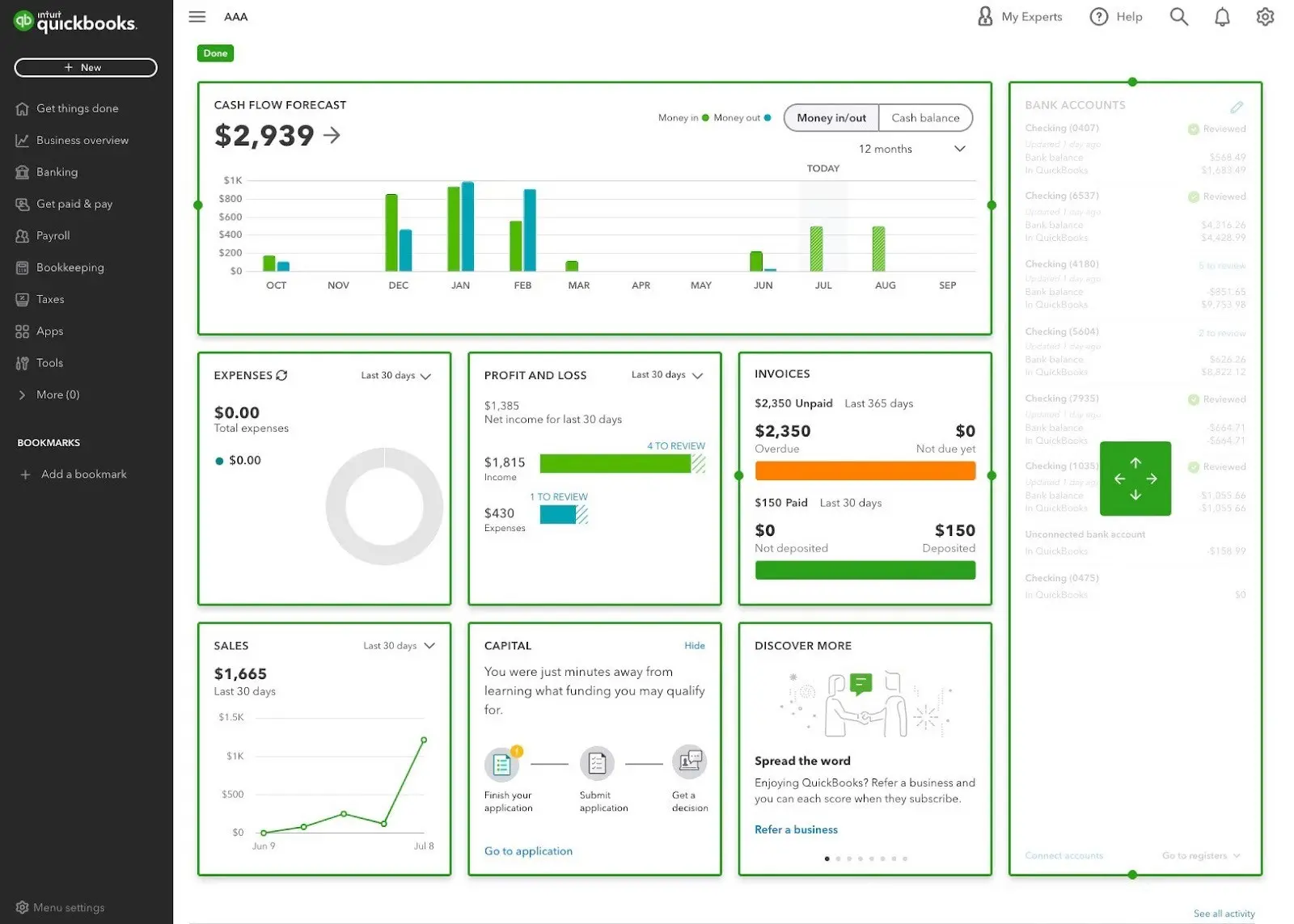
QuickBooks Online is the leading accounting software for small businesses in the United States. Designed by Intuit, it's a cloud-based accounting software platform that handles everything from bank reconciliation and expense tracking to payroll systems and inventory management – all from your browser or the QuickBooks mobile app.
Core features include income and expense tracking with automated bank feeds, professional invoicing with online payments and recurring invoices, sales tax automation, inventory tracking (Plus and above), time tracking, financial reporting with customizable reports, receipt capture via the QuickBooks mobile app, and Intuit Assist AI for transaction categorization.
QuickBooks integrates with more than 750 third-party applications across sales channels, payroll systems, and CRM platforms. It also offers payroll add-ons, mileage tracking and direct accountant access on all plans.
What Is FreshBooks?
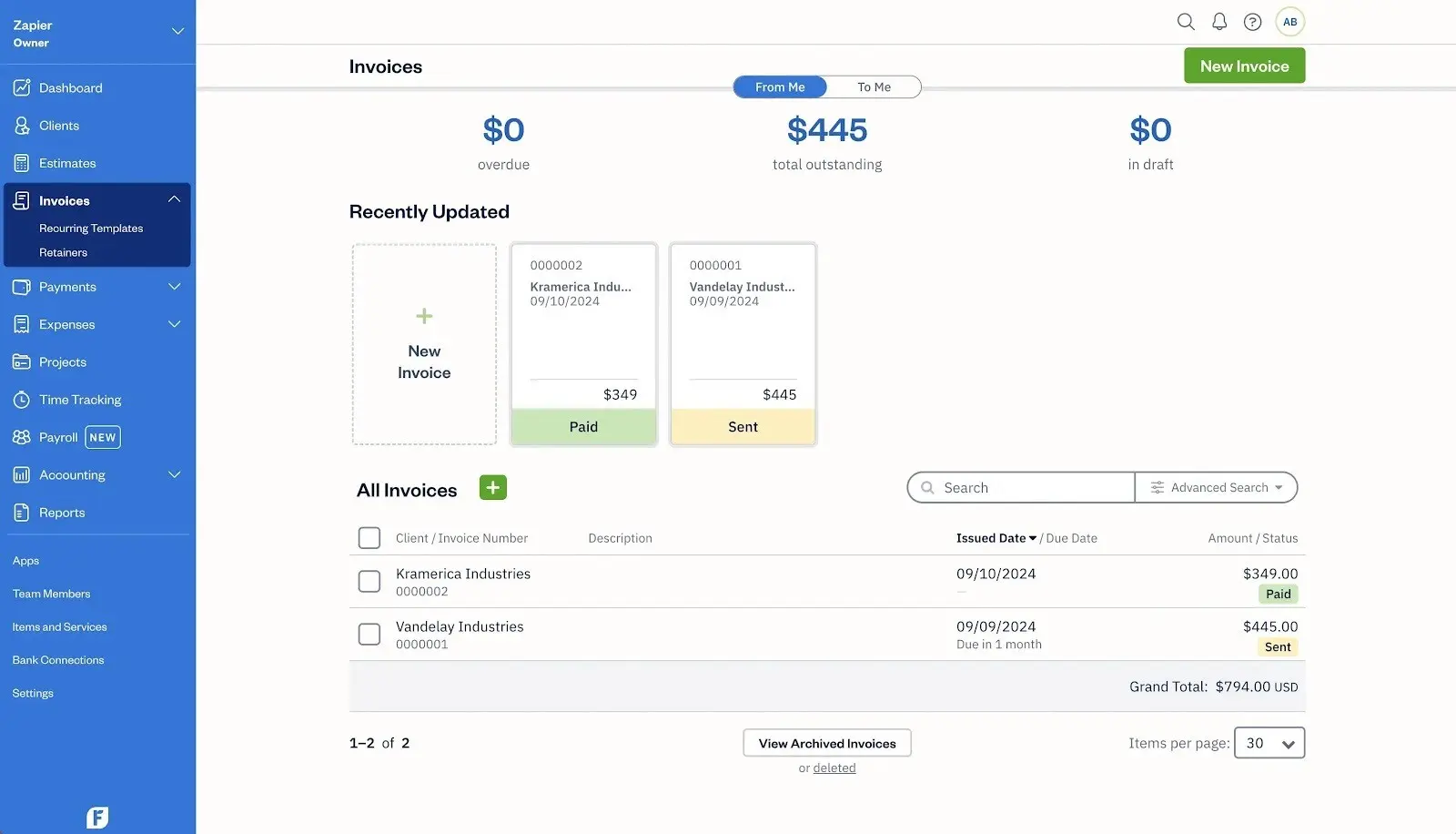
FreshBooks is cloud-based accounting software designed for freelancers, self-employed professionals, and service-based businesses. Where QuickBooks tries to be everything for everyone, FreshBooks focuses on doing a few things exceptionally well: invoicing, time tracking, and getting paid.
The FreshBooks mobile app lets you send customized invoices, capture receipts, and track expenses on the go. It's one of the most user-friendly interface experiences in the accounting software category.
Core features include customized invoices with branded templates and recurring billing, built-in time tracking that flows directly to invoices, expense management with automatic bank import and receipt capture, online payments via credit card and ACH, client estimates, basic reporting, FreshBooks payments with automated late-fee reminders, and the FreshBooks mobile app with mileage tracking.
FreshBooks integrates with roughly 100–150 third-party applications, including Stripe, PayPal, Gusto, HubSpot, and Shopify – significantly smaller than QuickBooks, but covering the essentials for most service-based freelancers.
FreshBooks vs QuickBooks: Key Differences and Similarities
We're not here to declare a winner between FreshBooks and QuickBooks. The right accounting software depends on your business model, team size, and financial complexity. Let's break down how both QuickBooks and FreshBooks compare across the categories that matter most.
Key Features
Both FreshBooks and QuickBooks handle the basics: invoicing, expense tracking, bank reconciliation, and financial reporting. The differences emerge when you dig into depth.
QuickBooks offers a full double-entry accounting solution on all plans. You get a proper general ledger, accounts receivable, accounts payable, GAAP-compliant reporting, and advanced accounting tools like class and location tracking on the Plus plan. It also includes sales tax automation, inventory management, and over 100 built-in reports, with customizable reports on higher tiers.
FreshBooks takes a different approach. Rather than overwhelming you with advanced accounting features, it excels at the workflow freelancers actually use: track time → create invoice → get paid. FreshBooks' time tracking is built into every FreshBooks plan, flowing directly into invoices for accurate billing. The invoicing experience is widely considered best in class – customized invoices with payment links, view tracking, and automated reminders that chase late payers for you.
Critical limitation most comparisons miss: FreshBooks Lite does not include bank reconciliation, accountant access, or double-entry accounting reports. You must upgrade to the Plus FreshBooks plan (now $43/month) to get these foundational accounting features. QuickBooks includes all of these on every plan, starting at $38/month. This means FreshBooks' apparent price advantage evaporates once you need actual bookkeeping.
For accountant access, QuickBooks includes it free on all plans and connects to the massive ProAdvisor network – virtually every CPA in the US knows QuickBooks. FreshBooks offers accountant access starting on the Plus plan. In practice, if your accountant isn't familiar with FreshBooks, they may charge more for the extra time or ask you to export data to QuickBooks anyway.
AI and Automation: FreshBooks vs QuickBooks (2026)
This is one of the biggest differentiators in 2026, yet most comparisons barely cover it.
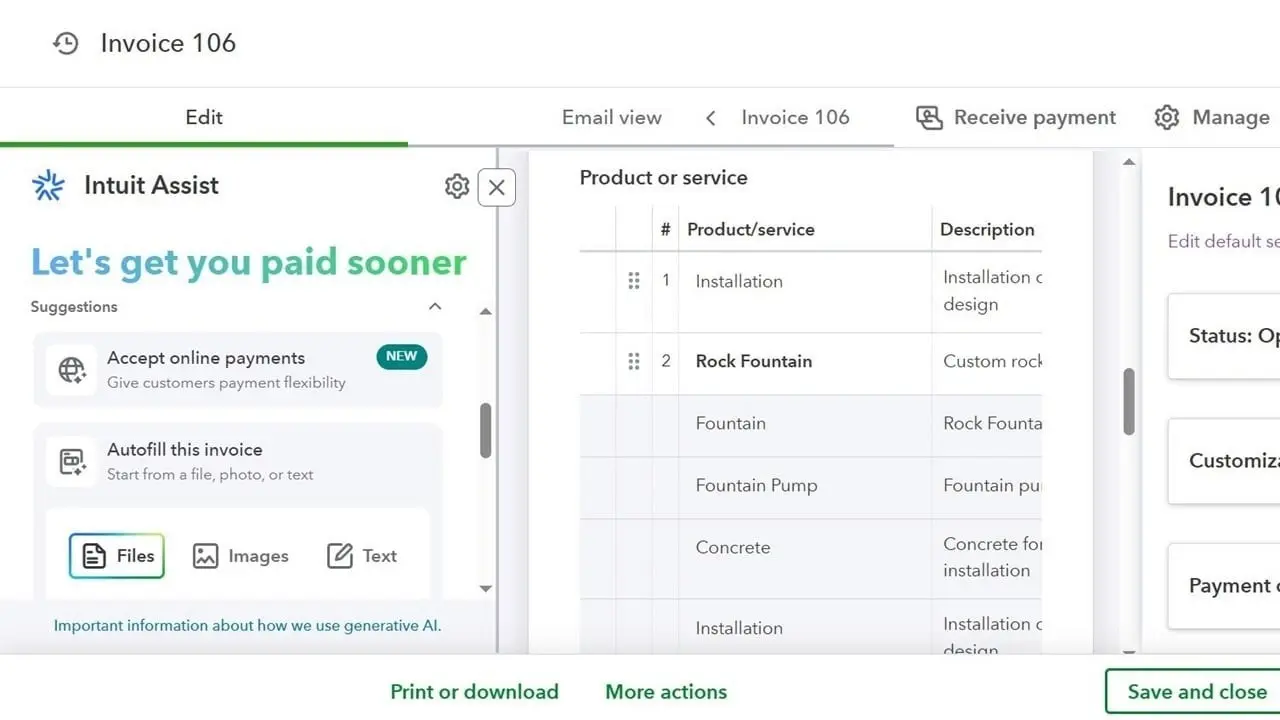
QuickBooks has invested heavily in Intuit Assist, which now includes six specialized AI agents. The Accounting Agent detects anomalies and flags misclassifications. The Payments Agent optimizes reminders based on customer behavior – QuickBooks reports this helps businesses get paid 45% faster. There's also a Finance Agent for cash flow insights, a Customer Agent for lead management, plus Project Management and Recruiting agents on Advanced. No competitor matches this level of AI in small business accounting software.
FreshBooks offers basic automation – recurring invoices, payment reminders, expense categorization – but has no AI assistant, no anomaly detection and no intelligent forecasting.
For solopreneurs who want AI-driven financial guidance without QuickBooks' complexity, Cashflowy offers Clara, an AI CFO and financial coach that analyzes your numbers and answers plain-English questions like "How much can I pay myself?" or "Why is profit down?" – plus automated bookkeeping with double-entry accounting that handles transaction categorization without manual data entry.
Integrations
QuickBooks offers over 750 integrations through its app marketplace – Shopify, Amazon, Square, Stripe, PayPal, HubSpot, Salesforce, and hundreds of industry-specific tools for sales channels, payroll systems, and expense management.
FreshBooks provides 100–150 integrations covering essentials like Stripe, PayPal, Gusto (for FreshBooks payroll via add-on), Shopify, and Zapier. Adequate for most freelancers, but if you need deep ecommerce connections or industry-specific tools, the gap is significant.
FreshBooks vs QuickBooks Pricing
FreshBooks raised prices in January 2026. Here's what you'll actually pay:
FreshBooks pricing (as of January 2026):
- Lite: $23/month (5 billable clients)
- Plus: $43/month (50 billable clients)
- Premium: $70/month (unlimited clients)
- Select: Custom pricing
QuickBooks costs:
- Solopreneur: $20/month (1 user, no payroll or inventory)
- Simple Start: $38/month (1 user)
- Essentials: $75/month (3 users)
- Plus: $115/month (5 users)
- Advanced plan: $275/month (25 users)
Both platforms offer promotional discounts for new customers – FreshBooks currently advertises 90% off for 3 months, QuickBooks typically 50% off. Both offer a 30-day free trial as an alternative to the discount.
Be aware: both platforms have been raising prices aggressively. QuickBooks increases 12–17% annually. FreshBooks jumped from $19/$33/$60 to $23/$43/$70 in under twelve months – a 17–21% increase.
What you'll actually pay: Total cost of ownership (Year 1, after promos expire)
| Scenario | FreshBooks | QuickBooks | Cashflowy |
|---|---|---|---|
| Solo freelancer, basic needs | Lite: $276/yr | Simple Start: $456/yr | $348/yr |
| Solo + accountant access | Plus: $516/yr (Lite lacks it) | Simple Start: $456/yr | $348/yr (unlimited bookkeeper calls + CPA can log in) |
| Solo + 1 team member | Plus + 1 user: $648/yr | Essentials: $900/yr | $348/yr (unlimited users) |
| 50+ clients, time tracking | Premium: $840/yr | Plus: $1,380/yr | $348/yr* |
*Cashflowy does not include time tracking. You'd need a separate tool like Toggl or Clockify.
Once you add the features most businesses need – bank reconciliation, accountant access, team members – FreshBooks' cost advantage narrows or disappears.
Customer Support
Customer support FreshBooks delivers is consistently rated among the best in the industry. FreshBooks has won 10 Stevie Awards for customer service, and phone support connects you to a real human quickly. One Capterra reviewer noted the software was "quick to learn" with "good access via app and automated invoices." For self-employed professionals, this responsiveness is a genuine differentiator.
QuickBooks offers phone and chat support during business hours, with Priority Circle on the Advanced plan. However, user reviews across Reddit, Trustpilot, and G2 describe declining quality – long hold times, scripted agents, and difficulty resolving complex issues. One G2 reviewer reported payroll posting problems that took months of manual corrections because support couldn't identify the cause.
If customer support quality matters to you, FreshBooks is the clear winner.
Ease of Use
FreshBooks wins this category for most users, particularly those without accounting backgrounds. The FreshBooks app is designed for people who aren't accountants – navigation is clean, everything uses plain language instead of accounting jargon, and creating invoices or logging time takes seconds. A Millo reviewer described the interface as bridging the gap between simple invoicing tools and complex accounting software without overwhelming complexity.
QuickBooks Online has improved its user-friendly interface significantly, but the platform is inherently more complex. More features mean more menus, more settings, and more places to make mistakes. According to a widely cited study, QuickBooks is considered the most confusing office tool, generating tens of thousands of help-related searches monthly.
That said, ease of use depends on what you're trying to accomplish. If you need customizable reports, inventory tracking, sales tax automation, and multi-user collaboration, QuickBooks makes those complex accounting tasks easier because FreshBooks simply can't do them.
Time Tracking
Time tracking is one of FreshBooks' standout features. Every FreshBooks plan includes a built-in timer that logs hours by project and client. One click converts tracked time into an invoice line item. For consultants and freelancers who bill by the hour, this workflow is unbeatable for accurate billing.
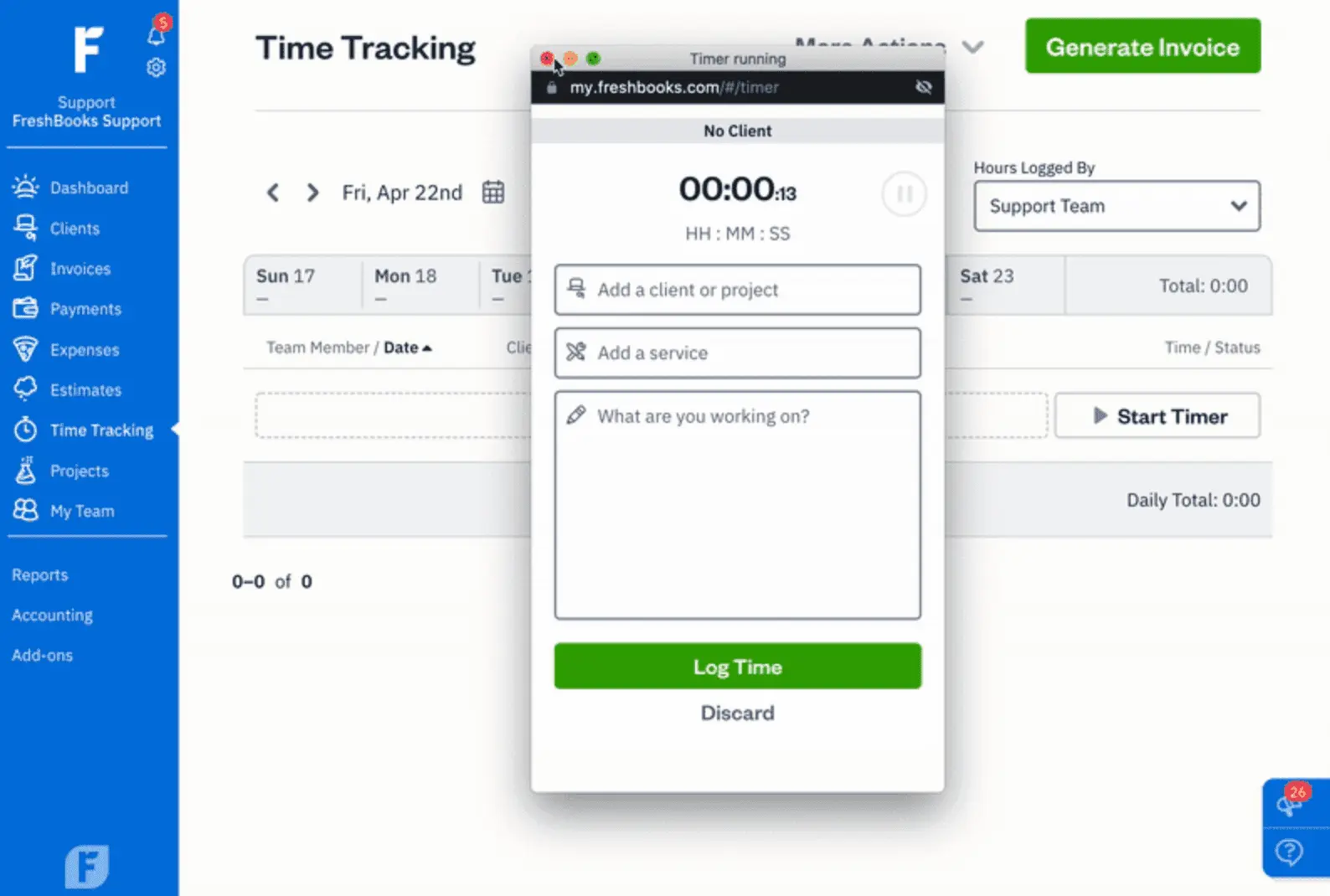
QuickBooks offers time tracking through QuickBooks Time (formerly TSheets), but it's a paid add-on – $20+/month plus $10/user. More robust for teams (GPS tracking, scheduling), but the additional QuickBooks costs mean solo operators pay more for less convenience.
Both FreshBooks and QuickBooks let you track billable hours for specific billable clients, but FreshBooks makes the time-to-invoice flow significantly smoother.
Mobile App Comparison
The QuickBooks mobile app gives you access to nearly everything the desktop version offers: invoicing, expense tracking, receipt capture with AI-powered matching, mileage tracking, bank reconciliation, and report viewing. The app supports Intuit Assist AI features, but can feel cluttered given the volume of features.
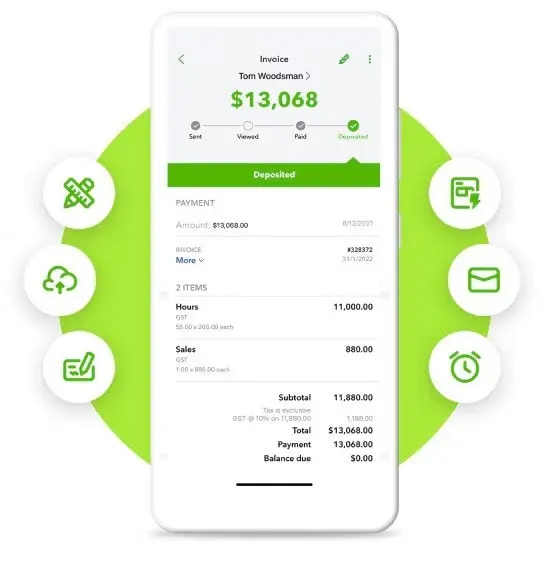
The FreshBooks mobile app is more focused – create and send customized invoices, start and stop time tracking timers, capture receipts, track mileage and manage expenses. The interface is cleaner precisely because it does less. For freelancers who primarily need to invoice and track time from job sites, the FreshBooks app's streamlined experience is often preferable.
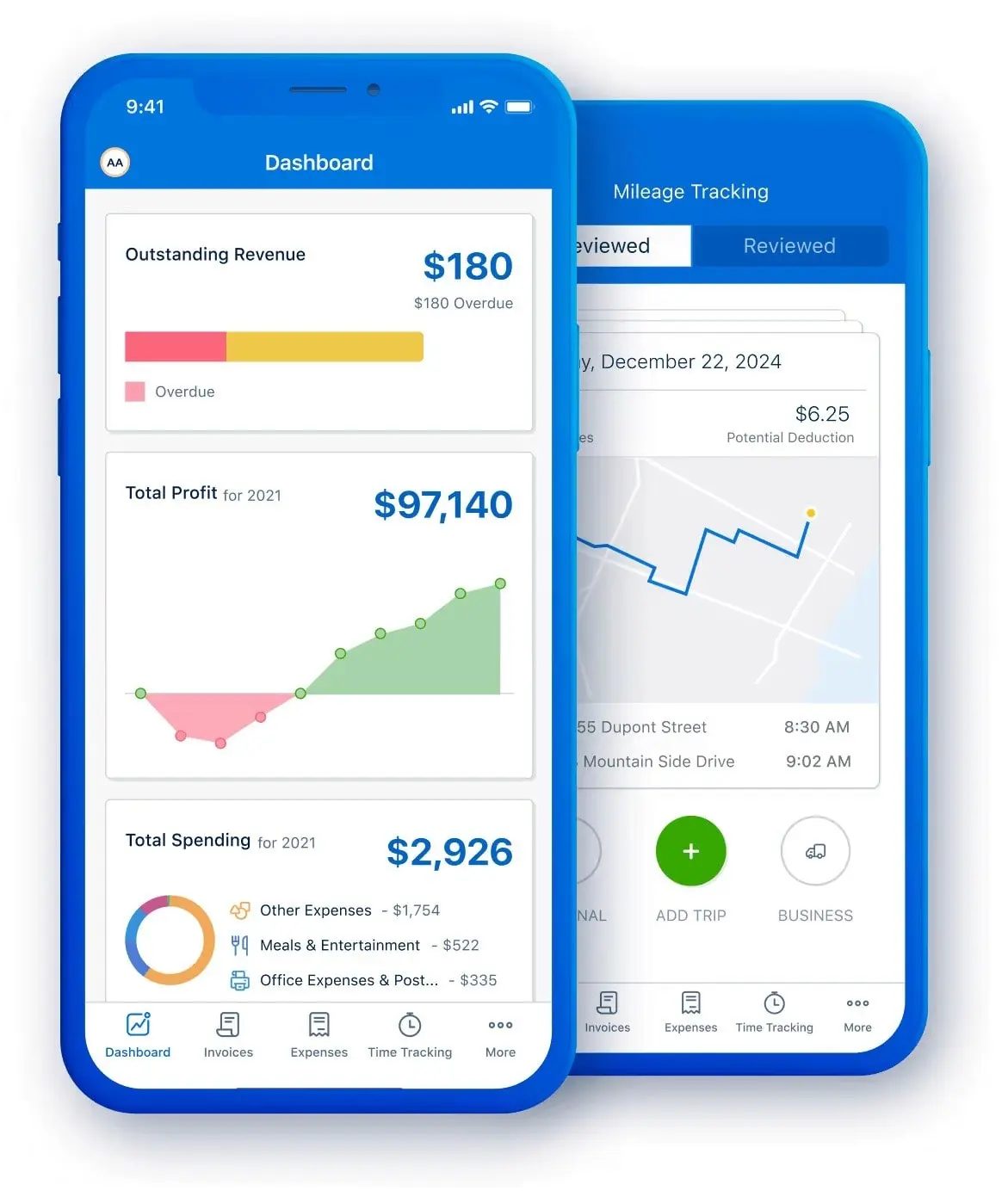
Both apps are available on iOS and Android. Neither offers full offline functionality.
Financial Reporting and Advanced Accounting Tools
This is where QuickBooks pulls decisively ahead. QuickBooks Online includes 40–100+ reports, depending on your plan: P&L, balance sheet, cash flow statements, A/R and A/P aging, general ledger, trial balance, and more. The Advanced plan adds customizable reports, a chart builder, and Excel data sync for in-depth reporting.
FreshBooks offers basic reporting – P&L, expense reports, tax summaries, and accounts receivable aging. Clean and readable, but lacking the depth and customization that growing businesses need. No custom reports, no budget tracking, no class or location-level analysis.
If your business taxes require detailed financial statements or your accountant needs GAAP-compliant data, QuickBooks is the right accounting solution. FreshBooks reports work for tax preparation at the sole-proprietor level, but professional bookkeepers consistently describe them as too basic for serious accounting work.
Receipt Capture and Expense Management
Both QuickBooks and FreshBooks handle receipt capture through their mobile apps – snap a photo, OCR reads it, and it attaches to matching expenses. QuickBooks edges ahead with AI-powered matching through Intuit Assist that learns your categorization patterns over time and the ability to create bank rules for further automation. FreshBooks' categorization is more basic but adequate for straightforward service businesses.
Both connect to credit card accounts and bank accounts for automatic transaction import. Both let you track expenses by category, attach receipts, and mark expenses as billable to specific billable clients.
Invoicing and Payments
Invoicing is FreshBooks' crown jewel. Create customized invoices with branded templates, send unlimited invoices on all plans, set up recurring invoices, add late-fee automation, and track when clients view your invoices. FreshBooks payments process credit card and ACH transactions directly within invoices.
QuickBooks offers solid invoicing with online payment processing, recurring invoices, and payment reminders. Intuit Assist generates invoice reminders with a customizable tone and optimizes timing based on customer payment patterns.
Both accept payments via credit card and bank transfer. QuickBooks and FreshBooks both work with major credit card companies – FreshBooks charges 2.9% + $0.30 per transaction; QuickBooks charges 2.99% + $0.25.
FreshBooks vs QuickBooks: Comparison Table
| Feature | QuickBooks Online | FreshBooks |
|---|---|---|
| Best for | Small businesses needing comprehensive accounting | Freelancers and service businesses focused on invoicing |
| Starting price | $20/month (Solopreneur) | $23/month |
| Users included | 1–25 by plan | 1 ($11/month per additional) |
| Free trial | 30-day free trial | 30-day free trial |
| Invoicing | Strong with AI reminders | ⭐ Very strong |
| Time tracking | Add-on ($20+/month) | ⭐ Built-in on all plans |
| Inventory tracking | Yes (Plus and above) | Basic only |
| Bank reconciliation | All plans | Plus plan and above only |
| Sales tax | Automated multi-jurisdiction | Not available |
| Reporting | 40–100+ customizable reports | Basic reporting only |
| Payroll | Built-in add-on | Gusto add-on only |
| Integrations | 750+ | 100–150 |
| AI features | ⭐ Intuit Assist (6 agents) | Basic automation only |
| Mobile app | Full-featured, complex | ⭐ Streamlined, intuitive |
| Customer support | Declining quality per reviews | ⭐ Award-winning |
| Accountant access | Free on all plans | Plus plan and above |
| Double-entry accounting | All plans | Plus plan and above |
| Ease of use | Moderate learning curve | ⭐ Very easy |
| G2 / Capterra rating | 4.0 / 4.3 | 4.5 / 4.5 |
Which Should You Choose? Real Scenarios
The right accounting solution depends less on features and more on how you actually run your business:
You're a freelance designer billing 8 clients monthly. FreshBooks Plus ($43/month). You'll use the time tracking daily, invoice clients with one click, and the clean mobile app works great on the go. You don't need inventory or advanced reporting.
You're a photographer selling prints and packages. QuickBooks Plus ($115/month). You need inventory tracking, sales tax automation for physical goods, and Shopify or ecommerce sales channels integration.
You're a business coach with 30 clients and a VA. FreshBooks Plus covers invoicing and time tracking, but adding your VA costs $11/month extra, plus Gusto for payroll ($46+/month). QuickBooks Essentials ($75/month) includes 3 users and a built-in payroll add-on. Depending on your workflow, QuickBooks may be cheaper.
You're a solopreneur consultant who just wants to know: "How much can I pay myself?" Neither platform answers this directly. Both give you raw data, but translating a P&L into a safe monthly paycheck requires accounting knowledge. This is exactly the gap Cashflowy was built to fill – its Owner's Pay Calculator shows precisely what you can take home.
You're a plumber running a crew of 3. QuickBooks Plus ($115/month) with QuickBooks Time for field timesheets. FreshBooks wasn't designed for trades with multiple field workers and job costing.
Switching Between Platforms
FreshBooks offers an "Easy Switch" service where their specialists handle migrating your data from QuickBooks – expenses, invoices, and client details. QuickBooks doesn't offer an equivalent white-glove service, but its import tools handle CSV data, and the broader accountant ecosystem means you can find a ProAdvisor to help.
Before switching either direction: close out your books, reconcile all accounts, and export key reports. Don't cancel your old software until you've verified bank connections, payment processors, and daily workflows work in the new platform.
Cashflowy: A Smarter Alternative for Solopreneurs
Here's the uncomfortable truth: both FreshBooks and QuickBooks are accounting software. They're excellent at recording what happened. They're less good at telling you what to do next.
QuickBooks will show you a P&L statement. FreshBooks will track your billable hours. But neither will proactively tell you whether you can safely pay yourself this month or how much to set aside for taxes.
That's where Cashflowy enters the picture.
Cashflowy is an AI-powered accounting platform built exclusively for solopreneurs, freelancers, coaches, consultants, and creatives. Instead of a general-purpose tool designed for teams, it focuses entirely on the solo operator experience.
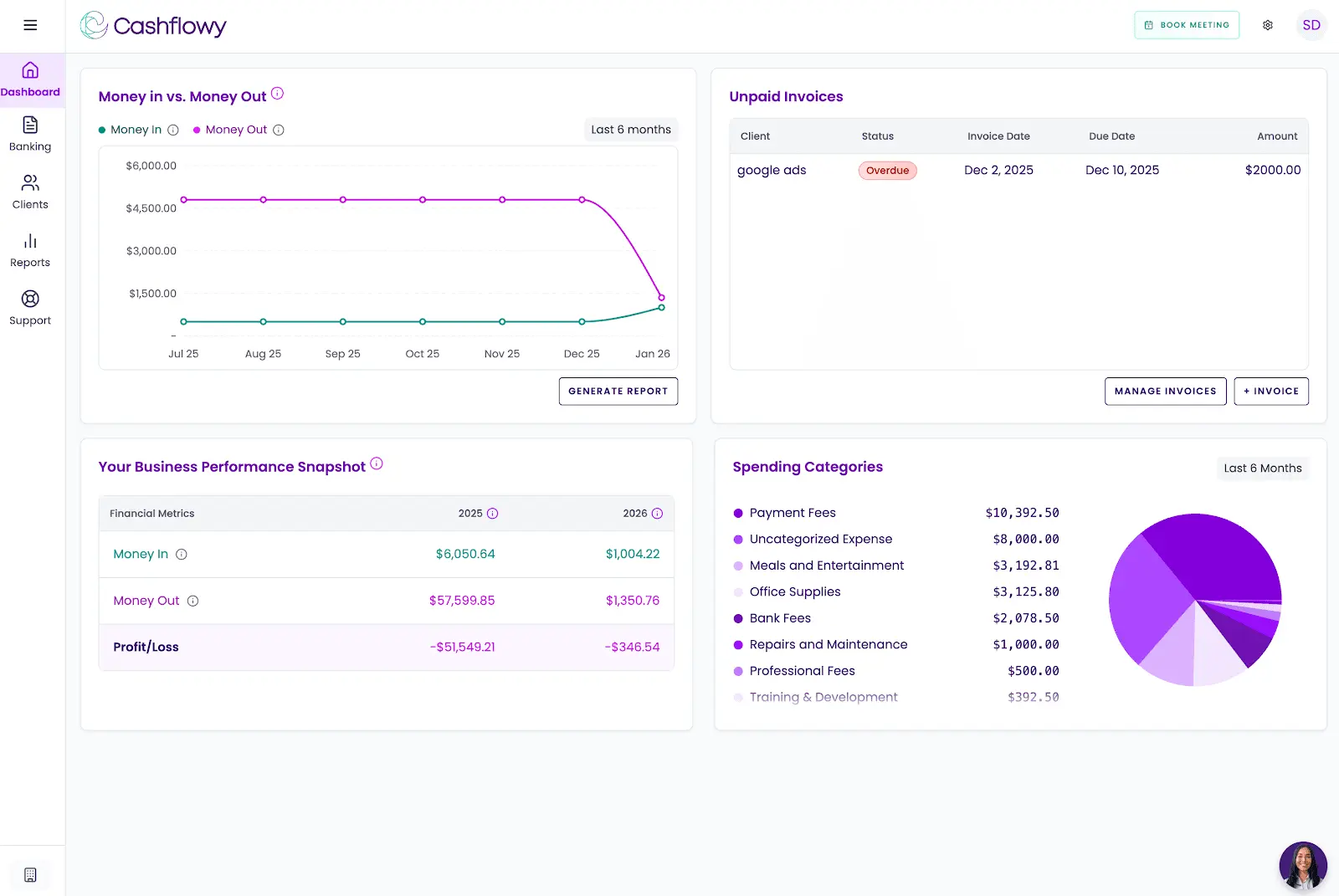
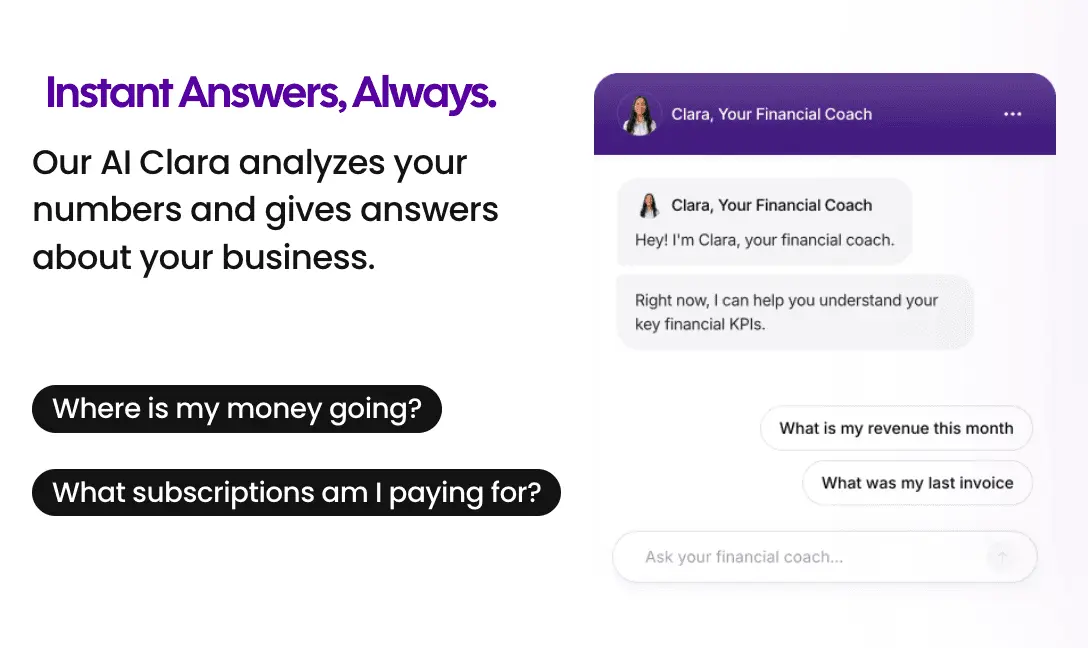
AI Financial Coach (Clara): Cashflowy's AI CFO analyzes your numbers and answers plain-English questions about your business – "How much can I pay myself?", "Can I afford this expense?", "Why is profit down?" Get instant, data-backed answers without needing to read a P&L statement.
Automated Bookkeeping with Double-Entry Accounting: Smart transaction categorization eliminates manual data entry. Transactions flow in automatically via Plaid-powered bank connections (supporting US banks, PayPal, and Wise). Unlike many simplified tools, Cashflowy includes full double-entry bookkeeping with CPA-ready reports: P&L, Balance Sheet, Trial Balance, and General Ledger.
Owner's Pay Calculator: The single metric most solopreneurs want – how much you can safely take home each month.
Cashflow Tracking & Real-Time Dashboard: See where your cash flow stands at any moment with a live finance dashboard showing income, expenses, and trends.
Auto Bank Reconciliation: Automatic matching of bank transactions to keep your books clean without manual reconciliation.
Client Invoicing + Billing: Create and send branded invoices with your logo. Clients pay in one click via Stripe Connect (credit card, ACH). Note: recurring invoices and automated payment reminders are not yet available, though more invoicing features are planned for 2026.
Real Bookkeeper Access: Every customer service agent is a trained bookkeeper, and every new user gets a private onboarding call with an accountant. Support is available M–F 6 am – 6 pm EST via unlimited calls and in-platform chat (guaranteed next-business-day response outside hours). Cashflowy also hosts regular live Profit Breakthrough Sessions – small-group coaching led by the founder and senior accountant to help you increase take-home pay and understand your KPIs. Your own CPA or bookkeeper can log in too, via a built-in "invite team member and accountant" feature. All for $39/month with a free trial and 30-day money-back guarantee.
What Cashflowy doesn't do: No inventory management, no payroll, no sales tax automation and no time tracking. Integrations are limited to Plaid-powered bank connections (including PayPal and Wise) plus Stripe Connect for invoice payments – with CSV/PDF bank statement import coming soon. It's US businesses only, very new – launched 2024–2025 with minimal presence on major review platforms. If you need proven, full-featured accounting software, QuickBooks or FreshBooks are safer choices. But if you're a solopreneur who's tried both and still can't figure out your numbers, Cashflowy's AI coaching may be worth a free trial.
FreshBooks vs QuickBooks vs Cashflowy: Comparison Table
| Platform | Best for | Monthly price |
|---|---|---|
| QuickBooks Online | Small businesses needing comprehensive accounting, payroll, inventory, 750+ integrations, Intuit Assist AI, advanced accounting tools | $20–$275/month |
| FreshBooks | Freelancers and service based businesses focused on invoicing, time tracking and ease of use | $23–$70/month |
| Cashflowy | Solopreneurs wanting financial clarity with AI coaching, double-entry bookkeeping, CPA-ready reports, owner's pay calculator and real bookkeeper access | $39/month flat |
Beyond Accounting Software: Making the Right Choice
If you're a small business with employees, inventory, and complex reporting needs, QuickBooks Online delivers the most comprehensive accounting solution available.
If you're a freelancer who bills by the hour and values simplicity, FreshBooks gives you the best invoicing and time tracking experience in the category. Just budget for the Plus plan ($43/month) if you need bank reconciliation and accountant access.
If you're a solopreneur who's tried both and still can't answer "how much should I pay myself?" – Cashflowy might be exactly what you need.
The best accounting software isn't the one with the most features. It's the one you'll actually use.
Frequently Asked Questions
What's the main difference between FreshBooks and QuickBooks?
Can FreshBooks handle payroll?
Which is better for invoicing: FreshBooks or QuickBooks?
Do I need a business banking account to use these tools?
Does FreshBooks Lite include bank reconciliation?
Can I switch from QuickBooks to FreshBooks?
Is FreshBooks good for e-commerce businesses?
Is there a simpler alternative to both FreshBooks and QuickBooks?
Keep reading

Accounting Software for Real Estate Agents: 9 Tools Compared
Compare 9 accounting software options for real estate agents. See how each handles commission splits, mileage, tax readiness and financial reporting.

Best Accounting Software for Freelancers in 2026: 7 Options Compared
Compare seven freelance accounting software options by expense tracking, invoicing, bank feeds, cash flow, tax readiness and key limitations.

Most Practical Self-Employed Accounting Software, Bookkeeping and Finance Tools
Compare the best accounting software and bookkeeping tools for the self-employed. See features, limitations, and which option fits your business.