
Bookkeeping and accounting software
FreshBooks vs Wave: 2026 Comparison (And a Smarter Option You Haven't Considered)

CEO · Mar 19, 2026
Heidi DeCoux is the founder of Cashflowy, an AI-powered bookkeeping platform, and has worked with thousands of self-employed professionals to simplify finances and improve profitability.
There's a version of this decision that looks easy on paper. One platform costs money. The other is free. Just take the free one and move on.
But anyone who has spent more than a few months running a real business knows the calculus is never that simple. Free tools have ceilings. And the moment you hit one, the cost of switching, the lost time, the scrambled data, often ends up being more expensive than paying for the right tool from the start.
That's the honest tension at the center of the FreshBooks vs Wave comparison in 2026. Wave is genuinely free for core features, and for the right business at the right stage, that's a real and meaningful advantage. FreshBooks costs real money every month, and for the right business, it earns that money back before the statement closes. The question isn't which one is cheaper. The question is which one fits the business you're actually running right now.
The short version: Wave fits you if you're a micro-business or early-stage solopreneur based in the US or Canada, your financial needs are straightforward, and keeping monthly costs at zero is a genuine priority. FreshBooks fits you if you're billing clients by the hour, working with international clients, need award-winning support when something goes wrong, or want your invoicing to feel like a professional extension of your brand. And if you're a solopreneur who has poked around both and still can't answer the question "am I actually doing okay financially?", there's a third option called Cashflowy that might cut through the noise.
FreshBooks vs Wave 2026 Comparison and a Smarter Option You Haven't Considered: What is FreshBooks?
FreshBooks started as an invoicing tool and grew into accounting software, and that origin still shapes everything about it. The people who built it understood that most freelancers and small business owners didn’t need more accounting complexity in their lives. They needed to get paid faster and spend less time on paperwork.
The result is a platform with an unusually short distance between opening the app and accomplishing something useful. The time tracker is always one tap away. An invoice can go out in under a minute. The whole experience is designed around the assumption that accounting is a means to an end, not an end in itself.
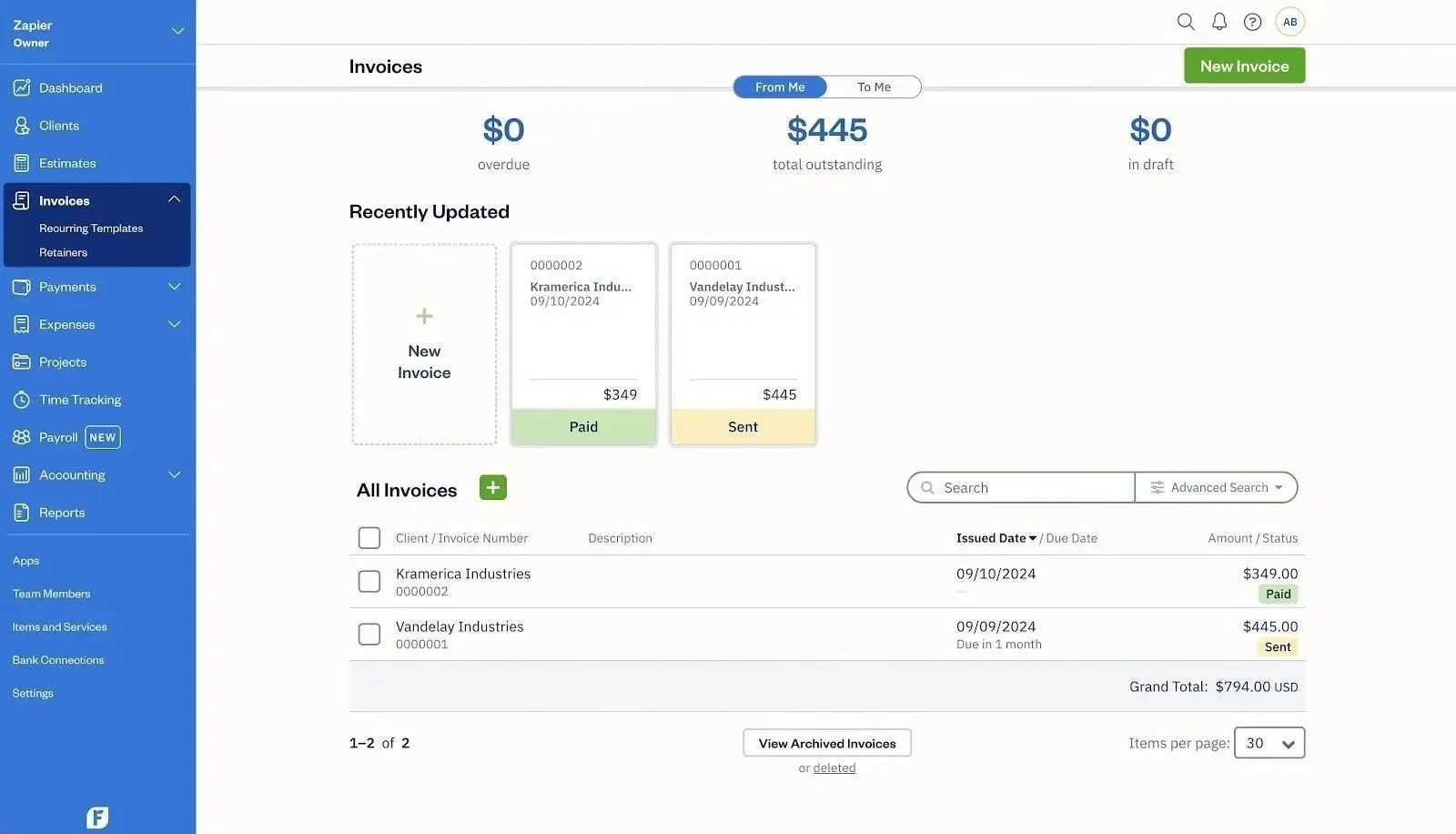
Core features include customized invoices with branded templates and recurring billing, built-in time tracking that flows directly into invoices, expense management with automatic bank import and receipt capture, online payments via credit card and ACH as well as Apple Pay and Google Pay, client estimates and proposals on the Plus plan and above, automated late payment reminders with real-time view tracking on every invoice, and mileage tracking via the mobile app.
In addition to these core features, FreshBooks offers a range of additional features—especially in its premium plan—including project profitability tools, advanced client management with a dedicated client self-service portal, built-in tools for proposals and retainer billing, project management, and bank reconciliation. This all-in-one approach is designed for service-based businesses that require clear visibility into profitability and project management.
FreshBooks pricing is structured across several plans, with each tier unlocking more advanced features. The premium plan is aimed at growing businesses and agencies, offering enhanced capabilities like project profitability analysis, inventory management, and additional user access. As of early 2026, FreshBooks stands out as a premium, feature-rich solution for service-based businesses, while Wave provides a robust, zero-cost or low-cost option for freelancers and micro-businesses.
FreshBooks connects with 100 to 150 third-party apps including Stripe, PayPal, Gusto, HubSpot, and Shopify. It’s not the largest ecosystem in the category, but it covers the tools most service-based businesses actually rely on.
When to choose FreshBooks: It’s generally the better choice for growing agencies, hourly billing, and service-based businesses that need advanced features, project management, and clear insight into profitability. Wave, on the other hand, is best for budget-friendly, simple, flat-rate invoicing.
What Is Wave?
Wave is free accounting software, and it’s important to say that plainly because it shapes everything else about the platform. Wave was built on the premise that the financial barrier to professional bookkeeping should be zero, and it has largely delivered on that promise since 2010. Owned by H&R Block since 2019, Wave makes its money through optional paid services like payment processing, payroll, and premium advisor add-ons, while keeping the core product permanently free.
That business model has real implications for the product. Wave does not have the same incentive to compete on feature depth that a subscription software company does. It competes on accessibility. And in that category, it wins.
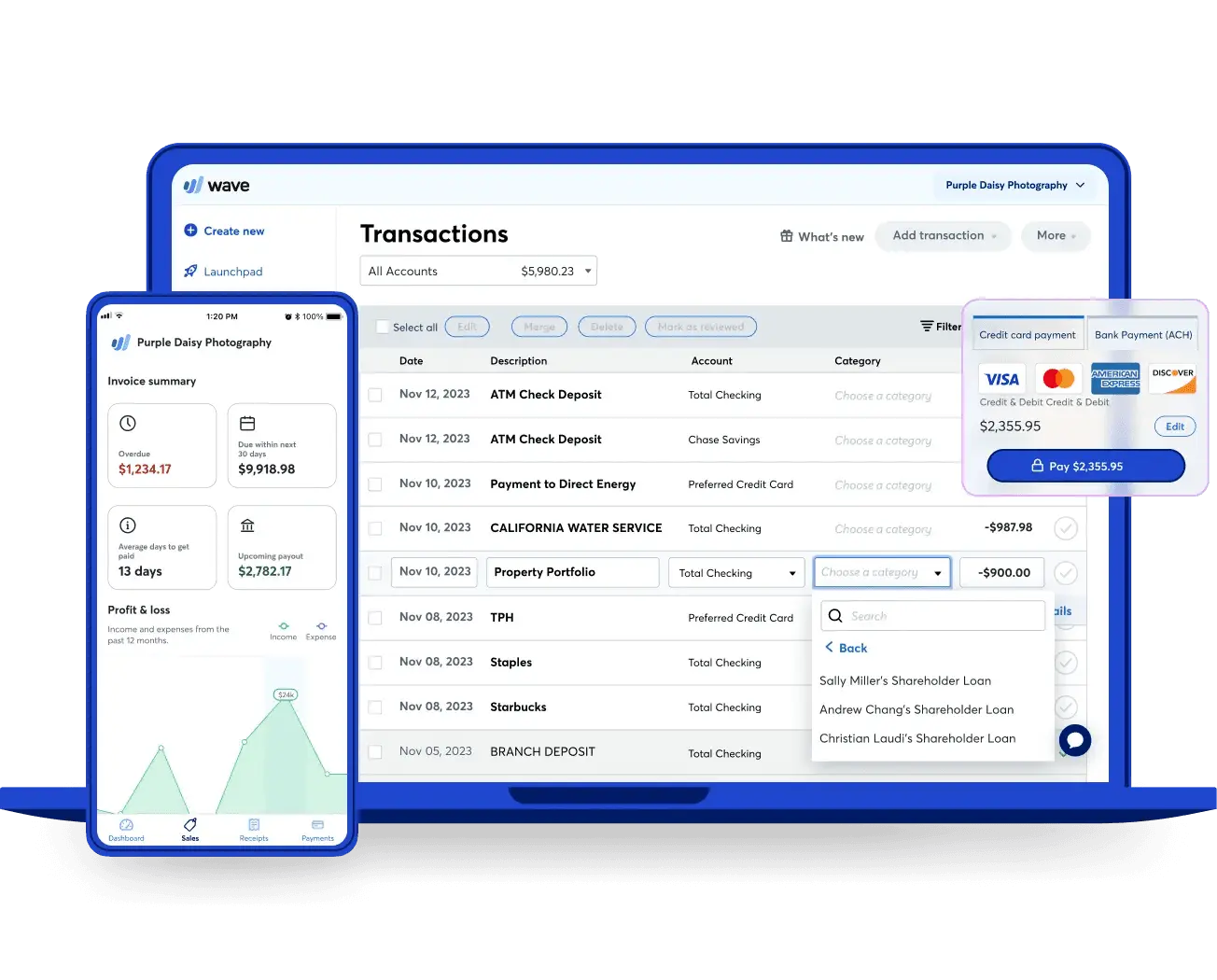
Wave Accounting is a cost-effective solution for small businesses seeking free invoicing and expense tracking. Core features include unlimited invoicing with customizable templates, income and expense tracking, double-entry bookkeeping, basic financial reports covering P&L, balance sheet, and cash flow, bank reconciliation, receipt scanning, accountant access on the Pro plan, and a payroll add-on for US and Canadian businesses.
Tracking expenses is a key feature for small businesses, freelancers, and microbusinesses, and Wave supports this with straightforward tools for categorizing and monitoring spending. However, Wave's free plan lacks advanced features such as project tracking tools and industry-specific reports, which may be necessary for growing businesses. Additionally, Wave does not provide an audit trail, which can be a drawback for businesses needing detailed financial oversight. Its simplicity can become a limitation as businesses grow and require more complex financial insights and reporting capabilities. Many businesses find that free accounting software like Wave struggles to provide the necessary insights for decision-making as they grow.
When to choose Wave: Wave is best suited for very small service-based businesses, freelancers, or contractors who need affordable, flexible, and straightforward invoicing and accounting tools. It is more affordable than FreshBooks and offers unlimited invoicing across all plans, while FreshBooks limits the number of clients in its Lite and Plus plans. Both Wave and FreshBooks can handle the fundamentals of accounting well, but their differences become clear as business needs grow. In any wave comparison or wave vs freshbooks evaluation, the platforms’ similarities in core features are apparent, but their differences become more pronounced as your business evolves.
Wave’s native integration list is short: Shopify, PayPal, Etsy, and Zapier. The Zapier connection opens indirect access to thousands of other tools, but if you need deep, native integrations with your operational stack, Wave will leave you wanting.
The Real Differences: Where Each Platform Earns or Loses Your Trust
What "Free" Actually Costs You
Wave’s Starter plan is genuinely free, no expiration date, no credit card required to get started. You get unlimited invoicing, manual expense tracking, basic reports, and double-entry bookkeeping at zero cost. For a brand-new business with ten transactions a month and simple needs, it’s hard to argue with that. Wave also allows additional users, and on the Pro plan, you get unlimited user access, making it easier for small teams to collaborate.
But free has a specific shape. Automatic bank transaction imports, the feature that saves hours of manual data entry every month, require the Pro plan at $16 per month. On the free Starter plan, you’re entering transactions by hand or uploading CSV files. That’s workable at low volumes. At higher volumes it becomes a part-time job. Paying users on both platforms unlock additional features and support, so upgrading can be worthwhile as your needs grow.
FreshBooks has no free tier, and its cheapest plan at $23 per month is called the Lite plan. The Lite plan comes with its own limitations: no bank reconciliation, no accountant access, and no double-entry accounting reports. Those require the Plus plan at $43 per month. Additionally, FreshBooks charges for each additional user, while Wave’s Pro plan includes unlimited users. Another key difference: Wave offers unlimited invoicing across all plans, but FreshBooks limits the number of clients you can invoice in its Lite and Plus plans. So the real entry point for proper bookkeeping is $43 on FreshBooks and $16 on Wave. That’s a meaningful difference, and it matters.
Where FreshBooks earns its money back is in time tracking and invoicing sophistication. Every FreshBooks plan includes a built-in timer that logs hours by client and project. One click converts those hours into invoice line items. For anyone who bills by the hour, that workflow captures revenue that would otherwise slip through the cracks. Wave has no time tracking at any price.
The International Wall
This one is binary and worth knowing upfront: Wave stopped accepting new international accounts in November 2020. If your business operates outside the US or Canada, Wave is not available to you. FreshBooks works globally, supports multi-currency invoicing, and has no geographic restrictions. For any freelancer working across borders, this closes the conversation before it starts.
AI and Automation
Neither platform is leading the AI charge in 2026. FreshBooks offers solid workflow automation around recurring invoices, payment reminders, and expense categorization. It reduces friction without requiring much thought on your part. Wave uses basic machine learning to suggest transaction categories on the Pro plan, but the suggestions still need manual confirmation and there's no proactive financial intelligence of any kind on either platform.
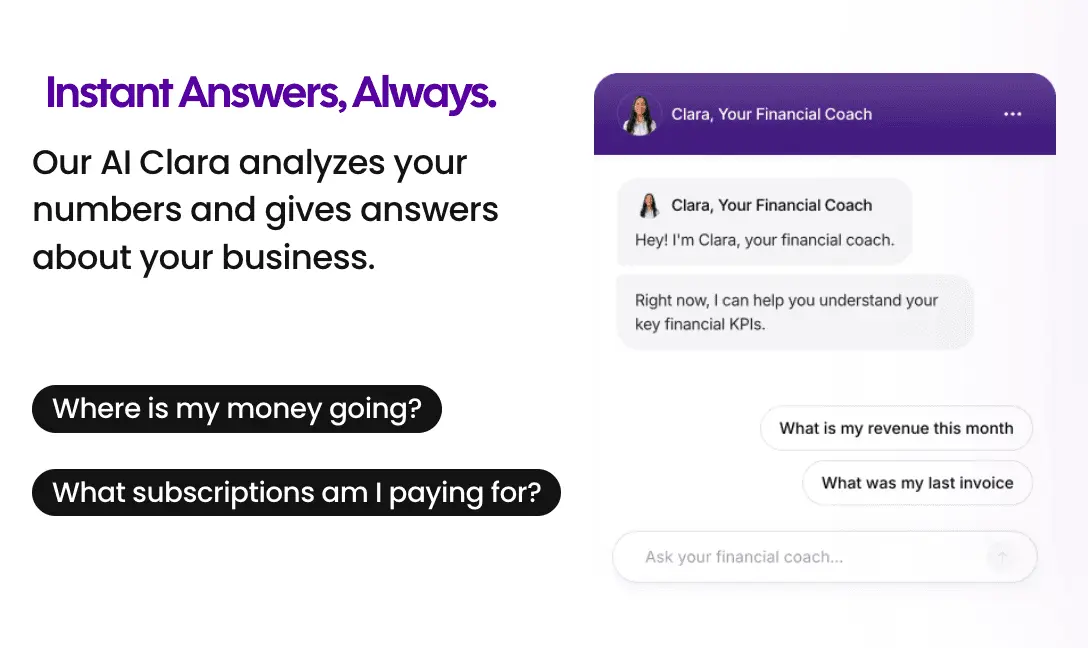
For solopreneurs who want an AI that actually reads their numbers and answers questions in plain English, the gap to fill is Cashflowy's Clara, not a feature either of these platforms currently offers.
Integrations
FreshBooks connects with 100 to 150 apps including Stripe, PayPal, Gusto, Shopify, HubSpot, and Zapier. Wave's native connections are limited to Shopify, PayPal, Etsy, and Zapier. For most simple service businesses, both are adequate. For anyone building on a more connected operational stack, FreshBooks is the practical choice.
Pricing: The Full Picture
FreshBooks (as of January 2026):
- Lite: $23/month (5 billable clients)
- Plus: $43/month (50 billable clients)
- Premium plan: $70/month (unlimited clients, advanced features like project profitability tracking, advanced reporting, and additional user access)
- Select: Custom pricing
FreshBooks pricing reflects the operational complexity and needs of different business sizes. The Lite and Plus plans are suitable for freelancers and small teams, while the Premium plan is designed for more established businesses needing comprehensive financial tools. Paying subscribers unlock more advanced features and priority support, especially at the Premium and Select tiers.
Wave:
- Starter: $0/month (manual transaction entry, core features)
- Pro: $16/month (automated bank imports, receipt scanning, automated reminders, multi-user access)
- Payroll add-on: $40/month plus $6 per active employee in the US
Payment processing fees differ in ways that matter at volume. Wave Starter charges 2.9% plus $0.60 per credit card transaction. Wave Pro reduces this to 2.9% plus $0 for the first ten monthly transactions before reverting to the higher rate. FreshBooks charges a flat 2.9% plus $0.30 per transaction on all plans.
FreshBooks has raised prices aggressively, from $19/$33/$60 to $23/$43/$70 in under twelve months, a 17 to 21 percent increase with little in the way of new features to show for it. Worth factoring in if you’re thinking about long-term cost.
Year 1 total cost of ownership, after promotions expire:
| Scenario | FreshBooks | Wave | Cashflowy |
|---|---|---|---|
| Solo freelancer, basic needs | Lite: $276/yr | Starter: $0/yr | $348/yr |
| Solo + accountant access + auto bank feeds | Plus: $516/yr | Pro: $192/yr | $348/yr (included) |
| Solo + 1 team member | Plus + 1 user: $648/yr | Pro: $192/yr (unlimited users) | $348/yr (unlimited users) |
| Solo + payroll (1 employee) | Plus + Gusto: $1,188/yr | Pro + Payroll: $696/yr | N/A (no payroll) |
On pure cost, Wave wins at every tier. The question is whether the cost savings outweigh the capability differences over the course of a real year of running a business.
When considering market leaders, QuickBooks Online stands out as a more scalable solution than FreshBooks and Wave, offering a wide range of features and add-ons for growing businesses. Xero is also a top choice, allowing unlimited users even on its lowest-priced plans and integrating with over 1,000 small-business apps. Xero is recommended as a cloud-native platform that supports growing teams better than FreshBooks or Wave. Zoho Books, while capping users at 15 in its highest tier, provides highly automated workflows, real-time project tracking, and native integration with other Zoho products, making it a strong option for businesses seeking advanced automation. Paying for these market leaders unlocks even more robust features, integrations, and support, making them suitable for businesses that anticipate growth and need scalable, future-proof solutions.
Customer Support: Where the Free Model Shows Its Limits
This is the category where the gap between the two platforms is widest, and it’s the one most people discover too late.
FreshBooks has won 10 Stevie Awards for customer service. Phone support connects you to a real human on all paid plans during business hours. Across thousands of verified reviews on G2 and Capterra, responsive and knowledgeable support—including reliable email support and live chat—is one of the most consistent reasons users stay. The availability of prompt email support is especially important for resolving issues quickly, which can significantly impact customer satisfaction and purchasing decisions.
Wave’s support story is shaped by its business model in ways that are hard to overlook. Free Starter plan users receive zero human support. No email, no live chat, no phone. There is a chatbot called Mave and a help center. Pro plan users unlock email support and live chat Monday through Friday, but verified reviews describe multi-day response times for urgent issues with some regularity. The limited window for email support can be a concern for paying users who need timely resolutions. Wave’s Trustpilot rating sits at 1.3 out of 5 based on 180 reviews as of early 2026, driven largely by reports of payment funds held for extended periods without explanation and payroll errors following Wave’s processor transition in 2025.
The pattern is consistent enough to treat as a genuine operational risk. If your business depends on payments clearing and support being available when they don’t, Wave’s track record on both fronts deserves scrutiny before you commit.
Ease of Use
Both platforms are accessible by design. Neither requires an accounting background to get started, and both use plain language rather than bookkeeping jargon throughout. Both FreshBooks and Wave also prioritize security to protect your financial data, which is especially important for businesses with multiple users or external accountants.
Wave earns praise for its stripped-back simplicity. The dashboard is clean, the setup is minimal, and reviewers consistently describe it as something you can start using productively within minutes. That simplicity is partly a feature and partly a reflection of what the platform does. There’s not much to configure because there’s not that much to it. Notably, Wave's Pro plan supports multiple users, making it easier for teams to collaborate securely.
FreshBooks is also highly approachable, but it carries more surface area. The time tracker, the client portal, the proposal workflow, the project management features. More capability means more places to explore, and the interface earns consistent credit for making that exploration feel intuitive rather than overwhelming. Reviewers describe it as software that feels like it was built for people, not for accountants.
The honest answer is that both are easy. Wave is simpler. FreshBooks is easy given what it does. Whether that distinction matters depends entirely on what you need.
Time Tracking
There's no nuanced comparison to make here. FreshBooks includes a built-in time tracker on every plan. Wave has no time tracking on any plan, at any price.
For freelancers and consultants who bill by the hour, time tracking is not a nice-to-have. It's where the money is. The FreshBooks workflow, start a timer, finish the work, convert the hours to an invoice line item with one click, removes every opportunity to undercharge, forget to bill, or spend half an hour reconstructing hours at the end of the month.
Without native time tracking, Wave users who bill hourly need a separate tool like Toggl or Clockify and have to manually transfer that data into Wave invoices. It works, but it adds friction that compounds over a year of client work. FreshBooks eliminates it entirely.
Mobile Apps
The FreshBooks mobile app is built around how service professionals actually move through their days. You can invoice a client from the job site, run the time tracker between calls, photograph receipts at lunch, and get a notification the moment a client opens your invoice. Sending invoices is quick and seamless, allowing you to send invoices easily from the app, even while on the go. The experience is coherent because it was designed with a specific kind of user in mind.
The Wave mobile app handles invoicing and receipt scanning reliably and earns consistent praise for being approachable. You can also send invoices directly from the app, making it easy to manage billing tasks wherever you are. It mirrors Wave’s overall character: clean, accessible, and sufficient for straightforward needs. Worth noting that Wave removed receipt scanning for non-US accounts, which limits its usefulness for international users even further.
Both apps are available on iOS and Android. Neither offers full offline functionality.
Reporting and Accounting Depth
Both platforms run on double-entry bookkeeping and produce the core financial reports a small business needs: P&L, balance sheet, cash flow statement, and accounts receivable aging. For a freelancer doing basic tax preparation, both cover the ground.
The differences show up at the margins. FreshBooks includes accounts payable, more detailed expense reporting, and reports that are polished enough to share with an accountant without embarrassment. Wave’s reports are functional but reviewers consistently flag limited customization as a frustration. Additionally, Wave does not provide an audit trail, which can be a drawback for businesses needing detailed financial oversight. You can filter by date range, but building custom reports or drilling into specific line items isn’t something Wave supports on any plan.
As businesses grow, the need for additional features and more advanced reporting becomes apparent. Many businesses find that free accounting software like Wave struggles to provide the necessary insights for decision-making as they scale.
Neither platform approaches the reporting depth of something like Xero or QuickBooks. If your business eventually needs layered financial statements, class tracking, or multi-dimensional reporting, you’ll outgrow both.
Invoicing and Payments
Invoicing is the category FreshBooks was born to win. Fully branded invoices, unlimited sends on every plan, recurring billing with automation, late fee application, and real-time tracking of exactly when each client opened your invoice. The client portal gives customers a dedicated space to pay, review history, and communicate. Payment options extend to Apple Pay, Google Pay, and Buy Now, Pay Later.
Wave's invoicing is genuinely strong for a product that costs nothing. Unlimited invoices, customizable drag-and-drop templates, recurring billing, and automated payment reminders on the Pro plan. For a zero-dollar tool, it competes meaningfully with paid alternatives on the basics.
The caveat worth repeating: Wave's payment processing has produced a substantial body of negative reviews from verified users. Reports of funds held for days or weeks without warning or clear resolution are common enough to represent a real risk for any business where cash flow timing matters. FreshBooks' payment processing generates far fewer complaints of this type, and the reliability difference at the point of collection is a practical consideration, not just a feature comparison.
Comparison Table
| Feature | FreshBooks | Wave |
|---|---|---|
| Best for | Freelancers billing by the hour, international clients, polished invoicing | Micro-businesses needing free basic accounting in the US or Canada |
| Starting price | $23/month (Lite plan) | $0/month (Starter) |
| Free plan | No (30-day trial) | Yes, permanently |
| Users included | 1 (Lite plan); additional users $11/month each; Premium plan allows more users | Unlimited on Pro plan; unlimited users included |
| Multiple users & permissions | Additional users can be added for a fee, each with customizable permissions (Premium plan supports more roles) | All plans support multiple users with customizable permissions at no extra cost |
| Invoicing | Best in class | Strong and free |
| Time tracking | Built-in on all plans | None |
| Bank reconciliation | Plus plan and above | Both plans |
| Auto bank feeds | All paid plans | Pro plan only ($16/month) |
| Reporting | Basic but polished | Basic, limited customization |
| Payroll | Gusto add-on | Native ($40+/month, US/Canada only) |
| Integrations | 100 to 150 | ~20 native plus Zapier |
| AI features | Basic automation | Basic ML categorization |
| Mobile app | Full-featured, invoicing-focused | Clean but limited |
| Customer support | Award-winning phone support, all plans | Free = chatbot only; paid = slow |
| Accountant access | Plus plan and above | Pro plan only |
| International availability | Yes | US and Canada only |
| Double-entry accounting | All plans | All plans |
| Payment processing risk | Low | Reported holds and delays |
| G2 / Capterra rating | 4.4 / 4.5 | 4.3 / 4.4 |
Which One Actually Fits Your Business?
You’re just starting out, revenue is modest, and every dollar counts. Choose Wave. Wave Starter is best suited for very small service-based businesses, freelancers, or contractors who need affordable, straightforward invoicing and basic bookkeeping. Get your invoicing and basic bookkeeping in place for free. Enter transactions manually. Revisit the decision when your volume grows or your needs become more complex.
You’re a freelance photographer billing 8 clients a month and tracking billable hours. Choose FreshBooks. FreshBooks Plus ($43/month) is better suited for service-based businesses that need time tracking and project management features. The time tracker alone will recover the cost of the platform from hours that would otherwise go unbilled. The polished invoicing makes you look more professional, and the support line is there if anything goes sideways.
You have a business partner or VA who needs their own account access. Choose Wave. Wave Pro ($16/month) includes unlimited users at a flat rate. FreshBooks charges $11 per month per additional user on top of your existing plan. For multi-user setups, Wave’s pricing structure is considerably more favorable.
You work with clients outside the US. Choose FreshBooks only. Wave does not accept new international accounts.
You process high-value payments regularly and can’t afford a cash flow disruption. Choose FreshBooks. The volume of credible reports about Wave holding payments without warning is too consistent to ignore for a business where payment timing is critical.
You’re a solopreneur who just wants to know whether you’re financially okay. Neither platform tells you that directly. Both produce data and hand it to you. Translating that data into a real answer about whether you can pay yourself, cover your expenses, and still have room to invest in growth, that’s a different conversation. That’s the one Cashflowy was built for.
Switching Platforms
FreshBooks offers an Easy Switch service where their team handles migrating your expenses, invoices, and client records from other platforms. Wave doesn't offer an equivalent, but its simple data structure makes CSV exports relatively painless.
Before moving in either direction, close out your books, reconcile all accounts, and export your key reports. Don't cancel your current software until bank connections, payment processing, and your daily workflows are confirmed and running correctly in the new platform.
Cashflowy: For the Question Accounting Software Doesn't Ask
Most accounting software is built to answer the question: what happened? It records transactions, categorizes expenses, produces reports, and hands you a picture of the past. That's genuinely useful. But it's not the same as answering the question most small business owners actually lie awake thinking about: am I okay?
Wave tells you what came in and what went out. FreshBooks tells you how many hours you billed and what clients owe you. But neither one looks at the full picture and says: here's what you can safely take home this month, here's what you should hold in reserve, here's why your profit is lower than it looks.
That's the gap Cashflowy was built to close, specifically for solopreneurs, freelancers, coaches, consultants, and creatives running one-person businesses.
AI Financial Coach (Clara): Clara reads your actual financial data and responds to plain-English questions. "How much can I pay myself?" "Can I afford this expense?" "Why did my profit drop last month?" Not a generic dashboard. A specific, data-backed answer based on your numbers.
Automated Bookkeeping with Double-Entry Accounting: Transactions flow in automatically through Plaid-powered bank connections covering US banks, PayPal, and Wise. Smart categorization handles the routine work. Full double-entry bookkeeping with CPA-ready reports: P&L, Balance Sheet, Trial Balance, and General Ledger.
Owner's Pay Calculator: The number FreshBooks and Wave both leave you to figure out yourself. How much you can safely take home this month, calculated directly from your books.
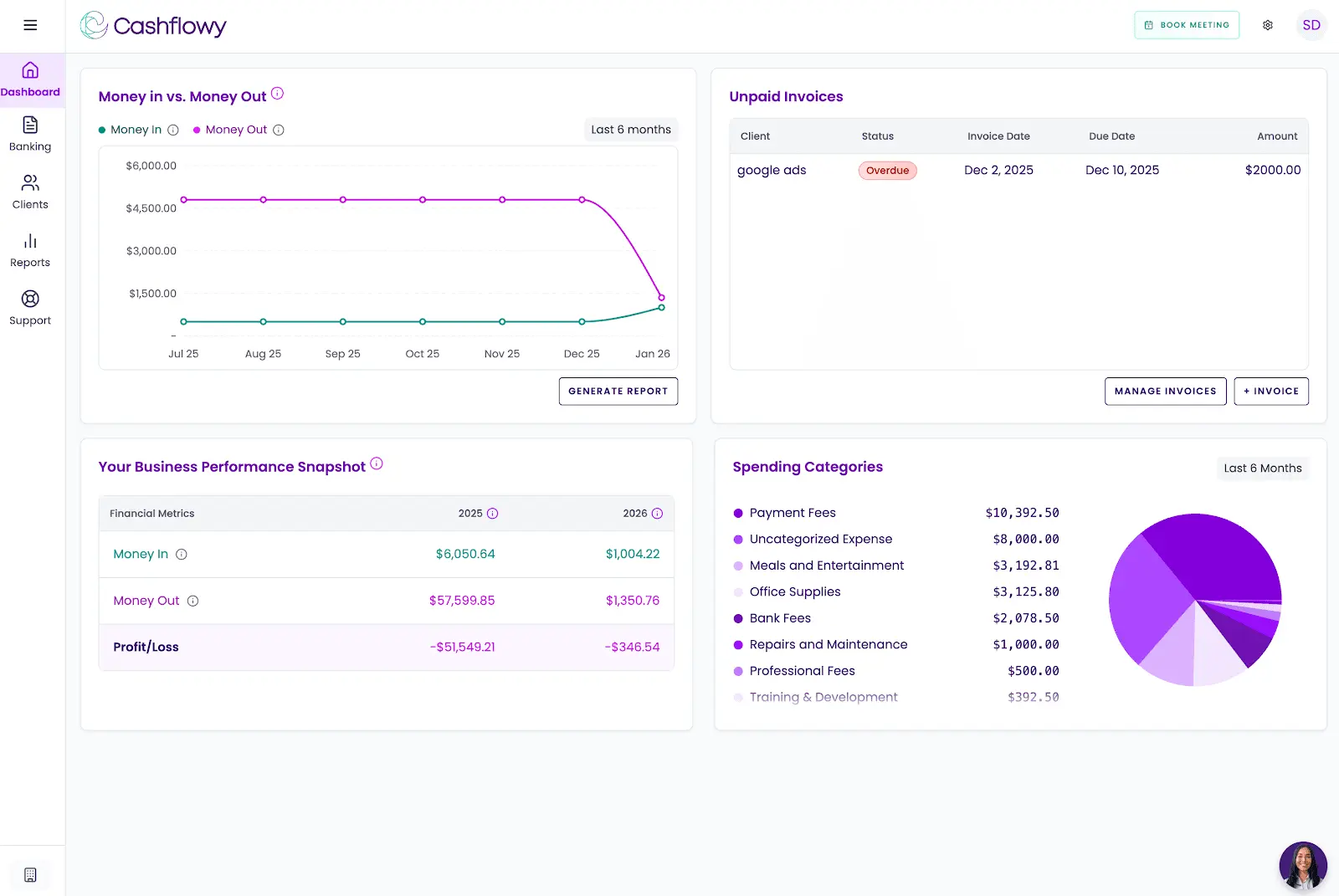
Cashflow Tracking and Real-Time Dashboard: A live view of income, expenses, and trends so you always know where things stand without opening a report.
Auto Bank Reconciliation: Automatic transaction matching keeps your books clean without manual reconciliation on your end.
Client Invoicing and Billing: Branded invoices with your logo. Clients pay with one click via Stripe Connect, by credit card or ACH. Recurring invoices and automated reminders are on the 2026 roadmap.
Real Bookkeeper Access: Every support agent is a trained bookkeeper. Every new user gets a private onboarding call with an accountant. Support runs Monday through Friday, 6am to 6pm EST, via unlimited calls and in-platform chat, with a guaranteed next-business-day response outside those hours. Cashflowy also runs regular live Profit Breakthrough Sessions, small-group coaching led by the founder and a senior accountant. Your own CPA or bookkeeper can log in directly through the built-in team invite feature. All of this for $39/month, with a free trial and a 30-day money-back guarantee.
What Cashflowy doesn't cover: No inventory, no payroll, no sales tax automation, no time tracking. Bank connections are Plaid-powered for US banks, PayPal, and Wise. Stripe Connect handles invoice payments. CSV and PDF import is coming soon. US businesses only. It's new, launched 2024 to 2025, with limited presence on major review platforms. If you need a proven, full-featured accounting tool with a free starting tier, Wave is the safer first step. But if you've tried both platforms and you're still not sure whether your business is working for you, Cashflowy's free trial exists for exactly that situation.
FreshBooks vs Wave vs Cashflowy
| Platform | Best for | Monthly price |
|---|---|---|
| FreshBooks | Freelancers and service businesses focused on invoicing, time tracking, and international billing | $23 to $70/month |
| Wave | Micro-businesses and solopreneurs needing free basic accounting in the US or Canada | $0 to $16/month plus add-ons |
| Cashflowy | Solopreneurs wanting financial clarity with AI coaching, double-entry bookkeeping, CPA-ready reports, and a direct answer on owner's pay | $39/month flat |
Making the Call
The decision between FreshBooks and Wave is really a decision about where you are in your business and where you’re headed.
If you’re at the beginning, revenue is still finding its footing, and free tools are a genuine necessity, Wave gives you real accounting infrastructure at no cost. Use it. Get your business off the ground. When the ceiling becomes visible, you’ll know it’s time to move.
If you’re past that stage, billing hourly clients, working internationally, processing meaningful payment volume, or simply tired of dealing with a support chatbot when something breaks, FreshBooks earns what it charges. The time tracking alone, the award-winning support alone, the reliability of the payment processing alone, any one of those things can justify the monthly cost over the course of a year.
However, market leaders like Xero and QuickBooks Online provide more scalable solutions for growing businesses. QuickBooks Online, for example, is a more scalable solution than FreshBooks and Wave, accommodating larger small businesses with a range of features and add-ons. Unlike FreshBooks, Xero allows unlimited users even on its lowest-priced plans and connects with more than 1,000 small-business apps, making it a cloud-native platform recommended for supporting growing teams.
And if you’re somewhere in the middle, running a one-person business that’s past the starter phase but not yet large enough to need enterprise tooling, and you’re still not sure whether the numbers are actually working in your favor, that’s not a problem either platform was designed to solve. That’s Cashflowy’s territory.
Frequently Asked Questions
What is the main difference between FreshBooks and Wave?
Is Wave genuinely free?
Which is better for invoicing?
Does FreshBooks include time tracking?
Can I use Wave outside the US?
Does FreshBooks Lite include bank reconciliation?
What’s the difference between FreshBooks Lite and Premium plans?
How does FreshBooks pricing relate to features?
Which platform has better customer support?
Is there a simpler option built specifically for solopreneurs?
Keep reading

Accounting Software for Real Estate Agents: 9 Tools Compared
Compare 9 accounting software options for real estate agents. See how each handles commission splits, mileage, tax readiness and financial reporting.

Best Accounting Software for Freelancers in 2026: 7 Options Compared
Compare seven freelance accounting software options by expense tracking, invoicing, bank feeds, cash flow, tax readiness and key limitations.

Most Practical Self-Employed Accounting Software, Bookkeeping and Finance Tools
Compare the best accounting software and bookkeeping tools for the self-employed. See features, limitations, and which option fits your business.