
Bookkeeping and accounting software
QuickBooks vs Xero: 2026 Comparison (And a Smarter Option You Haven't Considered)

CEO · Mar 19, 2026
Heidi DeCoux is the founder of Cashflowy, an AI-powered bookkeeping platform, and has worked with thousands of self-employed professionals to simplify finances and improve profitability.
Walk into almost any CPA's office in the United States and ask them which accounting software they recommend. Odds are they'll say QuickBooks without pausing. It's the default answer, the safe answer, the one that's been true for over three decades. QuickBooks isn't just a product at this point. It's a category standard.
Then walk into a fast-growing startup, a design agency with offices in two countries, or a tech-forward business that runs on integrations, and ask the same question. Increasingly, the answer is Xero.
That shift tells you something important about where the comparison actually lives. This isn't a contest between a good tool and a bad one. It's a contest between two very different philosophies about what accounting software is for and who it serves. QuickBooks was built to be comprehensive. Xero was built to be scalable and collaborative. Both have earned their reputations. The question is which philosophy matches the business you're running right now.
The short version: QuickBooks Online fits you if you need deep US-specific features, built-in payroll, inventory tracking, advanced reporting, and the near-universal compatibility with American accountants that comes with 62 percent market share. Xero fits you if you're growing a team, operating internationally, running a tech-forward business that lives on integrations, or simply want cleaner software that doesn't charge you per seat. And if you're a solopreneur who finds both platforms considerably more than you need and just wants to understand whether the business is financially healthy, there's a third option called Cashflowy that addresses a different question entirely.
QuickBooks Online vs Xero 2026 Comparison and a Smarter Option You Haven't Considered: What is QuickBooks Online?
QuickBooks Online is the cloud version of the software that has dominated small business accounting in the US since 1992. Built by Intuit, it carries 30-plus years of accumulated features, a massive ecosystem of ProAdvisor accountants trained specifically on the platform, deep integration with US tax infrastructure, and the kind of institutional familiarity that means your bookkeeper, your CPA, and the next accountant you hire have almost certainly used it before.
The ongoing QuickBooks debate among small and mid-sized businesses often centers on the comparison between QuickBooks Desktop and QuickBooks Online, with each offering distinct features and workflows that appeal to different business needs.
That history is both its greatest strength and its most visible weakness. The depth is real. So is the complexity.
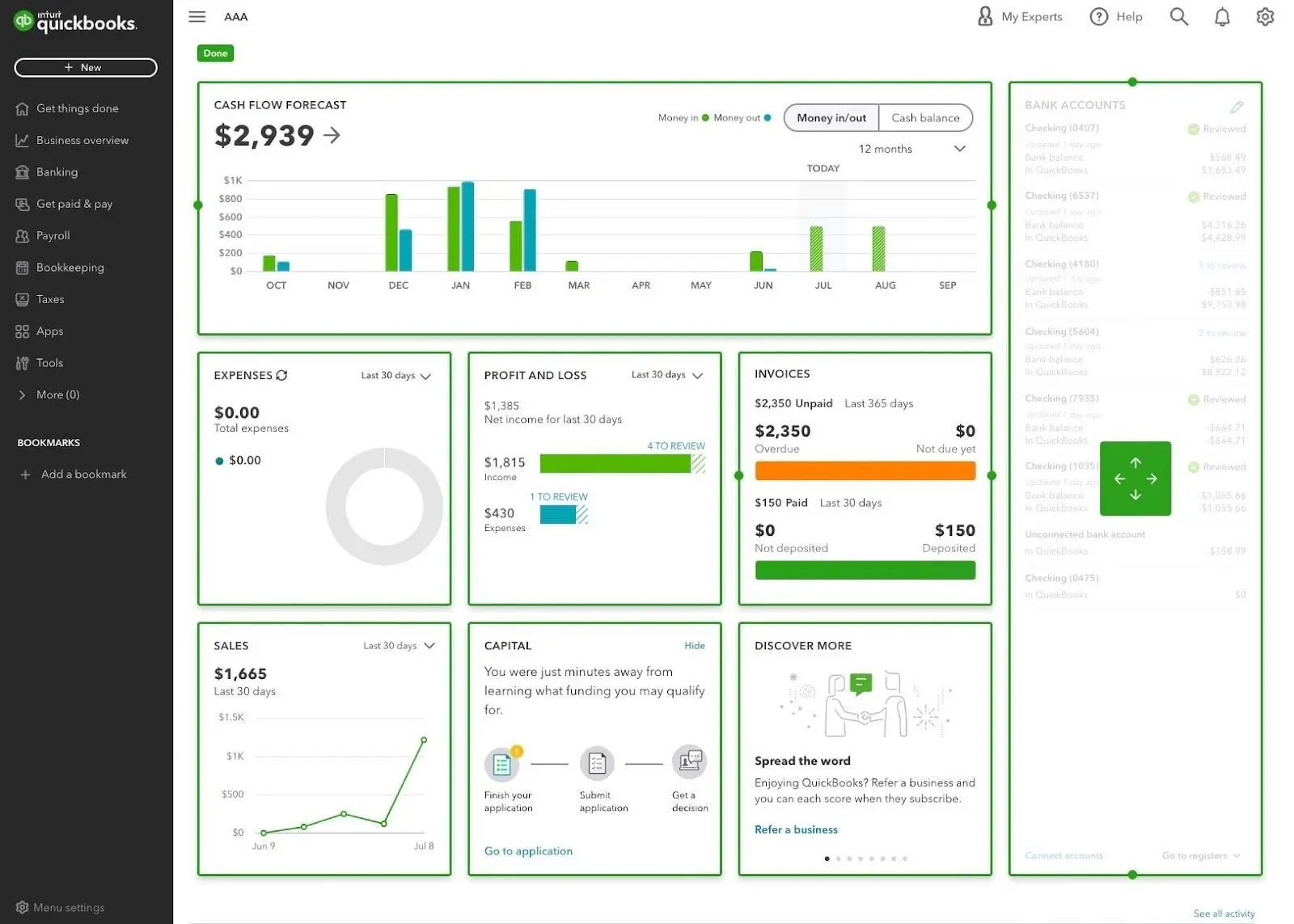
Core features include double-entry accounting on all plans, bank reconciliation with automated matching and bank rules, unlimited invoicing, full accounts payable and receivable management, sales tax automation, inventory tracking on Plus and above, time tracking on Essentials and above, project profitability tracking, class and location tracking for multi-dimensional reporting, payroll as a built-in add-on, over 750 third-party integrations, and Intuit Assist, QuickBooks’ growing suite of AI agents that now covers accounting, payments, cash flow, customer management, and more on higher-tier plans. QuickBooks Online offers advanced accounting features, advanced inventory management, and detailed reporting capabilities that are especially beneficial for businesses needing in-depth financial analysis. QuickBooks integrates with a wide range of third-party applications and business platforms to enhance operational efficiency and data management. It also allows users to track income and expenses by automatically syncing bank and credit card transactions, and offers features for calculating tax deductions automatically to help maximize savings.
QuickBooks structures its plans around user counts and feature tiers. As your team grows and your needs deepen, you move up. The pricing follows accordingly. Having accounting experience can help users adapt more quickly to QuickBooks' interface and advanced features.
What Is Xero?
Xero launched in New Zealand in 2006 with a tagline, “Beautiful business,” that announced its intentions clearly. It wasn’t trying to out-feature QuickBooks. It was trying to out-design it, to build accounting software that felt modern, clean, and genuinely pleasant to use. Today, Xero is recognized as one of the most popular accounting software options and popular accounting tools for small businesses and startups. In the years since, it has grown to over 4.4 million subscribers in more than 180 countries, and its approach has become a real alternative to the QuickBooks default, not just a niche competitor.
The most structurally significant thing about Xero is something that sounds minor but isn’t: all plans include unlimited users at no extra charge. For any business with a team, that single decision reshapes the entire pricing conversation. Add an employee, a bookkeeper, an accountant, a business partner. The bill doesn’t change. Xero's appeal to growing businesses and global startups is due to its simplicity, unlimited users, and budget-friendly entry tier.
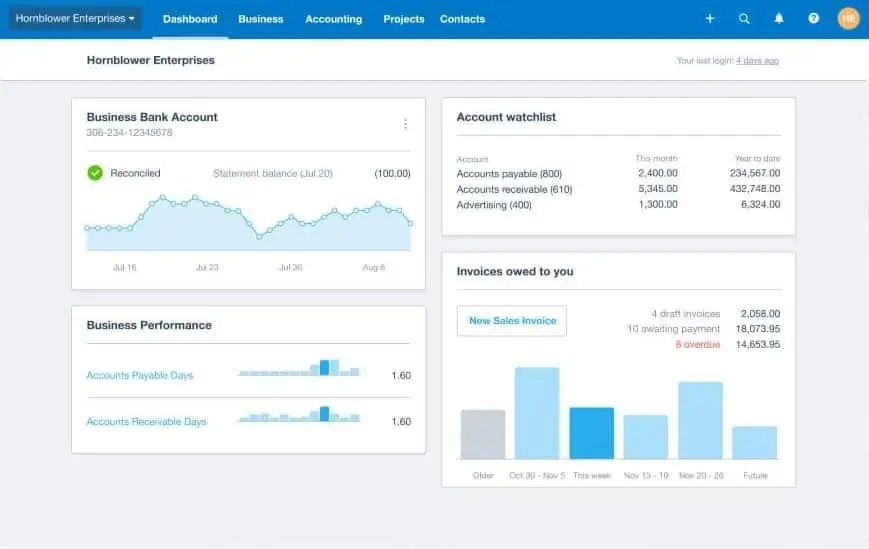
Xero is designed with a clean and modern interface that is easy to navigate, making it approachable for new users and non-accountants. Its navigation uses plain language and logical steps, allowing users to accomplish basic tasks quickly without needing help documentation. Xero's dashboard allows users to rearrange key metrics in a streamlined manner, enhancing user experience and accessibility.
Core features include double-entry accounting on all plans, bank reconciliation with custom bank rules on all plans, unlimited invoicing on Growing and Established plans, accounts payable, inventory tracking, Hubdoc for automatic bill and receipt capture, project tracking and expense claims on the Established plan, multi-currency support on the Established plan, 1,000-plus third-party integrations, and JAX, an AI assistant currently in development aimed at making accounting tasks more conversational. Xero allows users to connect bank accounts and automate bank transactions, streamlining reconciliation and bookkeeping. Xero's collaborative features allow multiple users to work simultaneously within client records, and both Xero and QuickBooks offer cloud-based solutions that facilitate real-time collaboration among users, reducing version control issues. Xero emphasizes API accessibility and open integrations, making it a preferred choice for tech-driven and growing businesses. Its open API allows for extensive third-party integrations, making it adaptable to various business needs.
Xero’s payroll situation in the US differs from QuickBooks. Rather than a native payroll engine, Xero integrates with Gusto, which is a strong product in its own right but adds a separate subscription and introduces a seam in an otherwise unified workflow.
Where the Real Differences Live
Market Presence and Accountant Compatibility
This one deserves to be said plainly before anything else, because it affects everything downstream.
Small business owners often prioritize accountant compatibility and ease of onboarding when selecting accounting software. QuickBooks holds approximately 62 percent of the US small business accounting software market. That means the overwhelming majority of American bookkeepers, CPAs, and financial advisors have been trained on it, work in it daily, and can navigate it without friction. When you share a QuickBooks file with your accountant, nothing needs to be explained. When you hire a new bookkeeper, there’s a high probability they already know the system. That ecosystem familiarity is a real and underappreciated part of QuickBooks’ value proposition.
Xero’s accountant network is growing and legitimate, with 250,000-plus partner accountants globally, but it remains a minority choice in the US market. Your CPA may not know Xero. If they don’t, you’re either paying for their learning time or managing the friction of working with someone who would prefer a different system. For US-based businesses with an existing accountant relationship, that compatibility question is worth asking before you commit to either platform.
The Unlimited Users Question
The second thing to settle upfront, because it reshapes the pricing comparison entirely.
QuickBooks caps users by plan. Simple Start allows one user, Essentials allows three, Plus allows five, and Advanced allows twenty-five. Each step up in users means a step up in monthly cost. A five-person team needs the Plus plan at $115 per month. More people means more money, and there’s no escape from that structure short of upgrading. QuickBooks Online's pricing is based on the number of users allowed per plan, which can add up quickly for growing teams.
Xero includes unlimited users on every plan, including the Growing plan at $55/month, which accommodates most small business needs and can provide better value compared to QuickBooks' user-based pricing. Xero's collaborative features allow multiple users to work simultaneously within client records, enhancing teamwork and accuracy. A five-person team and a twenty-person team pay the same flat rate for their chosen tier. For any business that anticipates adding people, this difference is not cosmetic. It can make Xero meaningfully less expensive in practice even when the headline price looks higher.
AI and Automation
This is where QuickBooks has pulled significantly ahead, and the gap is growing.
Intuit Assist has evolved into a suite of specialized AI agents embedded across QuickBooks Online. The Accounting Agent detects anomalies, flags misclassifications, and keeps categorization clean without manual intervention. Both QuickBooks and Xero automate the management of bank transactions, including importing statements, reconciling accounts, and categorizing transactions to streamline bookkeeping tasks. Additionally, both platforms automate tasks like payment reminders and recurring invoices, reducing manual bookkeeping efforts. The Payments Agent learns customer payment patterns and generates personalized reminders timed to maximize collection speed. The Finance Agent surfaces cash flow insights and forward-looking analysis. The Customer Agent identifies new leads and drafts follow-up communications. On the Advanced plan, Project Management and Recruiting agents add operational depth beyond pure accounting. No accounting software competitor is matching this level of AI integration in 2026, and QuickBooks reports that businesses using the Payments Agent get paid up to 45 percent faster.
Xero has announced JAX, an AI assistant designed to let users complete accounting tasks through natural conversation. It’s in development and not yet fully rolled out. Xero also includes short-term cash flow forecasting and scenario planning on the Established plan, which provides genuine forward-looking value, but the breadth and depth of QuickBooks’ current AI suite is a meaningful competitive advantage that didn’t exist two years ago.
Reporting and Financial Depth
QuickBooks runs deeper. That’s the honest summary. Financial reporting is a core feature of both QuickBooks Online and Xero, with QuickBooks especially known for its detailed and customizable reporting capabilities.
QuickBooks Online includes between 40 and 100-plus reports depending on your plan, covering everything from basic P&L and balance sheets to accounts receivable aging, general ledger, trial balance, class and location-based reporting, and budget variance analysis. The Advanced plan adds customizable dashboards, a chart builder, and Excel data sync for in-depth financial modeling. For businesses that need GAAP-compliant reporting, multi-dimensional analysis, or the kind of financial statements a sophisticated accountant expects, QuickBooks has more to work with.
Xero’s reporting is solid across all plans, covering the core statements, bank reconciliation reports, budget comparisons, and more. The Established plan adds financial health scorecards, 180-day cash flow forecasting, and Syft integration for advanced analytics. It’s a capable suite, but reviewers who have used both consistently describe QuickBooks’ reporting as deeper and more customizable, particularly for US-specific compliance needs.
Inventory and Product Businesses
QuickBooks handles inventory management natively on its Plus and Advanced plans, with support for products and services, purchase orders, inventory valuation, and COGS tracking. For US-based businesses that sell physical products, it integrates directly with Shopify, Amazon, Square, and other ecommerce platforms with deep inventory sync. Both QuickBooks and Xero allow businesses to create professional invoices, which can be customized and automated to streamline billing processes.
Xero also includes inventory tracking on Growing and Established plans and connects to Shopify and other platforms. It handles inventory well for most small business use cases and is generally rated more favorably for international product businesses that deal in multiple currencies. For domestic US product businesses with complex inventory needs, QuickBooks has more depth and tighter native integration.
Integrations
Xero connects with more than 1,000 third-party applications, and its open platform allows for extensive integration with various services, making accounting tasks easier and more efficient. QuickBooks integrates with more than 750 third-party applications and business platforms, offering seamless integration capabilities within its ecosystem to enhance operational efficiency and data management. Both numbers are large enough to cover most operational needs, and both support Zapier for indirect connections to nearly anything else. The gap in raw count favors Xero, but QuickBooks’ integrations tend to be deeper and more native for US-specific services, particularly in banking, payroll, and tax tools. Xero emphasizes API accessibility and open integrations, making it a preferred choice for tech-driven businesses. Xero’s API is widely praised by developers and tends to produce higher-quality integrations in the third-party ecosystem.
For businesses that run on a tightly connected operational stack, both platforms are capable. Xero edges ahead for international and API-forward businesses. QuickBooks edges ahead for US-focused businesses that need tight native connections to domestic financial infrastructure.
Pricing: The Numbers That Actually Matter
QuickBooks Online (as of March 2026):
- Solopreneur: $20/month (1 user, limited features, not a full double-entry system)
- Simple Start: $38/month (1 user)
- Essentials: $75/month (3 users)
- Plus: $115/month (5 users)
- Advanced: $275/month (25 users)
- Payroll: Add-on starting at $50/month plus $6.50 per employee
QuickBooks Online offers several online plans and subscription tiers, each with different features and pricing to fit a range of business needs. The QuickBooks subscription plans include options for solopreneurs up to larger teams, and users can add QuickBooks Payroll as a key add-on for payroll automation and management. Both QuickBooks Online and Xero charge additional fees for add-ons like payroll services and payment processing, which can significantly increase the total cost depending on your business requirements.
Xero (as of March 2026):
- Early: $25/month (unlimited users, 20 invoices and 5 bills per month; this limitation makes it unsuitable for most active businesses)
- Growing: $55/month (unlimited users, unlimited invoices and bills)
- Established: $90/month (unlimited users, plus multi-currency, project tracking, expense claims)
- Payroll: Gusto add-on starting at $40/month plus $6 per employee
Xero’s online plans also come in several tiers, but the perception of Xero as the costlier option is largely due to its higher starting price compared to QuickBooks Online's entry-level plan. The Xero 'Early' plan is limited to 20 invoices and 5 bills per month, which restricts its usefulness for most businesses beyond the smallest operations. Like QuickBooks, Xero charges extra for add-ons such as payroll and payment processing.
Both platforms offer a 30-day free trial. QuickBooks typically runs 50 percent off for the first three months. Xero currently offers 85 percent off for the first six months for new US customers.
Both platforms raise prices annually and without apology. QuickBooks has increased Simple Start by an average of 12.7 percent per year since 2023, Plus by 13.1 percent, and Advanced by 17.3 percent. Xero’s entry-level plan has risen from $13 to $25 since 2021. Existing customers on both platforms report receiving price increase notifications with no meaningful new features to explain them.
Year 1 total cost of ownership (after promotions expire):
| Scenario | QuickBooks Online | Xero | Cashflowy |
|---|---|---|---|
| Solo operator, basic accounting | Simple Start: $456/yr | Early: $300/yr | $348/yr |
| Small team of 3, no inventory | Essentials: $900/yr | Growing: $660/yr | $348/yr |
| Team of 5, with inventory | Plus: $1,380/yr | Growing: $660/yr | $348/yr* |
| Team of 5, with payroll | Plus + Payroll: $2,580/yr | Growing + Gusto: $1,620/yr | N/A |
*Cashflowy does not include inventory management.
The pricing comparison is not close once teams get involved. Xero’s unlimited user model creates a structural cost advantage that widens as headcount grows. For solo operators, the gap between the platforms is modest. For teams of five or more, Xero can be less than half the annual cost of a comparable QuickBooks plan.
Customer Support: A Tale of Two Directions
QuickBooks offers phone and chat support during business hours on Simple Start, Essentials, and Plus plans, with 24/7 support on the Advanced plan. The ProAdvisor network, tens of thousands of QuickBooks-certified accountants across the US, functions as an extended support ecosystem. When you need expert help, finding a QuickBooks ProAdvisor is rarely difficult.
The support quality itself, however, is an area where QuickBooks has drawn sustained criticism. User reviews across Reddit, G2, and Trustpilot describe declining quality over recent years, with complaints about long hold times, scripted responses, and difficulty resolving anything beyond routine questions. One reviewer described spending months correcting payroll errors that support staff couldn't identify. The ProAdvisor network compensates for some of this, but the direct support experience is a legitimate concern.
Xero provides 24/7 online support and a comprehensive knowledge base and community forum. What it does not offer is an inbound phone number on any plan. For users who prefer to talk through problems rather than type them into a ticket, this is a real limitation. Reviewer sentiment about Xero's support is mixed, with similar complaints about slow resolution times for complex issues.
Neither platform has a strong story to tell on support quality in 2026. QuickBooks has the phone channel; Xero has the 24/7 availability. Neither has earned consistent praise for the actual human experience when something goes wrong.
Ease of Use
QuickBooks has made meaningful improvements to its interface over the years, and newer users often find it more approachable than its reputation suggests. But years of feature additions have left marks. The navigation can feel cluttered, the number of menus and settings is genuinely large, and new users without accounting backgrounds frequently describe feeling overwhelmed before they find their footing. One widely cited study identified QuickBooks as generating more help-related searches than almost any other office software, which is either a reflection of its complexity or its ubiquity, probably both.
Xero has built its reputation on the other side of that equation. The interface is clean, the language avoids jargon, the dashboard surfaces what you need without burying it in submenus. Users who are new to accounting software consistently rate the learning curve as lower than QuickBooks. That said, Xero's redesigned invoicing interface, which replaced a widely liked classic version, has frustrated longtime users and generated sustained complaints about the replacement feeling harder to use and less intuitive.
For a first-time user with no accounting background, Xero is generally easier to start with. For an experienced accountant or bookkeeper who has worked in QuickBooks for years, the familiarity advantage flips.
Mobile Apps
Both platforms offer full-featured mobile apps that go well beyond what most accounting software mobile apps provide.
The QuickBooks mobile app gives access to invoicing, expense tracking, receipt capture with AI-powered matching, mileage tracking, bank reconciliation, and report viewing. The app supports Intuit Assist features, though the volume of functionality can make it feel dense for users who just need to accomplish a single task quickly.
Xero's mobile app handles invoicing, expense capture through Hubdoc, receipt scanning, bank reconciliation including the ability to match transactions directly from the phone, and financial report access. It is generally rated well for its balance of capability and usability. Both apps are available on iOS and Android.
Payroll
This is one of the clearest structural differences between the two platforms, and it matters more for some businesses than others.
QuickBooks has a native payroll engine built by Intuit that lives inside the same product you use for accounting. Payroll data flows directly into your books without any data handoff or sync process. Tax filings, direct deposit, employee self-service, and compliance automation are all managed within the QuickBooks ecosystem. For US businesses that want a single vendor relationship for accounting and payroll, QuickBooks makes that straightforward.
Xero uses Gusto for US payroll. Gusto is an excellent product that many businesses prefer on its own merits, and the Xero integration is well-built. But it is a separate subscription with a separate login, a separate support relationship, and a monthly cost that adds to your Xero bill. For businesses that want everything under one roof, that seam is a real consideration.
Who Each Platform Actually Serves
You’re a US-based business owner with a CPA who expects QuickBooks files. QuickBooks. The compatibility question alone settles this. Switching accounting systems mid-relationship with an accountant introduces friction and potentially cost. If your CPA works in QuickBooks, you work in QuickBooks. QuickBooks is also particularly favored in North America due to its robust payroll features and seamless integration with other Intuit products.
You’re a growing agency with 8 employees and a lean operations budget. Xero Growing ($55/month). Eight users in QuickBooks would require the Advanced plan at $275 per month. The same team in Xero pays $55. Over a year, that difference funds a marketing campaign. Xero is especially appealing for growing businesses due to its unlimited user model and scalable pricing.
You run an ecommerce business with complex US inventory needs. QuickBooks Plus or Advanced. The native inventory engine, the direct connections to US ecommerce platforms, and the sales tax automation for domestic transactions are deeper and more integrated in QuickBooks than in Xero. QuickBooks is also well-suited for businesses with complex accounting needs.
You operate internationally or invoice in multiple currencies. Xero Established ($90/month). Multi-currency support is where Xero has always outperformed QuickBooks, and the native handling of exchange rate differences, foreign currency bank accounts, and cross-border transactions is genuinely superior.
You want the most advanced AI-assisted accounting available today. QuickBooks Advanced. The six-agent Intuit Assist suite, the anomaly detection, the predictive payment optimization, and the cash flow intelligence on the Advanced plan represent the most sophisticated AI integration available in small business accounting software right now. Nothing else is close.
You’re a solopreneur who wants clean books without a learning curve and doesn’t want to pay for seats you’ll never fill. Xero Early ($25/month) covers the accounting fundamentals. But if your real need is understanding your financial position in plain language, rather than just maintaining clean records, Cashflowy addresses that gap more directly.
Switching Between Platforms
Moving from QuickBooks to Xero requires exporting your chart of accounts, customer and supplier lists, and historical transaction data, then rebuilding opening balances carefully in Xero. The reconciliation discipline that Xero requires at setup can actually improve the cleanliness of books that were maintained loosely in QuickBooks, but it takes work. Most accountants recommend making the switch at the start of a new financial year to avoid splitting data across systems.
Moving from Xero to QuickBooks is generally more guided. QuickBooks offers import tools and migration support, and its ProAdvisor network includes specialists who handle transitions regularly. If your accountant prefers QuickBooks, they can often manage the migration process directly.
Either way: reconcile everything before you start, export every report you might need from the old system, and run both platforms in parallel briefly before fully committing.
Security and Support
When evaluating cloud based accounting software, security and support are non-negotiable pillars for any small business or growing business. Both QuickBooks Online and Xero recognize this, investing heavily in robust security frameworks to protect your financial data and ensure your business finances remain confidential and compliant.
QuickBooks Online leverages advanced encryption protocols, secure servers, and continuous monitoring to safeguard sensitive information. With features like multi-factor authentication and automatic data backups, QuickBooks Online ensures that your accounting tools and financial data are protected against unauthorized access and data loss. This commitment to security is especially important for businesses managing complex accounting, inventory management, or payroll processing, where the stakes for data integrity are high.
Xero matches this focus with its own comprehensive security measures. The platform employs end-to-end encryption, strict access controls, and regular security audits to maintain the integrity of your business finances. Xero’s cloud infrastructure is designed for resilience, with frequent backups and disaster recovery protocols that help keep your financial management uninterrupted—even in the face of unexpected events. For businesses operating internationally or handling multi currency accounting, Xero’s security framework provides peace of mind that cross-border transactions and foreign bank accounts are protected.
On the support front, both Xero and QuickBooks Online offer a range of resources to help users navigate their accounting software space. QuickBooks Online provides 24/7 customer support via phone, chat, and email, making it easy to get help when you need it—whether you’re troubleshooting bank feeds, setting up advanced inventory management, or integrating with project management software. The extensive QuickBooks ProAdvisor network also means you can find accounting professionals familiar with the platform, further streamlining financial management and tax compliance.
Xero, while not offering a direct phone line for pre-sales inquiries, delivers responsive ticket-based support and a rich online knowledge base. Their community forums and help center are valuable resources for both new businesses and experienced users, offering guidance on everything from seamless integration with payment processors to using project tracking tools. For teams leveraging both Xero and QuickBooks, these online resources can be a lifeline for resolving issues quickly and efficiently.
Ultimately, the right accounting software for your business will depend on your specific needs for security, support, and advanced features. If you prioritize a user friendly interface, unlimited users, and multi currency support, Xero may be the better fit. If seamless integration with US-based accounting tools, a wide range of pricing plans, and direct phone support are more important, you may choose QuickBooks Online. Both platforms are trusted by small businesses and medium sized businesses alike, and both are committed to protecting your financial health as you grow.
By understanding the security protocols and support resources each platform offers, you can make an informed decision—ensuring your business operations run smoothly and your financial data remains secure. Whether you’re comparing xero vs quickbooks for advanced inventory management, project tracking, or simply peace of mind, both platforms deliver the foundation you need to focus on what matters most: growing your business.
Cashflowy: When the Question Is Different
Here is something both QuickBooks and Xero share: they are built to answer the question of what happened. Revenue came in, expenses went out, here is the record. They do this extremely well. Their reports are accurate, their reconciliation is reliable, and their audit trails are clean.
But a different question lives underneath most of the decisions a solopreneur makes every week, and neither platform is designed to answer it: what should I do?
Should you take that project? Can you afford to hire? Is the business actually profitable after you account for your own time? How much can you pay yourself this month without putting next month at risk? Those questions require someone to look at the numbers and translate them into guidance. QuickBooks and Xero produce the numbers. The translation is left to you, or to an accountant you may not have.
Cashflowy was built specifically for solopreneurs who need that translation layer built into the product itself.
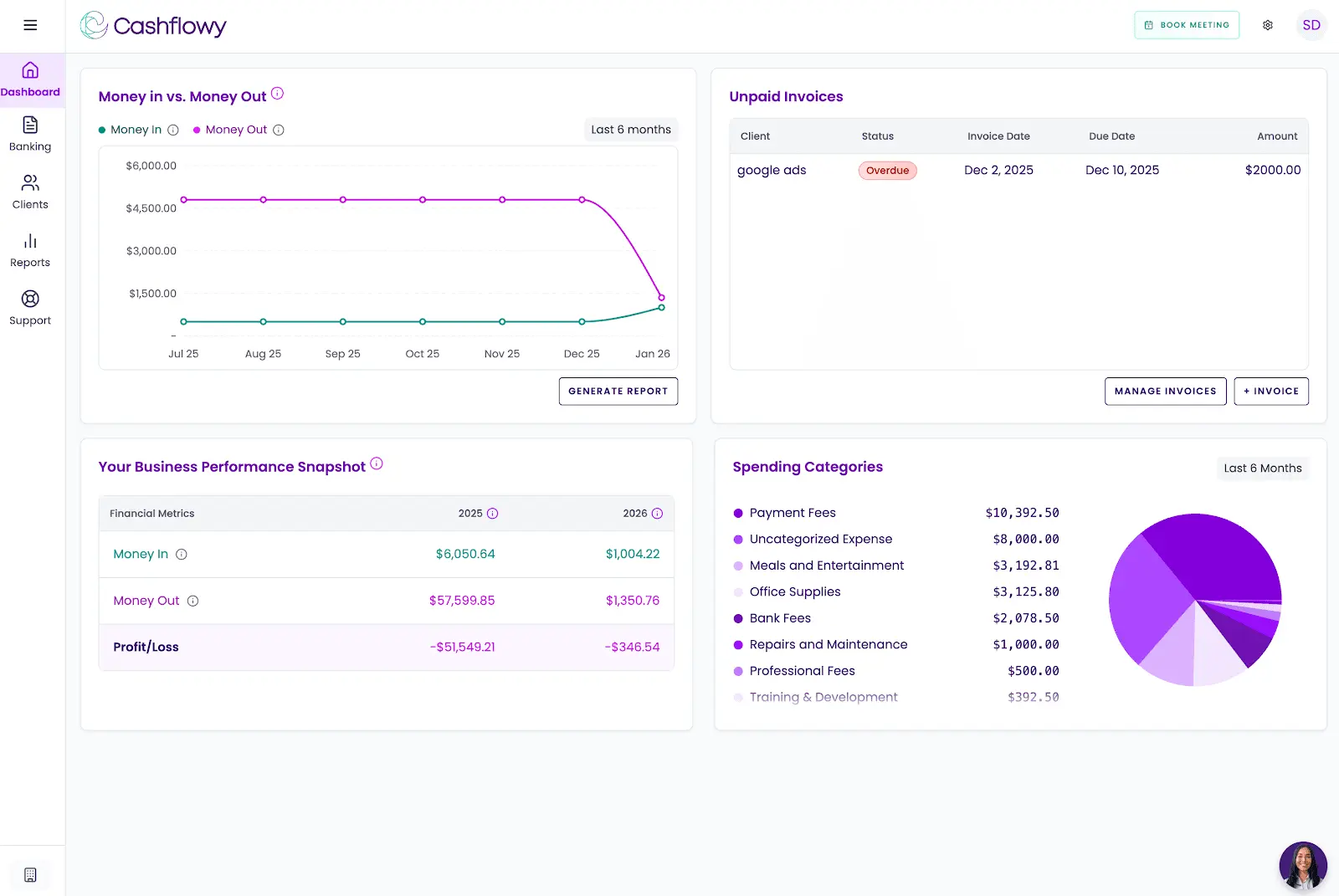
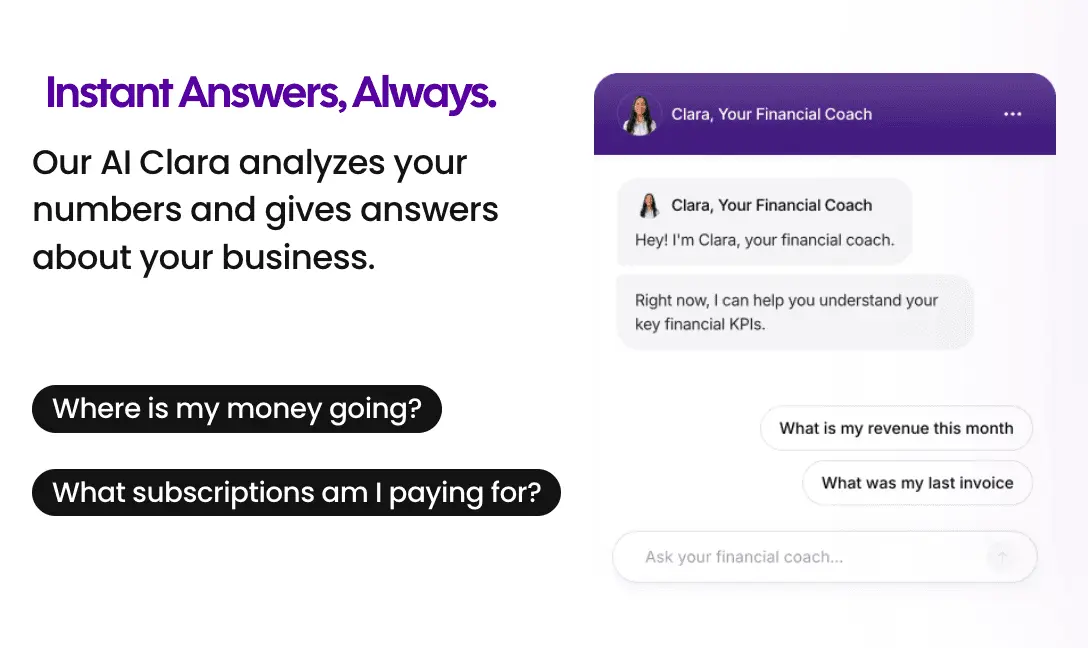
AI Financial Coach (Clara): Clara reads your actual financial data and responds to plain-English questions. "How much can I pay myself?" "Can I afford to hire a part-time assistant?" "Why is my net income lower than my bank balance suggests?" Specific, data-backed answers based on your books, not generic advice.
Automated Bookkeeping with Double-Entry Accounting: Transactions flow in automatically through Plaid-powered bank connections covering US banks, PayPal, and Wise. Smart categorization handles the routine work. Full double-entry bookkeeping with CPA-ready reports: P&L, Balance Sheet, Trial Balance, and General Ledger.
Owner's Pay Calculator: The number both QuickBooks and Xero leave you to derive yourself. How much you can safely take home this month, calculated directly from your financial position.
Cashflow Tracking and Real-Time Dashboard: A live view of income, expenses, and trends so you always know where things stand without opening a report.
Auto Bank Reconciliation: Automatic transaction matching keeps your books clean without manual reconciliation on your end.
Client Invoicing and Billing: Branded invoices with your logo. Clients pay with one click via Stripe Connect, by credit card or ACH. Recurring invoices and automated reminders are on the 2026 roadmap.
Real Bookkeeper Access: Every support agent is a trained bookkeeper. Every new user gets a private onboarding call with an accountant. Support runs Monday through Friday, 6am to 6pm EST, via unlimited calls and in-platform chat, with a guaranteed next-business-day response outside those hours. Cashflowy also runs regular live Profit Breakthrough Sessions, small-group coaching led by the founder and a senior accountant. Your own CPA or bookkeeper can log in directly through the built-in team invite feature. All for $39/month, with a free trial and a 30-day money-back guarantee.
What Cashflowy doesn't cover: No inventory management, no payroll, no sales tax automation, and no time tracking. Bank connections are Plaid-powered for US banks, PayPal, and Wise. Stripe Connect handles invoice payments. CSV and PDF import is coming soon. US businesses only. It's a newer platform, launched 2024 to 2025, without the review volume of established platforms. If your business needs the depth, compliance infrastructure, or team features of QuickBooks or Xero, those platforms are the right call. But if you're a solopreneur who has looked at both and still can't get a straight answer about whether the business is working for you financially, Cashflowy's free trial was built for exactly that situation.
QuickBooks Online vs Xero vs Cashflowy
| Platform | Best for | Monthly price |
|---|---|---|
| QuickBooks Online | US-focused small businesses needing deep reporting, native payroll, inventory, and maximum accountant compatibility | $38 to $275/month |
| Xero | Growing teams needing unlimited users, 1,000+ integrations, international capabilities, and scalable flat-rate pricing | $25 to $90/month |
| Cashflowy | Solopreneurs wanting financial clarity with AI coaching, double-entry bookkeeping, CPA-ready reports, and a direct answer on owner's pay | $39/month flat |
Making the Call
QuickBooks and Xero are both serious accounting platforms that businesses outgrow competitors to reach, not products people choose because nothing better was available. Both QuickBooks and Xero are considered popular accounting tools, trusted by businesses worldwide for their robust features, scalability, and integration capabilities. When choosing accounting software, it's crucial to consider your business's specific needs, such as required features, integrations, and usability—including mobile app capabilities. The decision between them is genuinely close for a wide range of businesses, and the right answer depends more on your specific situation than on any objective ranking.
Choose QuickBooks if US accountant compatibility is important, if you want native payroll in a single product, if your business has complex domestic inventory needs, or if you want the most advanced AI-assisted accounting available today. Accept that the pricing will escalate as your team grows and that the interface carries the weight of three decades of accumulated features.
Choose Xero if you’re building a team and don’t want to pay per seat, if your business operates across borders or invoices in multiple currencies, if you value clean and modern software design, or if your tech stack demands deep, high-quality API integrations. Accept that US accountant familiarity is lower, that payroll is a separate relationship with Gusto, and that support has no phone channel.
And if you’re a solopreneur who looked at both platforms and thought “this is a lot of machinery for a one-person business that just needs to know if it’s financially okay,” that instinct is correct. That’s the problem Cashflowy was actually designed to solve.
Frequently Asked Questions
What is the main difference between QuickBooks Online and Xero?
Does Xero include payroll?
Does Xero charge per user?
Which platform has better AI features?
Which is better for international businesses?
Is there a simpler alternative for solopreneurs who don’t need all of this?
Can I switch from QuickBooks to Xero or vice versa?
Do QuickBooks Online and Xero offer true end-to-end automation?
Keep reading

Accounting Software for Real Estate Agents: 9 Tools Compared
Compare 9 accounting software options for real estate agents. See how each handles commission splits, mileage, tax readiness and financial reporting.

Best Accounting Software for Freelancers in 2026: 7 Options Compared
Compare seven freelance accounting software options by expense tracking, invoicing, bank feeds, cash flow, tax readiness and key limitations.

Most Practical Self-Employed Accounting Software, Bookkeeping and Finance Tools
Compare the best accounting software and bookkeeping tools for the self-employed. See features, limitations, and which option fits your business.