The 5 Best FreshBooks Alternatives
If you’re a solopreneur, freelancer, or creative running your own show, chances are you didn’t start your business dreaming of spreadsheets and
Sep 2, 2025

Heidi DeCoux is the founder of Cashflowy, an AI-powered bookkeeping platform, and has worked with thousands of self-employed professionals to simplify finances and improve profitability.

Why FreshBooks Isn’t Always the Best Long-Term Choice
For many self-employed, accounting becomes a necessary evil the moment money starts moving. You open bank accounts, receive payments, send invoices, and suddenly realize you need a system to keep everything organized.
The challenge is that most accounting software wasn’t designed with real-life small businesses in mind. It was designed for accountants.
That disconnect is exactly why so many freelancers start searching for FreshBooks alternatives and better ways to manage financial data without drowning in complexity.
Common Reasons Businesses Outgrow FreshBooks
Let’s break down a few reasons you might be looking for a FreshBooks alternative today:
Client Limits on Starter Plans
Client Limits: On the starter plan, you can only bill five clients. That fills up fast.
This restriction alone pushes many freelancers and consultants to look elsewhere. Once you cross that threshold, pricing jumps quickly, without adding much additional value.
Pricing That Scales Faster Than Value
Scaling Issues: As your business scales, the costs increase steeply without giving you much more value.
Many users find themselves paying significantly more month over month just to remove basic limitations rather than unlock meaningful new capabilities.
No Clear Cash Flow Forecasting
Lack of Financial Insight: No real cash flow forecasting tools unless you patch together spreadsheets.
Knowing what’s happening right now isn’t enough. You need to understand what’s coming next—and FreshBooks doesn’t make that easy.
Limited Reporting Capabilities
Basic reports might be enough for filing taxes, but they won’t help you run a smarter business.
When your reporting is limited, you can’t easily see which offers are truly profitable, where your time is paying off, or what’s quietly draining money behind the scenes. You’re left guessing instead of making informed decisions.
This is where many self-employed professionals get stuck: tax-ready, but not strategy-ready.
If This Sounds Familiar, You’re Not Alone
If that hits close to home, you’re in the right place.
Thousands of freelancers, solopreneurs, and small business owners reach this exact moment—and the good news is that there are far better options available today.
What to Look for in a Freshbooks Alternative
Before choosing an accounting software, ask yourself:
Does it support real-time clarity?
The best tools provide real time insight and real time access to your numbers.Is it user friendly?
A user friendly platform with an intuitive interface reduces errors and stress.Can it handle invoices and payments easily?
Look for online invoicing, send invoices, recurring invoices, and automated payment reminders to get paid faster.Does it simplify expense tracking?
Strong expense tracking helps you import expenses, categorize business expenses, and prepare for tax time.Does it fit your business today?
You don’t need every feature, just the essential features that match your business needs.
1. Cashflowy – The Clear Winner for Self-Employed & Creators
Built for Clarity, Not Accounting Complexity
You didn’t start your business to be a bookkeeper. You want clarity:
How much can I pay myself?
Will I have enough for taxes?
Am I actually making money?
That’s where Cashflowy comes in.
Cashflowy is an all-in-one financial toolkit built for self-employed. In under an hour a month, you can handle your entire business finances, send unlimited one-click pay invoices, and even get tailored tips to make more money and keep more of it. Cashflowy is the only platform that removes accounting language from the product experience, making collaboration between business owners and financial professionals easier and faster.
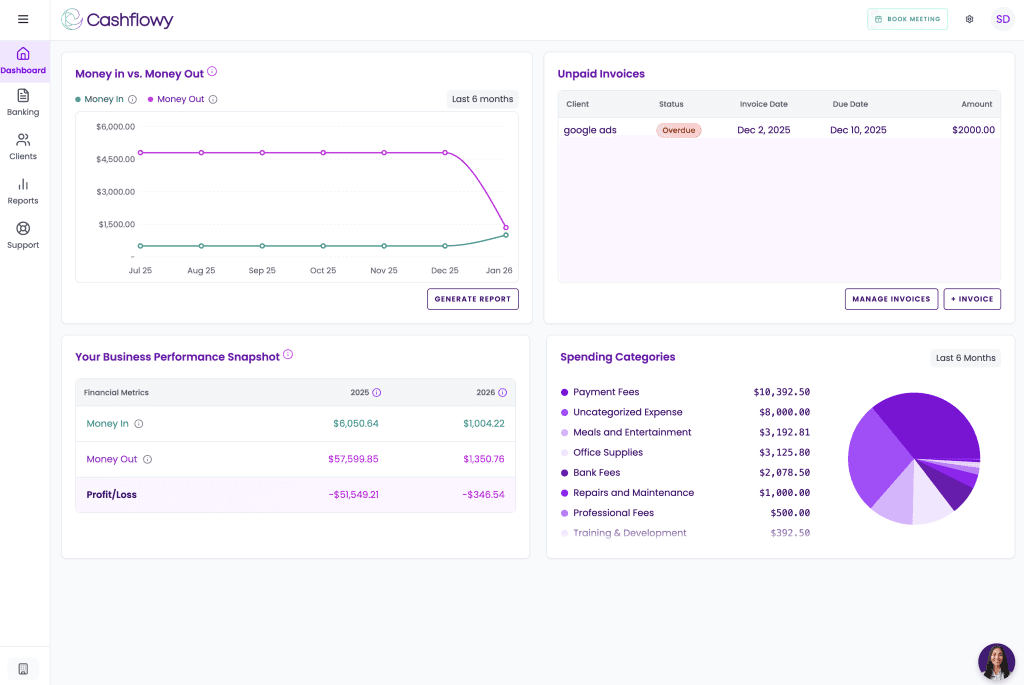
Description: Cashflowy’s dashboard welcoming the user, showing profit and loss trends, a list of invoices, net revenue totals, and an expense breakdown chart, with a left-side menu for transactions, reports, invoices, and clients.”
Key Features
Visual cash flow dashboard
Automated transaction categorization
AI-powered financial coach with tailored tips based on your results
One-click invoicing and payments
Clear financial reporting in plain English
Automatic tracking of unpaid invoices
Run all your finances in <1 hour per month
No accounting jargon
Free Annual 1:1 Meeting with an Accountant
Free Access to Human Bookkeepers
Why Cashflowy Is a Great Alternative
10-minute setup
Flat pricing with no add-ons or hidden fees
Unlimited users included
Automatic bookkeeping with real-time data
Clean, tax-ready reports at all times
Know exactly what’s safe to pay yourself
Built for real-time clarity, not after-the-fact reports
See which offers are most profitable and which aren’t
Get paid faster with 1-click paying invoicing
Invoicing and financial reporting in one place
No human bookkeeper needed
AI financial coach answers your questions 24/7 in plain English
Designed for self-employed people, not accountants
Extremely easy to use
Saves hours every month so you can focus on earning, not admin
Limitations
Newer in the market compared to legacy tools.
Best For
Self-employed, freelancers, and service providers who want a great alternative to QuickBooks without accounting stress. Cashflowy is for those who want to get paid faster, stay on top of overdue payments, and have complete financial clarity in one place.
With Cashflowy, users don’t just get clean, tax-ready reports. They see the numbers that actually matter: what’s working, what’s not, and where to focus next—so decisions are driven by real data, not gut feelings.
2. Zoho Books
Best for: Businesses already using Zoho CRM or wanting powerful automation features.
Zoho Books is one of the most complete xero alternatives available. It’s affordable, scalable, and provides a robust accounting system for small business owners and freelancers alike.
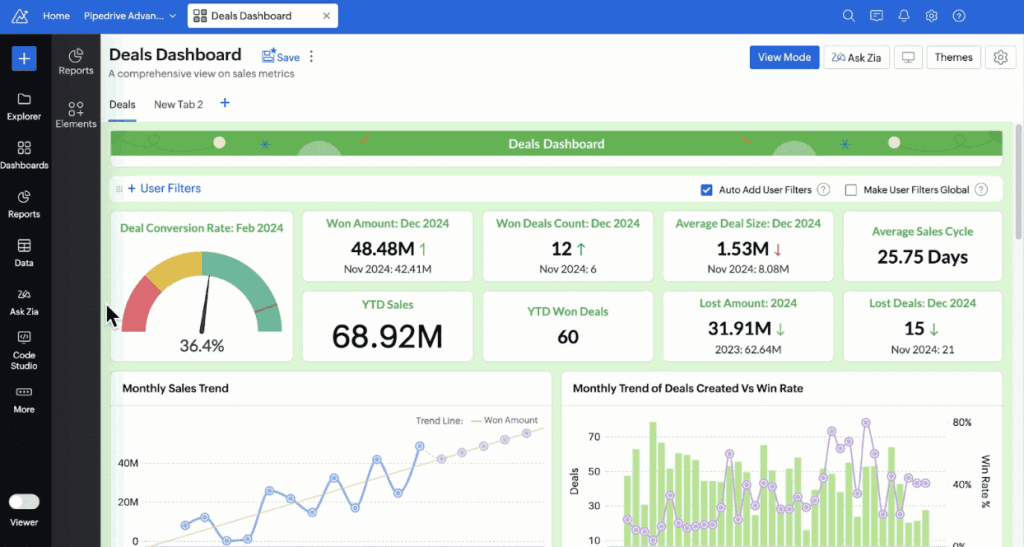
Description: Zoho Books dashboard showing key metrics like conversion rate, won deals, average deal size, and sales cycle length, with charts for monthly sales trends and win rates, plus navigation menus and filters.
Built for Process-Driven Teams
If your business relies on workflows, approvals, and automation, Zoho Books shines. It’s especially strong for service-based businesses managing multiple clients and projects.
Top Features:
Online invoicing with personalized invoices
Recurring invoices, automated payment reminders, and client portals
Project management and time tracking
Advanced custom reports
Smart tax compliance
Deep inventory features to track expenses and manage business expenses
Pros:
Seamless Zoho ecosystem integrations
Highly customizable workflows
Great for managing bookkeeping, reporting, and financial management
Multicurrency and tax handling baked in
Cons:
Requires time to learn
Support may not be fast for lower-tier users
When Zoho Books Makes Sense
Zoho Books isn’t about helping you grow faster — it’s about managing complexity. It’s best suited for businesses whose operations are becoming more layered, with multiple workflows, approvals, and accounting requirements.
If your business model is simple but profitable, this level of structure may feel heavy.
3. Xero
Best for: Teams that need robust accounting software with great UI and global support.
Xero is built for accountants and bookkeepers who manage complex businesses. With powerful financial controls, deep integrations, and clean reporting, it’s a smarter alternative to QuickBooks and FreshBooks–especially for companies that rely on professional bookkeeping support.
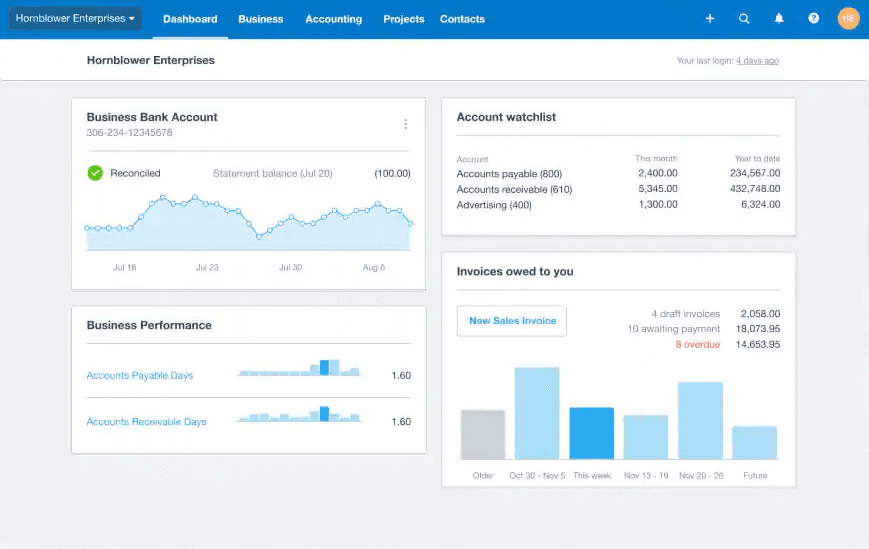
Description: Xero's dashboard showing a business bank account balance graph, account watchlist totals, business performance metrics, and a summary of invoices owed, including overdue payments.
A Favorite Among Accountants and CFOs
Xero is widely adopted by accounting professionals, making collaboration smoother when your business becomes more complex.
Top Features:
Full bank reconciliation and bank payments
Create and send invoices easily
Inventory management with batch tracking
Advanced accounting system tools and custom reports
Time tracking and project management
Scalable pricing with professional plan options
Pros:
Sleek UI and intuitive accounting software
Trusted by financial pros
Offers payroll integration
Grows with your business and needs
Cons:
Can be complex for newbies
Some powerful features only in premium tiers
4. QuickBooks Online
Best for: Established businesses that need full visibility into their business expenses and profits.
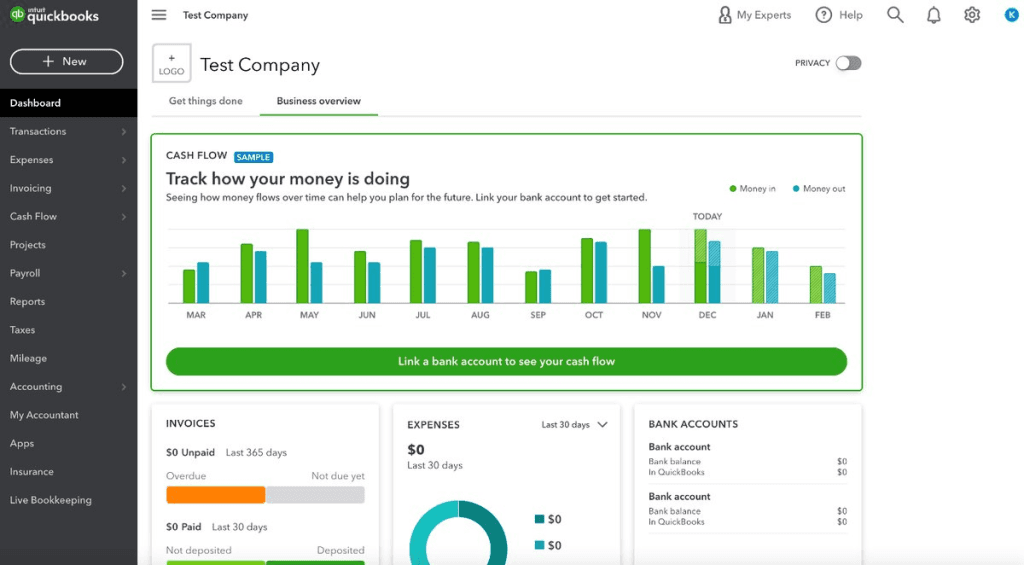
Description: QuickBooks business overview dashboard showing a cash flow chart with money in and money out by month, plus sections for invoices, expenses, and bank account balances, with a navigation menu on the left.
Built for Complexity and Compliance
QuickBooks excels in regulated environments, multi-entity businesses, and scenarios where compliance, audits, and detailed reporting matter.
Top Features:
Full-featured accounting software and reporting suite
Built-in payroll integration, tax filing, and contractor tools
Handle invoices, expenses, payments, and bank syncs
Detailed custom reports and insights
Works with hundreds of integrations
Pros:
Widely supported by accountants
Handles everything from bookkeeping to taxes
Perfect for scaling accounting systems
Cons:
Highly complex
Steep learning curve for non-accountants
Often requires help from a bookkeeper or accountant to use correctly
Built for accountants, not everyday business owners (they offer trainings for bookkeepers and accountants and encourage users to hire QB certified professionals)
Has a lot of functionality and features that self-employed and solopreneuers will never use or need
Clunky interface
5. Wave
Best for: Freelancers or side hustlers on a budget who want basic accounting software without the price tag.
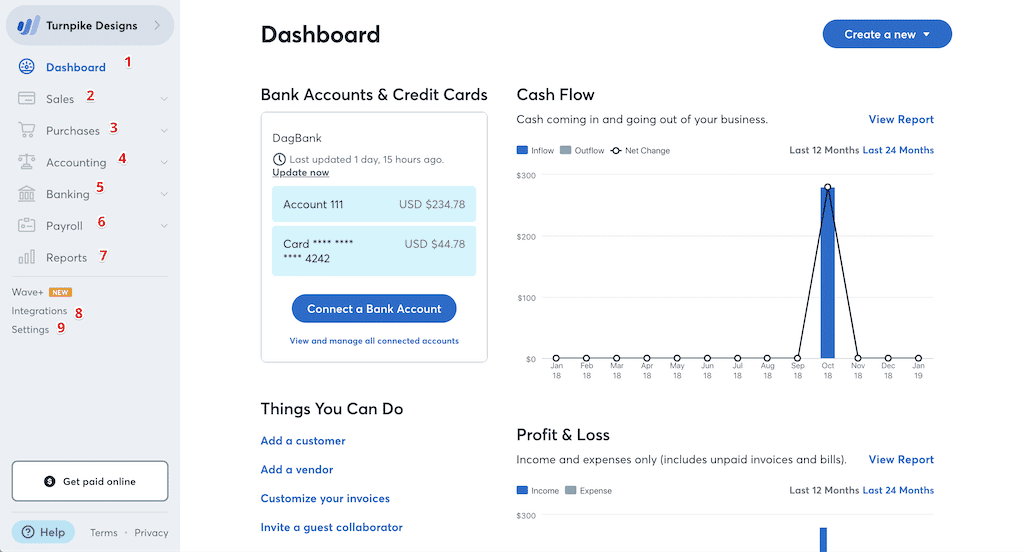
Description: Wave's dashboard showing bank accounts and credit cards with balances, a cash flow chart over time, and a profit and loss section, plus a left-side menu for sales, purchases, accounting, payroll, and reports.
A Starting Point for New Businesses
Wave works well for early-stage freelancers who want to learn basic bookkeeping without committing to monthly software costs.
Top Features:
Basic send invoices functionality
Receipt scanning and expense tracking
Syncs with bank accounts for accounting data
Handles core bookkeeping needs
Pros:
Free for most features
Great entry point into accounting software
Cons:
Limited custom reports
Free for limited features (not most)
As soon as your business grows, or your needs become more complex, you hit limitations
Not super user-friendly
When to Use Wave
Wave may work for very early-stage freelancers, but it’s limited to basic bookkeeping and lacks the depth most businesses quickly need. As a free FreshBooks alternative, it covers only the bare essentials.
FreshBooks Alternatives: Comparison Table
Key Features | Cashflowy | FreshBooks | QuickBooks Online | Wave | Zoho Books |
Designed for the Self-Employed | ✅ Yes | ✅ Yes | ❌ No | ✅ Yes | ❌ No |
Easy Setup (<10 mins) | ✅ Yes | ✅ Yes | ❌ No | ✅ Yes | ❌ No |
Intuitive, User-Friendly Interface | ✅ Yes | ✅ Yes | ❌ No | ✅ Yes | ❌ No |
Visual Cash Flow Dashboard | ✅ Yes | ❌ No | ❌ No | ❌ No | ❌ No |
Real-Time Profitability Snapshot | ✅ Yes | ❌ No | ❌ No | ❌ No | ❌ No |
Automated Expense Tracking | ✅ Yes | ✅ Yes | ✅ Yes | ✅ Yes | ✅ Yes |
Import & Categorize Expenses | ✅ Automatic | ❌ Manual | ❌ Manual | ❌ Manual | ❌ Manual |
Send Unlimited Invoices | ✅ Yes | ❌ Limited | ❌ Extra Fees | ✅ Yes | ✅ Yes |
Recurring Invoices | ✅ Yes | ✅ Yes | ✅ Yes | ✅ Yes | ✅ Yes |
Personalized Invoices | ✅ Easy to Customize | ✅ Yes | ✅ Yes | ✅ Yes | ✅ Yes |
Built-In Financial Coach | ✅ Yes | ❌ No | ❌ No | ❌ No | ❌ No |
AI-Generated Custom Reports | ✅ Yes | ❌ No | ✅ Yes | ❌ No | ✅ Yes |
Cash Flow Forecasting | ✅ Real-Time | ❌ No | ❌ Add-on | ❌ No | ✅ Yes |
Free Human Bookkeepers Available for Support | ✅Yes | ❌ No | ❌ No | ❌ No | ❌ No |
Free Annual Meeting with an Accountant | ✅Yes | ❌ No | ❌ No | ❌ No | ❌ No |
Automated Payment Reminders | ✅ Yes | ✅ Yes | ✅ Yes | ✅ Yes | ✅ Yes |
Tax-Ready Reporting | ✅ Yes | ✅ Yes | ✅ Yes | ✅ Yes | ✅ Yes |
Unlimited Users (No Extra Cost) | ✅ Yes | ❌ No | ❌ No | ✅ Yes | ✅ Yes |
Competitive Pricing | ✅ Affordable, flat Pricing | ❌ Scaling Fees | ❌ High Tiers | ✅ Free to start | ✅ Affordable, but hidden fees |
AI Insights & Recommendations | ✅ Yes | ❌ No | ❌ No | ❌ No | ❌ No |
Choosing the Right Accounting Software for Your Business
Running a business means wearing a million hats. But your accounting software shouldn’t be one of the problems.
Whether it's the simplicity of Cashflowy, the automation in Zoho Books, or the full-scale power of Xero and QuickBooks, there’s a better way to manage your accounting, expenses, and payments.
Key Takeaways
Cashflowy: Automated, easy, and smart for self-employed, no hidden fees, no complexity
Zoho Books: Robust and scalable for teams
Xero: Feature-rich for global teams
QuickBooks: Best for deep accounting systems
Wave: Free manual system for side hustlers, very limited unless you pay
Every one of these tools is a better alternative to FreshBooks in its own way. Pick the one that matches your needs, and helps you get paid faster.
Cashflowy is the best alternative to FreshBooks for self-employed business owners who want:
Clear numbers
Zero accounting complexity
To not be dependent on a human bookkeeper
To save time & money
Your next step
You didn’t start your business to become a part-time accountant or spend hundreds of dollars a month on bookeepers and software.
If you want your finances to answer themselves, in under 1 hour a month, start your free Cashflowy trial.
Setup takes just 10 minutes.
The clarity lasts forever.
FAQs
Which accounting software includes inventory and time tracking?
A: Zoho Books, Xero, and QuickBooks all include inventory and time tracking.
Can I use these tools for team workflows and projects?
A: Absolutely! Tools like Zoho and QuickBooks are built for teamwork and scaling.
Is there a good accounting system for new businesses?
A: Yes. Cashflowy offes affordable and effective accounting systems with flat pricing or starter plans.
Are these alternatives suitable for small business owners?
A: No. Only Cashflowy is built specifically to support small business owners with clarity, simplicity, and control.
Ready to Simplify Your Finances?
Want to ditch the stress and streamline your accounting?
Try Cashflowy today! The first platform built to maximize bookkeeping, tax tracking, and profit coaching — all in one place.