The Best Accounting Software for Small Businesses
Finding the right accounting software saves time, reduces stress, and keeps your business tax-ready. This guide compares the top tools and shows why Cashflowy is the best choice for solopreneurs.
Aug 28, 2025

Heidi DeCoux is the founder of Cashflowy, an AI-powered bookkeeping platform, and has worked with thousands of self-employed professionals to simplify finances and improve profitability.

Starting and running a small business is a monumental task. As an owner, you’re juggling sales, marketing, and operations—which leaves little time for the complexities of accounting. The right accounting software is essential for managing your finances, tracking cash flow, and ensuring you have everything you need for tax season.
This guide provides a detailed breakdown of the top accounting software solutions, helping you find the perfect fit for your business—whether you’re a one-person shop or managing a growing team.
TL;DR: The Top Contenders at a Glance
QuickBooks Online
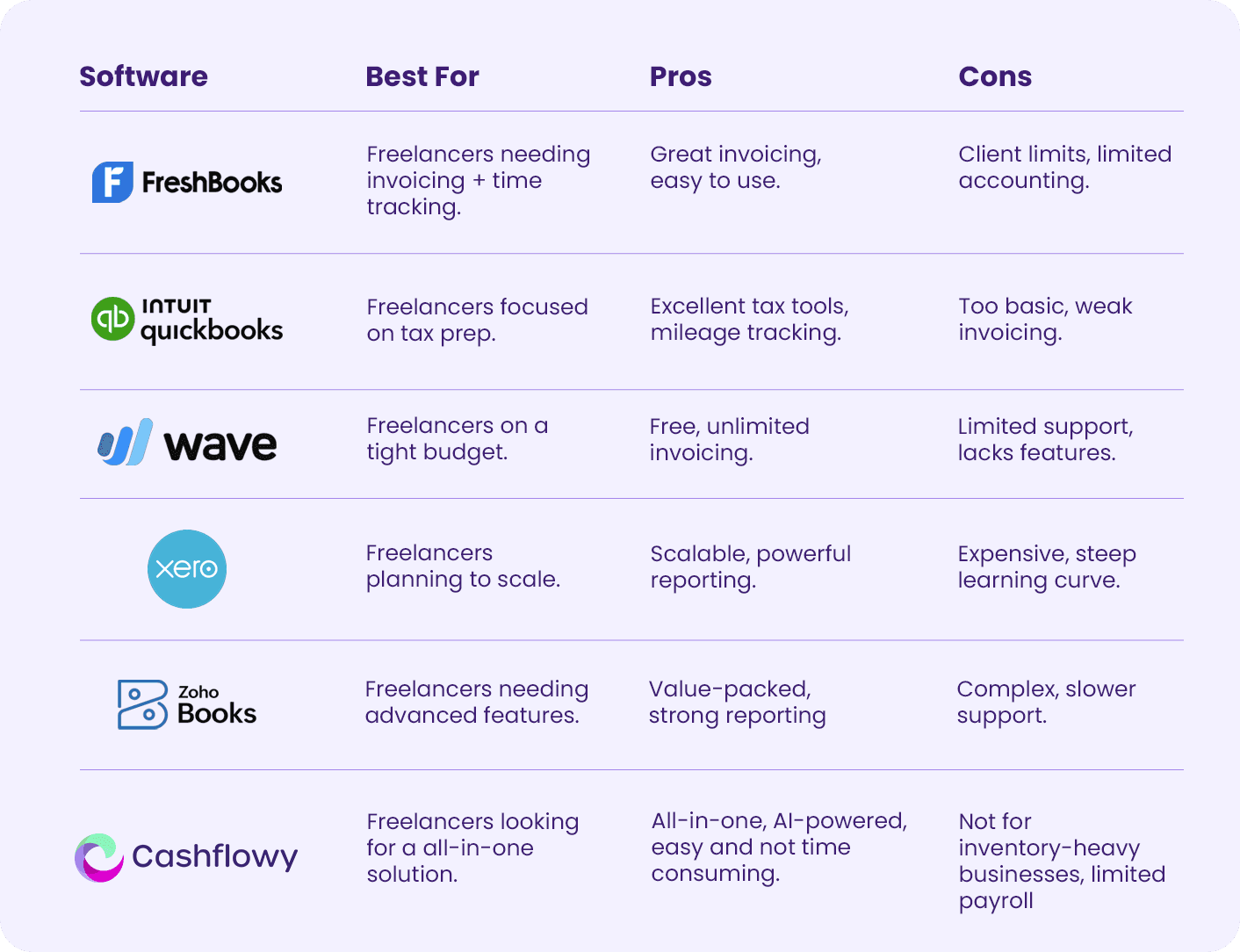
QuickBooks Online is often considered the industry standard for small business accounting. It’s packed with features—covering everything from payroll to inventory to detailed reporting. That makes it powerful, but also overwhelming and costly for smaller businesses that don’t need such a complex system.
Key Features
Full accounting tools with robust reports.
Inventory management and payroll.
Integrations with thousands of third-party apps.
Falls Short On: Pricing is high compared to alternatives, setup takes time, and many solopreneurs will pay for features they’ll never use.
Best For
Small businesses with employees, inventory, or complex accounting needs.
FreshBooks
FreshBooks shines when it comes to invoicing and time tracking. It’s popular among service-based businesses thanks to its ease of use. But beyond invoicing, its accounting features are limited, and client caps on cheaper plans make it restrictive for growth.
Key Features
Customizable invoicing and automated reminders.
Time tracking linked to invoices.
Expense tracking with receipt uploads.
Falls Short On: Client limits on lower plans, minimal accounting tools, and not built for inventory-heavy businesses.
Best For
Service-based businesses like consultants, designers, and agencies that primarily bill for time.
Xero
Xero is marketed as the modern alternative to QuickBooks, offering automation, strong reporting, and a clean interface. It works well for growing businesses. That said, invoice and bill restrictions on the entry plan and a learning curve make it less appealing to solopreneurs who just want simplicity.
Key Features
Automated bank feeds and reconciliation.
Hubdoc for receipt and bill automation.
Strong reporting and integrations.
Falls Short On: Restrictions on lower plans, rising costs as you scale, and less adoption in the U.S., which can make it harder to find support from local accountants.
Best For
Micro and small businesses that want scalability and automation, and are prepared to invest in setup.
Zoho Books
Zoho Books delivers a lot of value, especially with its free plan for qualifying small businesses. It offers advanced features like automations and detailed reporting, and it integrates smoothly with other Zoho tools. The downside? Its complexity can be overwhelming, and support isn’t always as responsive as other providers.
Key Features
Full financial management, including invoicing and inventory.
70+ financial reports.
Workflow automations.
Client and vendor portals.
Falls Short On: Steep learning curve, less brand recognition in the U.S., and slower customer support at times.
Best For
Small businesses already using Zoho products or those seeking an affordable, feature-rich system.
Cashflowy
Unlike the others, Cashflowy is built specifically for solopreneurs and one-person businesses. Instead of overwhelming you with features designed for teams, it brings together everything you actually need—bookkeeping, invoicing, cashflow tracking, tax-ready reports, and even personalized coaching. In under an hour a month, you’ll know exactly how much you’re making, how much you can keep, and how to grow smarter.
Key Features
AI-powered bookkeeping with smart categorization.
One-click invoicing with overdue tracking.
Instant Profit & Loss and Balance Sheet reports.
Real-time cashflow tracking.
Tailored coaching tips to boost profit.
Two meetings per year with a real accountant.
Falls Short On: Not a fit for retail or inventory-heavy businesses, and limited payroll functionality for larger teams.
Best For
Solopreneurs and one-person businesses who want clarity, speed, and simplicity—all in one tool.
Comparison Table
Key Features | Cashflowy | FreshBooks | QuickBooks Online | Wave | Zoho Books |
Designed for the Self-Employed | ✅ Yes | ✅ Yes | ❌ No | ✅ Yes | ❌ No |
Easy Setup (<10 mins) | ✅ Yes | ✅ Yes | ❌ No | ✅ Yes | ❌ No |
Intuitive, User-Friendly Interface | ✅ Yes | ✅ Yes | ❌ No | ✅ Yes | ❌ No |
Visual Cash Flow Dashboard | ✅ Yes | ❌ No | ❌ No | ❌ No | ❌ No |
Real-Time Profitability Snapshot | ✅ Yes | ❌ No | ❌ No | ❌ No | ❌ No |
Automated Expense Tracking | ✅ Yes | ✅ Yes | ✅ Yes | ✅ Yes | ✅ Yes |
Import & Categorize Expenses | ✅ Automatic | ❌ Manual | ❌ Manual | ❌ Manual | ❌ Manual |
Send Unlimited Invoices | ✅ Yes | ❌ Limited | ❌ Extra Fees | ✅ Yes | ✅ Yes |
Recurring Invoices | ✅ Yes | ✅ Yes | ✅ Yes | ✅ Yes | ✅ Yes |
Personalized Invoices | ✅ Easy to Customize | ✅ Yes | ✅ Yes | ✅ Yes | ✅ Yes |
Built-In Financial Coach | ✅ Yes | ❌ No | ❌ No | ❌ No | ❌ No |
AI-Generated Custom Reports | ✅ Yes | ❌ No | ✅ Yes | ❌ No | ✅ Yes |
Cash Flow Forecasting | ✅ Real-Time | ❌ No | ❌ Add-on | ❌ No | ✅ Yes |
Free Human Bookkeepers Available for Support | ✅Yes | ❌ No | ❌ No | ❌ No | ❌ No |
Free Annual Meeting with an Accountant | ✅Yes | ❌ No | ❌ No | ❌ No | ❌ No |
Automated Payment Reminders | ✅ Yes | ✅ Yes | ✅ Yes | ✅ Yes | ✅ Yes |
Tax-Ready Reporting | ✅ Yes | ✅ Yes | ✅ Yes | ✅ Yes | ✅ Yes |
Unlimited Users (No Extra Cost) | ✅ Yes | ❌ No | ❌ No | ✅ Yes | ✅ Yes |
Competitive Pricing | ✅ Affordable, flat Pricing | ❌ Scaling Fees | ❌ High Tiers | ✅ Free to start | ✅ Affordable, but hidden fees |
AI Insights & Recommendations | ✅ Yes | ❌ No | ❌ No | ❌ No | ❌ No |
Why Cashflowy Wins
The other tools are powerful, but they’re designed for teams and often come with extra features, complexity, and costs that solopreneurs don’t need.
Cashflowy is different. It’s built from the ground up for one-person businesses. With Cashflowy, you can:
Send invoices and get paid faster.
Track overdue payments in seconds.
Generate Profit & Loss and Balance Sheets automatically.
Get real-time visibility into your finances.
Receive personalized tips on how to earn more and keep more.
Instead of managing multiple apps or overpaying for unused features, Cashflowy keeps everything in one place... simple, affordable, and built for solopreneurs.
Try Cashflowy free today and experience accounting made easy.
FAQs About Small Business Accounting Software
Q: Do I really need accounting software for my business?
Yes. Spreadsheets don’t scale, and they leave room for error. Accounting software keeps your finances accurate, organized, and tax-ready.
Q: What is the difference between QuickBooks Online and QuickBooks Solopreneur?
QuickBooks Online is a full-featured system for teams with payroll and inventory needs. QuickBooks Solopreneur is simplified for one-person businesses but still feels complex compared to Cashflowy.
Q: Can I get by with free software?
Free tools like Wave or Zoho’s free plan work for very small businesses, but most solopreneurs outgrow them quickly. Cashflowy offers long-term value with automation and coaching.
Q: How can accounting software help with taxes?
It tracks your income and expenses year-round, generates Profit & Loss reports, and ensures your filings are accurate. With Cashflowy, your tax reports are instant and clean.